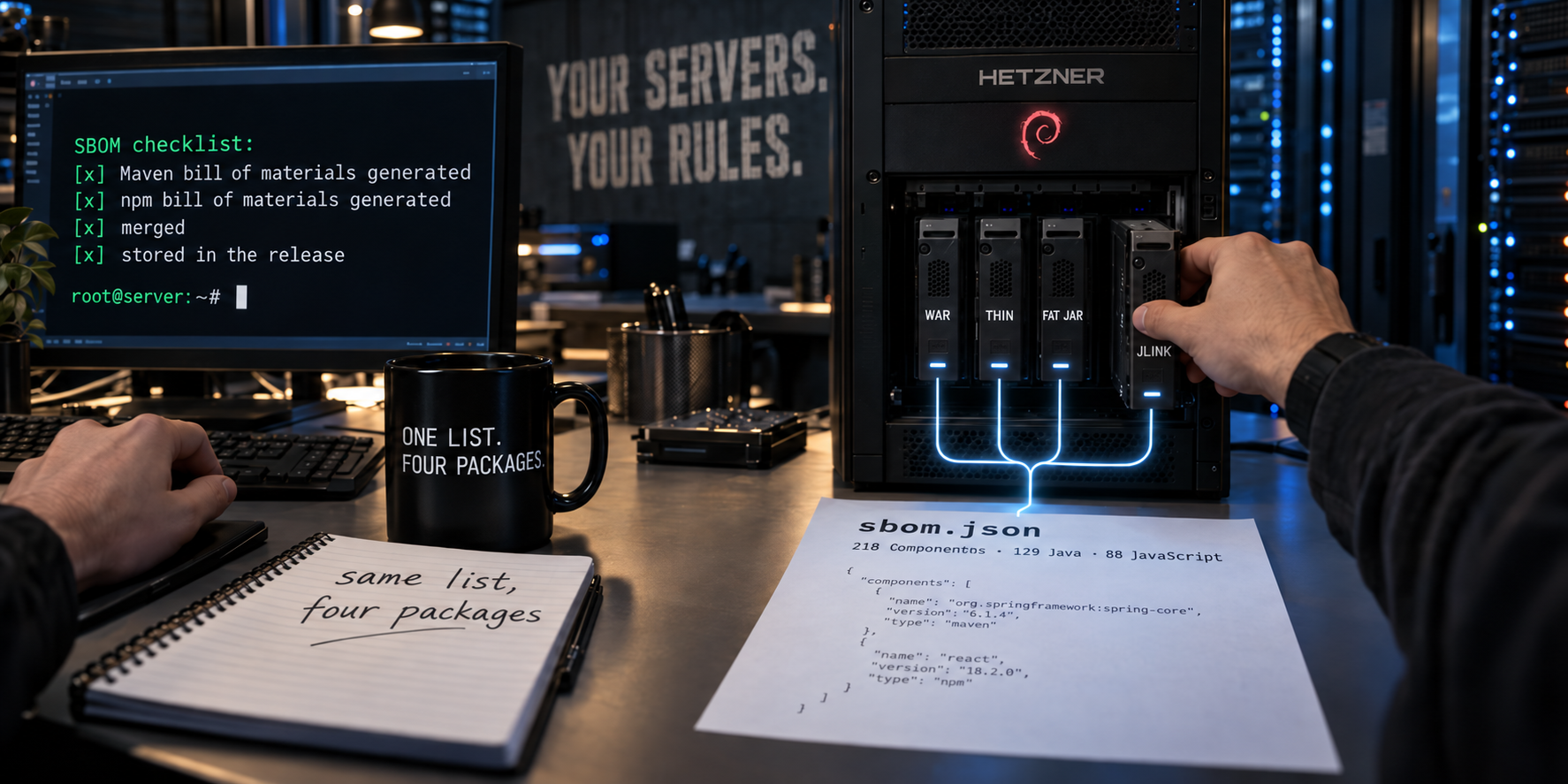
First of two articles on software bills of materials. One application, four delivery formats, one server — and the question of what the packaging reveals about the supply chain. All numbers come from an actual run; wherever an expectation was not confirmed, the text says so.
The Question Every Incident Starts With
A vulnerability is published. Within a few hours, the same question comes up in every company that operates software: Are we affected?
The question sounds simple. It is not — and the reason rarely lies in the
vulnerability. It lies in your own delivery. Anyone who wants to answer the
question has to know which parts are inside the artifact running on the server.
Not which dependencies are listed in the pom.xml. Not which ones the
development environment resolved. But which ones were shipped.
Between these three sets lie differences, and this article is about them.
What an SBOM Is
An SBOM — Software Bill of Materials — is a parts list. It names the components of a piece of software with name, version, and, where known, origin and license. The widespread format is CycloneDX; it is generated by tools that accompany the build process.
That is all it is, and that is precisely where its value lies: a bill of materials is a sober document. It claims nothing about quality, security, or suitability. It says what is included.
What an SBOM Is Not
It is not a statement about being affected. If jsoup 1.22.2 appears in the
list and an advisory is published for that version, then the component is
included — whether the vulnerable code path is ever reached in your own
operation is not stated there. That assessment is a separate process with a
format of its own, and it presupposes the bill of materials instead of
replacing it.
Nor is it a description of the artifact. That is the more uncomfortable point, and it is the core of this article: an SBOM describes what the build process resolved. What part of that ends up in the shipped file is a different question — one the document neither asks nor answers.
The Structure of This Article
The subject is one application, delivered in four formats, on one server. This setup is the real payoff: because nothing changes except the packaging, every difference in the bill of materials can be attributed to the packaging and to nothing else.
The four formats are covered in chapter 2. Chapter 3 pits them against each other and delivers the finding the rest of the article works its way along. Chapter 4 names three gaps, chapter 5 closes the largest of them, chapter 6 checks the result against the artifact, and chapter 7 brings the document to where the question is asked — next to the delivery.
All numbers in this article come from an actual run. Wherever an expectation was not confirmed, the text says so.
Four Formats of the Same Application
The application under examination is a Vaadin Flow application on Java 26, without Spring, with login, role management, persistent storage, and an audit log. It has been running for weeks on a Debian server at Hetzner and was repackaged step by step in the course of an article series. What matters for this article is not the series but its byproduct: four delivery formats of the same application, on the same server, within a few days of each other.
The Four Formats
WAR on installed Jetty. The classic model. The servlet container is
standalone software, installed under /opt/jetty, maintained by whoever looks
after the server. The application is an archive that they deploy.
Thin distribution. Jetty is no longer an installation but a dependency.
The release is a directory tree: a start script, the application, and next to
it lib/ with everything it needs — every dependency as its own file.
Fat JAR. The same application, the same Jetty, but everything pushed into a single archive. 127 files become three.
jlink distribution. The thin distribution, extended with a Java runtime image. The server no longer needs an installed Java; the application brings its own runtime along.
What Shifts in the Process
Across the four formats, a boundary migrates. In the first format, the application is the archive and everything else is environment. In the last, the Java runtime belongs to the release. What someone else used to be responsible for is now the responsibility of whoever ships.
For a bill of materials, this is no side issue. It is supposed to describe what is shipped — and what is shipped is a different scope in the fourth format than in the first.
| Format | What belongs to the application | What the environment provides |
|---|---|---|
| WAR | the archive | server, runtime, operating system |
| Thin distribution | application and server | runtime, operating system |
| Fat JAR | application and server, in one file | runtime, operating system |
| jlink | application, server, runtime | operating system |
Why This Setup Holds
Comparing the bills of materials of different projects means comparing, above all, their dependencies. Here, the application is identical, the source code the same, the server the same. The only thing that differs is the packaging.
This makes a question answerable that otherwise remains vague: How much of what a bill of materials states depends on the delivery format?
The answer is in the next chapter, and it turns out differently than you would expect.
Two Packagings, One SBOM
The thin distribution and the fat JAR differ as much as two deliveries of the same application can differ. One is a directory tree of 130 files in which every dependency sits on its own. The other is an archive with 17,904 entries in which no dependency is recognizable as a distinct piece anymore.
You would expect this difference to show up in the bill of materials. It does not.
mvn -Pproduction,thin   cyclonedx:makeAggregateBom  → 129 components
mvn -Pproduction,fatjar cyclonedx:makeAggregateBom  → 129 components

only in thin: []    only in fat: []    identical: True
Not similar, not largely congruent: the same document. No component appears only in one list, none only in the other.
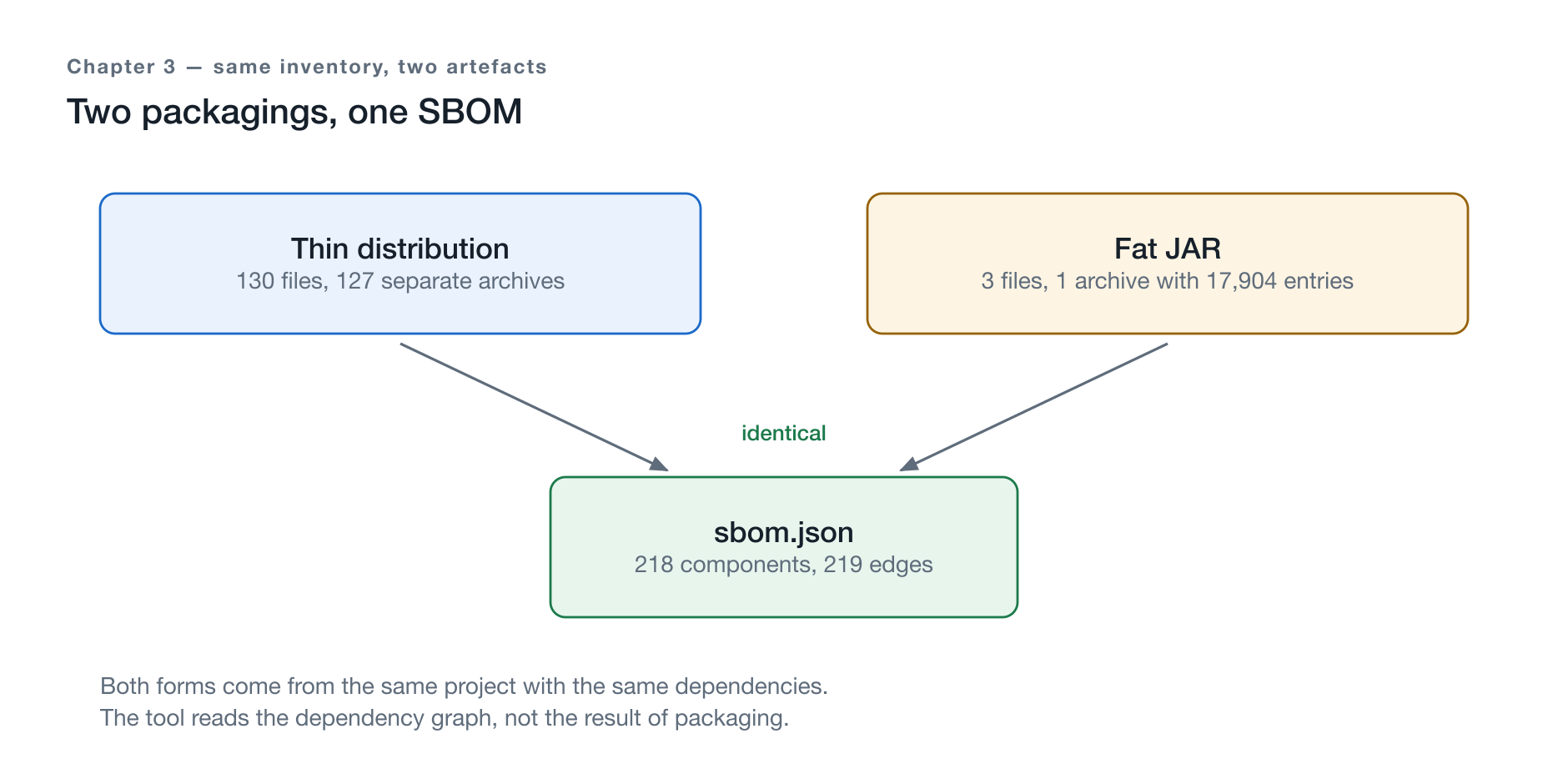
Figure 1: 130 files next to 3 — and below them, twice the same document.
| Thin distribution | Fat JAR | |
|---|---|---|
| Files in the release | 130 | 3 |
| Archives | 127 individual | 1 with 17,904 entries |
| Production bundle | 142 entries under META-INF/VAADIN | the same |
| SBOM | 129 components | 129 components |
Why It Has to Be This Way
The reason is not carelessness on the tool’s part but the way it works. The
cyclonedx-maven-plugin reads what Maven resolved: the project’s dependency
graph. This graph is identical in both cases, because both formats arise from
the same project with the same dependencies. Only afterwards does a profile
decide whether the result is packaged as a directory or as an archive — and the
plugin does not see that step.
The SBOM describes the dependency graph, not the delivery.
This sentence carries the entire article, and it has an unpleasant consequence.
What Follows From That
An SBOM alone does not say what was shipped. It says what a build process resolved — at some point, somewhere, on a machine nobody can question anymore. Without a link to the artifact, it is a claim about that build process.
Establishing that link is not hard, but it is often skipped: a checksum of the artifact in the document, or an attestation that binds the two together with a signature. Only then does “these components were resolved” become the verifiable statement “these components are inside exactly this file.”
If it is missing, the bill of materials remains a document next to the delivery instead of a document about it. This is not a theoretical objection: chapter 6 will show that one format can be checked file by file against its bill of materials — and the other not at all.
Three Gaps on Three Levels
Chapter 3 showed that the packaging does not change the bill of materials. This chapter shows the other half: what is missing from it, and why it is missing.
Three parts of the delivery do not appear. They sit on three different levels, and all three have the same cause.
The Server
As long as the servlet container is installed software, it is not in the bill
of materials. It came as an archive from the project’s website, was unpacked to
/opt, and was never obtained through dependency management — 53 MB that
nobody declared.
As soon as the same server becomes a dependency, it appears: 28 components,
scope=required. Not because anything changed about the shipped software, but
because it now passes through the tool that generates the bill of
materials.
The Runtime
If an application brings its own Java runtime along, the boundary shifts a second time — and the bill of materials does not follow. A runtime image made of 16 platform modules is a component with a version and an origin, and it sits in the release. It is not in the document.
The reason is plainer than it seems: the image does not yet exist at the build time of the Maven run. It is created afterwards, by a different tool.
The Frontend
The third gap is the largest, and it always exists. A Vaadin application ships a frontend bundle built from npm packages. Of these, the Maven SBOM lists zero — against 88 actually resolved packages.
These are not marginal parts. It is the part of the application that is executed in the user’s browser.
One Cause for All Three
| Part | in the Maven SBOM |
|---|---|
| Server, installed | missing entirely — never obtained through Maven |
| Server, embedded | 28 components, scope=required |
Runtime from jlink | missing — does not yet exist at build time |
| Frontend | always missing — 0 of 88 npm packages |
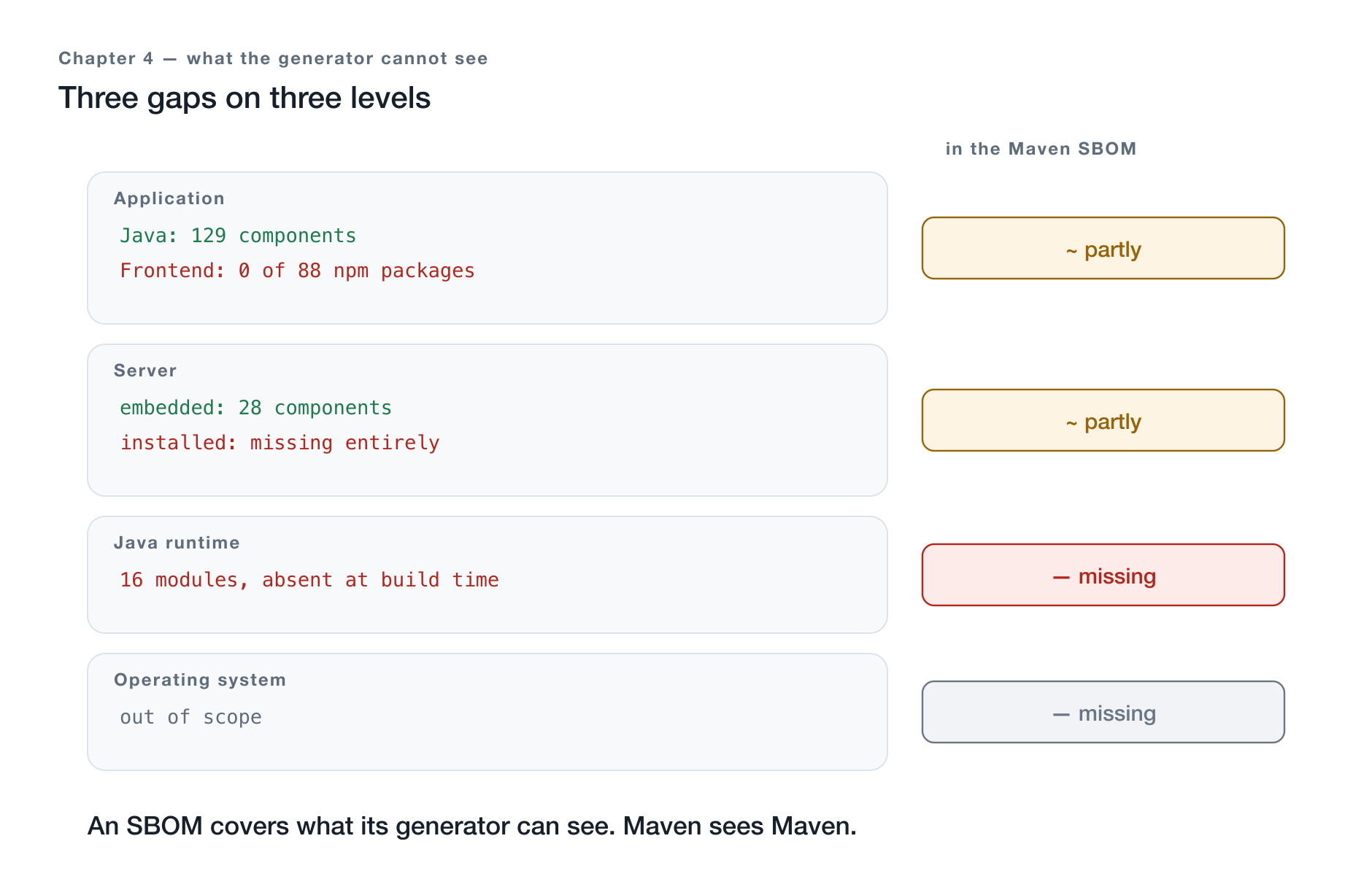
Figure 2: What the generator sees — and what lies outside its field of view.
Three rows, three levels, one sentence:
An SBOM covers what its generator can see. Maven sees Maven.
This is not an indictment of the tool. It does exactly what it was built for, and it does so reliably. The mistake lies in the expectation that a generator could issue a bill of materials for something outside its field of view.
From this follows the work order for the next chapter: whoever wants a complete bill of materials needs, for each level, a generator that sees it — and then one document instead of three. The first of these gaps can be closed, and it is the largest.
Making the SBOM Complete
Of the three gaps from the previous chapter, one can be closed, and it is the largest: the frontend. The path there is predictable — a second generator that sees what Maven does not — and it leads through four stumbling points, the first of which is the most unpleasant.
Two Generators, One Document
cyclonedx-maven-plugin 2.9.3      →  129 components
@cyclonedx/cyclonedx-npm 6.0.1    →   88 components
-------------------------------------------------------
Overlap of purls                  :    0
merged                            :  218 components, 219 edges
The overlap is zero, and that is no coincidence: the two generators describe separate worlds. Merged, they yield a document in which the Maven share is 59 percent — the other half of the application was previously invisible.
The merging is handled by a custom script, not an off-the-shelf tool.
cyclonedx-cli would be the obvious choice, but it is an executable from a
foreign language ecosystem that wants to be installed before every build. The
custom tool is shorter than the instructions for installing it, refuses to work
on mismatched spec versions and colliding identifiers — and derives the serial
number from the inputs instead of rolling dice for it.
Stumbling Point 1: Without a Lock File, Nothing Is Reproducible
The second generator reads the installed package tree. This tree is created anew on every build from a manifest file that names only version ranges. Two build runs can thus describe different software without anything having changed in the project.
This is not a theoretical worry. Measured on the same application, without a single changed line of application code:
| without lock file | with lock file | |
|---|---|---|
| Packages in the installed tree | 529 | 500 |
| npm components in the SBOM | 118 | 88 |
| Document total | 248 | 218 |
Thirty components of difference. The organically grown working tree carried along packages the project had long since stopped declaring — the package manager does not reliably clear away such leftovers. The higher number was not the more complete one, but the contaminated one.
With the lock file under version control, the finding is stable: two independent build runs from a fresh checkout both deliver 88 npm components, 218 in total, 219 edges, 500 packages in the tree. The document deliberately carries no timestamp and a serial number derived from the inputs — only that makes two runs comparable at all.
A bill of materials that cannot be reproduced proves nothing. It describes a state that nobody can restore.
Stumbling Point 2: The Order in the Build Process
The merge step does not belong where you would first suspect. The root of the multi-module project is built first — the frontend does not exist there yet. The step therefore sits in the module that produces the delivery, and runs before packaging.
Stumbling Point 3: The Nameless Root
The npm generator prepends a root node to the tree — the project itself, which
here is called no-name because the manifest file is generated, not
maintained. Adopt it unexamined, and a component without a license migrates
into the document. The evaluation promptly reported it as UNLICENSED; the
local check had found nothing. The node is removed during merging.
Stumbling Point 4: The Bundle Is Not the Tree
The fourth is the most fundamental, and it leads directly into the next chapter. The generator reads the dependency tree — what ships is a bundle that a tool ties together from it, removing everything nobody calls.
How far that goes is shown by the same before-and-after comparison. The organically grown tree contained nine packages of a commercially licensed component collection, among them a charting library under its own license. All nine appeared in the document. In the shipped bundle, there was no trace of them — only styling variables that the base design ships for all components anyway.
With the lock file, they are gone entirely, and the reason is sobering: they had long since ceased to belong to the project. On the Java side, they had been removed earlier; in the package tree, they lingered because the package manager had not cleared them away.
The document named nine components that were neither shipped nor even part of the project anymore — among them one under a commercial license.
So the SBOM does not only undercount, it also overstates — and in the worst case in both directions at once. Both follow from the same sentence from chapter 3: it describes the dependency graph, not the delivery. A graph that is not maintained eventually no longer describes even the project.
Verifiability: Holding the SBOM Against the Artifact
The document is now complete enough to allow a question that would have been pointless before: Is it correct?
The question is not whether it is formally valid. The question is whether what it states matches what is actually shipped. And here the packaging does make a difference after all — not in the content of the bill of materials, but in the ability to verify it.
The Thin Distribution: File by File
The directory tree contains 127 individual archives. Each carries a name, each can be held against the local package repository it came from.
126 of the 127 are byte-identical. The one that differs is the application itself, which is rebuilt on every build. Every third-party component in the release can thus be matched to a line in the document, and vice versa.
That is the ideal case: the bill of materials is not just a claim about a build process but can be checked against the result.
The Fat JAR: Not at All
The same release as a single archive: 17,904 entries, all on one level, none with an indication of origin. From the file alone, it is no longer possible to tell which component an entry came from — the boundaries between the dependencies disappeared during packaging.
You can check whether a class is present. You cannot check whether it came from the version the document names.
| Format | verifiable against the artifact? |
|---|---|
| WAR on installed server | partially — the library directory can be listed, the server is missing from the document |
| Thin distribution | yes — 126 of 127 archives byte-identical |
| Fat JAR | no — 17,904 entries without origin |
| jlink distribution | application part like thin, the runtime modules not at all |
The Parallel That Holds Everything Together
Exactly the same thing happens one level further down, and there hardly anyone notices it:
The frontend bundle is the browser’s fat JAR.
There, too, hundreds of individual packages are fused into a few files. There, too, the boundaries disappear in the process. There, too, it is impossible to say afterwards which package contributed which line — and, as chapter 5 has shown, some packages do not end up in the result at all.
Both fusions have the same good reason: fewer files, faster delivery. And both have the same price.
What This Means in Practice
The price is not that you would have to forgo one format or the other. It is that verifiability has to be established at build time, because it cannot be established afterwards.
Two means suffice for that, and both are cheap:
A checksum of the artifact in the document. This records which file the bill of materials speaks about — not some result of some run.
An attestation that binds the two together with a signature. This additionally records who is responsible for the build process.
Without this link, even the most complete bill of materials remains a document next to the delivery. For the thin distribution, the comparison can be caught up on if need be; for the fat JAR and for the frontend bundle, the moment is irretrievably gone.
Putting the SBOM into the Release — and into the Platform
The document is complete, reproducible, and verifiable against the artifact. It sits in the build directory.
There it answers not a single question. The asking happens not on the machine where the build ran, but on the one where the application runs — weeks later, by someone who never saw the build process.
The First Place: Next to the Delivery
The bill of materials belongs in the release, for the same reason a package insert belongs in the package and not in the manufacturer’s archive.
The objection is obvious: this makes the delivery larger. How much larger can be calculated:
sbom.json, uncompressed     :    511,851 B
sbom.json, inside archive   :     75,841 B
Thin Distribution total     : 25,935,935 B
                              ----------------
Share                       :  2.9 per mille
Three per mille. That settles the objection — it was never an argument, but an assumption that nobody had bothered to calculate.
That the document sits in both delivery formats is no coincidence: the step that generates it runs before packaging, and both packagings pick it up.
The Second Place: Where the Searching Happens
A document next to the artifact helps whoever has the artifact. It does not help whoever wants to know which of the shipped versions contained a particular component — a question that spans multiple releases and that no single release answers.
For that, you need a place that holds versions side by side. The submission sensibly happens from within the build process, not through a user interface — what is generated automatically should also be filed automatically:
POST /api/v1/boms/inventory/bom/upload
  multipart: file=@sbom.json
             params={"inventorydisplayname": "…", "inventoryversion": "…"}

201  validation_status: valid    sbom_format: cyclonedx    spec_version: 1.6
     total_components: 218
What the Confirmation Is Worth
The number 218 already appeared earlier in this article — calculated on my own, from two merged documents. Now it stands in a second, independent place that has read the document in and found it valid.
That is the real gain: a private calculation becomes a traceable finding. And the cross-check comes for free — had the merging from chapter 5 produced a formally broken document, it would have surfaced here instead of at the recipient’s.
Two Versions Side by Side
The version with the lock file was submitted. The previous one remained, and only that makes visible what the work of the last chapters achieved:
| before | after | |
|---|---|---|
| Components | 248 | 218 |
| Vulnerabilities | 1 | 0 |
| Distinct licenses | 20 | 12 |
None of these three numbers dropped because less is being shipped. They dropped because the document stopped reporting things that no longer belong to the project.
With that, the inventory is recorded — complete, reproducible, next to the artifact, and confirmed in a second place. What can be answered with it is the subject of part 2.
What Follows From All This
Four formats, one application, one document. What remains of this for the decision that stands at the beginning of a project?
The Trade-Off on the Bill-of-Materials Axis
| Format | Completeness | Verifiability | What is missing |
|---|---|---|---|
| WAR on installed server | low | partial | the server, 53 MB, declared by nobody |
| Thin distribution | high | complete | — |
| Fat JAR | high | none | the boundaries between the components |
| jlink distribution | high | like thin | the runtime, 16 modules |
The column that surprises is the middle one. Completeness and verifiability are two different properties, and the packaging decides only the second. The fat JAR and the thin distribution carry the same bill of materials; only for one of the two can it be held against the result.
Whoever has the choice and values demonstrability takes the thin distribution. Whoever prefers the fat JAR for good reasons — one file, one step — has to establish the link between document and artifact at build time, because it cannot be established later.
Three Sentences That Carry This Article
The SBOM describes the dependency graph, not the delivery. Two artifacts whose file counts differ by a factor of 43 produce the same document.
An SBOM covers what its generator can see. Three gaps on three levels, one cause. The largest of them — the frontend, half the application — can be closed with a second generator.
A bill of materials that cannot be reproduced proves nothing. Without a lock file, two runs of the same project described 118 and 88 components. The higher number was not the more complete one, but the contaminated one.
What This Part Has Not Answered
The inventory is recorded, complete enough, and reproducible. With that, the groundwork is finished — and not a single one of the questions it is collected for has been answered.
Whether one of the 218 components carries a known vulnerability is not in it. Whether one of the licenses conflicts with the planned distribution is not in it either. Where the code comes from, least of all.
A bill of materials is a list. It only becomes an answer when someone queries it — and that is the subject of part 2.