

1. Introduction: The Interface as Proof
The preceding article in this series built an MCP server using nothing but the facilities of the JDK and placed the Model Context Protocol in its conceptual context. Its outcome, however, was not the server itself but a single image: two answers from the same language model, set side by side, on the left without an attached server and on the right with one. The left-hand answer draws solely on the model’s general knowledge of the world and proposes recipes that bear no relation to the user’s actual circumstances. The right-hand answer reaches, by way of the MCP server, into the actual pantry and the stored dietary profile, and recommends what can be prepared from the available ingredients while respecting the diet and the medical constraints.
This image is more than an illustration. It is the actual argument of the entire project. The value of a protocol for tool integration may be disputed at length so long as it is merely asserted; yet once two visibly different answers come into being before the viewer’s eyes at the very same moment, the dispute dissolves. The juxtaposition replaces assertion with immediate perception. For precisely this reason, it is not only the server but also the interface that produces this image which merits an examination of its own. Where the first article dealt with the mechanics of the protocol, the present part descends to the question of its perceptibility.
However plain the two-column arrangement may appear to the viewer, its production is anything but self-evident. For the compelling image to arise, two requests to the same model must be conducted concurrently, the one without and the other with an attached tool catalogue. Their answers arrive character by character and at differing speeds, and they must flow simultaneously into two separate areas without intermingling. The protocol traffic that makes the right-hand answer possible in the first place runs hidden during normal operation and must be rendered legible by deliberate design. And all of this has to happen without the interface stalling or losing the impression of simultaneity on which its effect depends.
From this follows the guiding observation of this part: the persuasive force of the juxtaposition rests less on the logic of the answers than on the discipline of their presentation. An interface for model-driven tool use must not merely display results; it must keep the process of their emergence comprehensible.
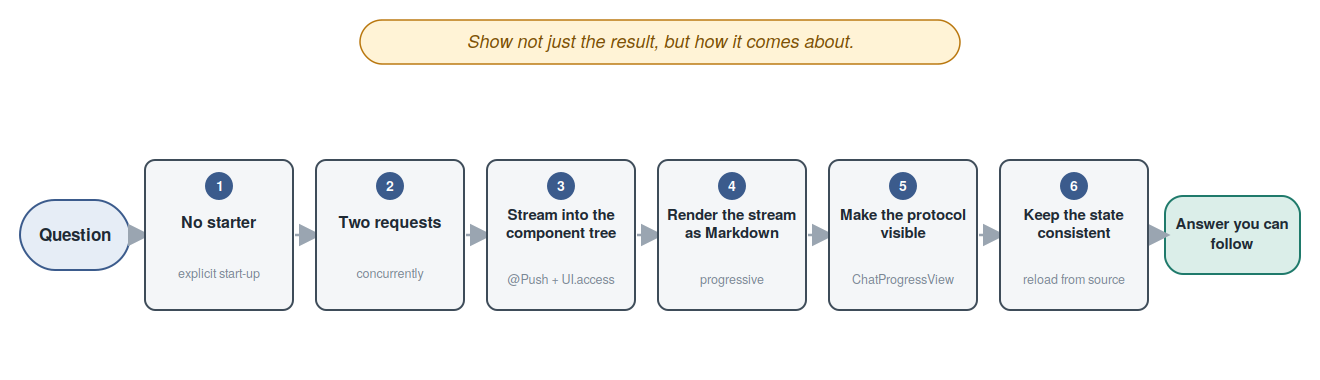
The present part is therefore conceived as a tour through the concrete challenges rather than as an exhaustive catalogue of every constituent of the interface. Each of the following chapters takes up a challenge of its own: running Vaadin without the comfort of a framework, conducting two requests concurrently, channelling a character-by-character stream into a server-side component tree, drawing an honest distinction between an unfinished and a completed answer, making the protocol visible, and finally preserving a consistent state. The beginning is made by the question of how the application comes to run at all — and that without Spring, without Jakarta EE, and with as few dependencies as possible.
2. Running Vaadin Without a Starter
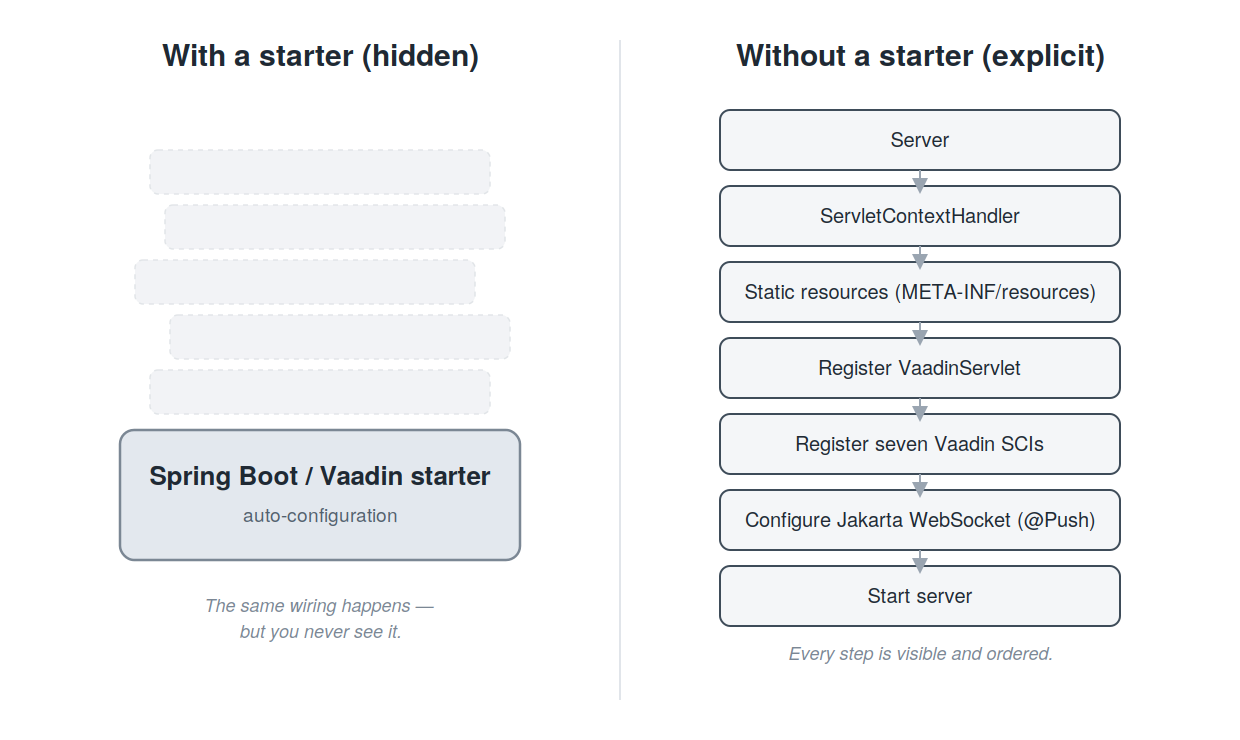
Anyone setting up a Vaadin application usually reaches for a starter. A single dependency entry, an annotation, and the interface is up and running; the servlet is registered, the initialisers are discovered, the static resources are mounted, and the WebSocket channel stands ready. All of this happens behind a façade that the developer neither sees nor needs to understand. For a project that has made a deliberate point of forgoing Spring and Jakarta EE, however, this very façade is the object of interest. The present chapter opens it and shows the few, clearly nameable steps of which the start-up in fact consists.
The entry point could hardly be plainer. The module’s Main class first sets the
default locale of the virtual machine to English and then starts the embedded
server on the centrally held port.
package com.svenruppert.mcp.ui;

import com.svenruppert.dependencies.core.logger.HasLogger;
import com.svenruppert.mcp.common.Ports;

import java.util.Locale;

public final class Main implements HasLogger {

    public static void main(String[] args) throws Exception {
        Locale.setDefault(Locale.ENGLISH);
        new Main().run();
    }

    private void run() throws Exception {
        logger().info("vaadin-ui starting on port {}", Ports.VAADIN_UI);
        new UiServer(Ports.VAADIN_UI).start();
    }
}
Setting the locale is no incidental detail. The entire application presents itself
in English, right down to the lang attribute that Vaadin writes into the
delivered HTML. Without this fixing, the application would adopt the locale of the
host machine and would unexpectedly speak German on a German system. The actual
work is carried out by UiServer, whose start-up routine structures the remainder
of the chapter.
The first step erects the server and the servlet context. Here the first non-obvious decision already arises.
public void start() throws Exception {
    server = new Server(port);

    ServletContextHandler context = new ServletContextHandler();
    context.setContextPath("/");
    context.setSessionHandler(new SessionHandler());
    // Sharing the parent classloader avoids the server/system class isolation
    // that a WebAppContext would impose.
    context.setClassLoader(Thread.currentThread().getContextClassLoader());

    // Expose every META-INF/resources/ directory from the classpath as a
    // virtual webapp root. Servlet 3.0 lets JARs ship static assets there
    // (Vaadin's flow-push delivers vaadinPush-min.js under
    // META-INF/resources/VAADIN/static/push/), but ServletContextHandler
    // does not auto-mount them the way WebAppContext does.
    context.setBaseResource(metaInfResources(context));
A plain ServletContextHandler is used, not the more obvious WebAppContext. The
difference is decisive here. A WebAppContext installs a class loader of its own
whose separation between server and application classes hides the classes from
org.eclipse.jetty.* from the application. Vaadin, however, requires these
classes during its own initialisation, which is why a WebAppContext would cause
the Vaadin initialisers to fail. The ServletContextHandler instead shares the
class loader of the calling thread, and the isolation falls away. This very
plainness, however, buys extra effort elsewhere: static resources that a
WebAppContext would mount of its own accord must now be provided explicitly. The
helper method responsible for this is examined further below.
In the second step, the VaadinServlet is registered.
    // Register VaadinServlet at "/*". Async + WebSocket support is needed for @Push.
    ServletHolder vaadinHolder = new ServletHolder("vaadin", new VaadinServlet());
    vaadinHolder.setInitParameter("productionMode", "true");
    vaadinHolder.setAsyncSupported(true);
    vaadinHolder.setInitOrder(1);
    context.addServlet(vaadinHolder, "/*");

    // ServletDeployer is a context listener. With VaadinServlet already registered,
    // it logs and skips creation.
    context.addEventListener(new ServletDeployer());
The servlet is registered under the path pattern /* and thus answers every
request. Three settings deserve attention. Production mode switches off the
development regime with its continuous frontend build and presupposes the
previously produced production bundle. Enabling asynchronous processing is the
precondition for @Push to work at all later on. The init order, finally, ensures
that the servlet comes up early in the initialisation of the context. The
ServletDeployer registered afterwards is a context listener that would otherwise
create the servlet itself; since the servlet has already been registered by hand,
it confines itself to a log entry.
The third and most extensive step constitutes the heart of the framework-free start-up. Since Vaadin 25, the framework no longer registers its initialisers of its own accord; they must therefore be registered by hand, and in the correct order.
    // Vaadin SCIs in correct order. LookupServletContainerInitializer must run first.
    context.addServletContainerInitializer(new ServletContainerInitializerHolder(
            LookupServletContainerInitializer.class,
            LookupInitializer.class,
            loadVaadinClass("com.vaadin.flow.di.LookupInitializer$ResourceProviderImpl"),
            loadVaadinClass("com.vaadin.flow.di.LookupInitializer$StaticFileHandlerFactoryImpl"),
            loadVaadinClass("com.vaadin.flow.di.LookupInitializer$AppShellPredicateImpl"),
            DefaultApplicationConfigurationFactory.class,
            DefaultRoutePathProvider.class
    ));
    context.addServletContainerInitializer(new ServletContainerInitializerHolder(
            RouteRegistryInitializer.class,
            MainView.class,
            WalkthroughView.class,
            MainLayout.class
    ));
    context.addServletContainerInitializer(new ServletContainerInitializerHolder(
            VaadinAppShellInitializer.class,
            AppShell.class
    ));
    context.addServletContainerInitializer(new ServletContainerInitializerHolder(
            AnnotationValidator.class,
            AppShell.class
    ));
    context.addServletContainerInitializer(new ServletContainerInitializerHolder(
            ErrorNavigationTargetInitializer.class
    ));
    context.addServletContainerInitializer(new ServletContainerInitializerHolder(
            WebComponentExporterAwareValidator.class
    ));
    context.addServletContainerInitializer(new ServletContainerInitializerHolder(
            WebComponentConfigurationRegistryInitializer.class
    ));
Each of these seven calls registers a ServletContainerInitializer and at the
same time names the classes for which it is responsible. These classes correspond
to the @HandlesTypes that a servlet container would otherwise determine by
scanning the classpath; since registration is done by hand here, they are passed
explicitly. The first initialiser is the service lookup and must run first, as all
the others build upon it. The second sets up the route registry and is given the
three navigable classes MainView, WalkthroughView and MainLayout; only thus
does the route registry find the two views and the shared layout. The remaining
five set up the application shell, validate annotations, determine the error
targets, and validate or register any web components.
Striking are the three classes loaded via loadVaadinClass in the first call.
These are internal, non-exported Vaadin classes that cannot be written directly as
a class literal. The helper method therefore loads them by name and fails with a
clear message should Vaadin’s internal structure ever change.
private static Class<?> loadVaadinClass(String name) {
    try {
        return Class.forName(name, false,
                Thread.currentThread().getContextClassLoader());
    } catch (ClassNotFoundException e) {
        throw new IllegalStateException("Vaadin runtime class not found: " + name, e);
    }
}
The fourth step completes the wiring and starts the server. Beforehand, Jakarta WebSocket support is configured, without which the server push over the WebSocket channel would not come about.
    // Jakarta WebSocket support so @Push can use the websocket transport.
    JakartaWebSocketServletContainerInitializer.configure(context, null);

    server.setHandler(context);
    Runtime.getRuntime().addShutdownHook(new Thread(this::safeStop, "ui-shutdown"));

    server.start();
    logger().info("Vaadin UI listening on http://localhost:{}/", port);

    CountDownLatch latch = new CountDownLatch(1);
    Runtime.getRuntime().addShutdownHook(new Thread(latch::countDown, "ui-latch"));
    latch.await();
}
After the context has been set as the handler, a shutdown hook is installed that
brings the server to an orderly halt on interruption. The actual start then
reports the reachable address. Since the main thread would otherwise end and the
virtual machine would terminate the application, a CountDownLatch keeps the
thread open until a second shutdown hook releases it. The server thus runs until
it is explicitly stopped.
There remains the helper method that provides the static resources — the very work
that a WebAppContext would take on of its own accord.
private static Resource metaInfResources(ServletContextHandler context) throws Exception {
    ClassLoader cl = Thread.currentThread().getContextClassLoader();
    ResourceFactory factory = ResourceFactory.of(context);
    // Servlet 3 convention: each JAR may carry static files under META-INF/resources/.
    // flow-push delivers vaadinPush-min.js under META-INF/resources/VAADIN/static/push/,
    // and Vaadin's prebuilt production bundle ships under
    // META-INF/resources/VAADIN/build/ in vaadin-prod-bundle.jar — both are
    // exposed by combining every classpath entry's META-INF/resources tree.
    List<Resource> resources = new ArrayList<>();
    for (URL u : Collections.list(cl.getResources("META-INF/resources"))) {
        resources.add(factory.newResource(u));
    }
    if (resources.isEmpty()) {
        return factory.newResource(".");
    }
    return resources.size() == 1 ? resources.get(0) : ResourceFactory.combine(resources);
}
By the Servlet 3 convention, every archive on the classpath may carry static
files under META-INF/resources. Vaadin makes use of this in several places, for
instance for the push script and for the prebuilt production bundle. The method
gathers all such directories from the classpath and combines them into a single
virtual root, so that the server delivers them as one resource collection.
The entire sequence can be grasped at a glance.
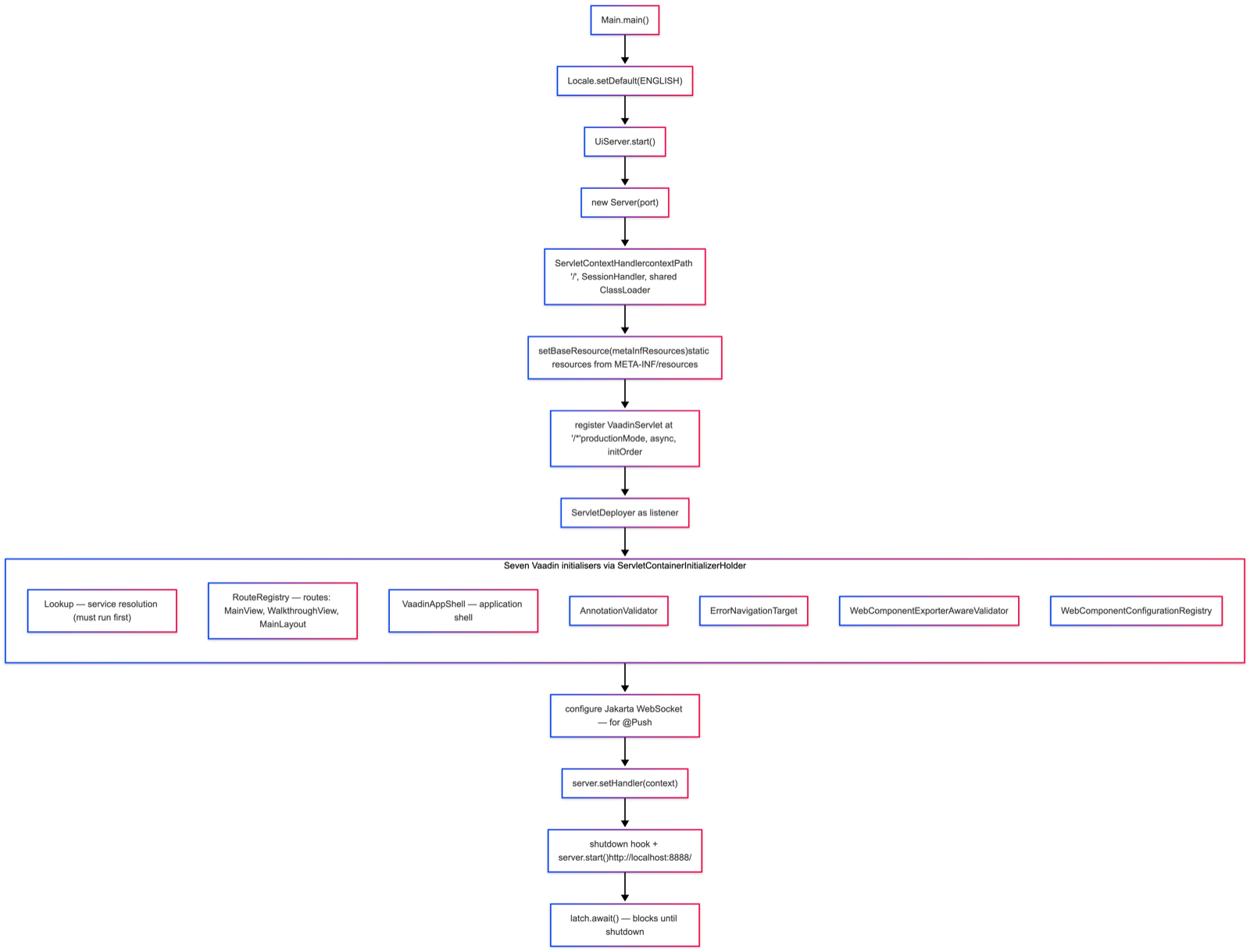
With that, the framework-free start-up is complete. It consists of erecting the context, providing the static resources, registering the servlet, explicitly registering the seven initialisers, configuring the WebSocket, and the actual start. Each of these steps is visible and traceable in the source. What a starter conceals as a convenience lies open here — and this very openness is the reward of forgoing it. The price is a handful of additional lines; the return is a start-up that can be understood entirely with the platform’s own means, without the detour through a further layer of abstraction. It is on this foundation that the next chapter builds, turning to the construction of the main view itself.
3. Conducting Two Requests Side by Side
The persuasive force of the juxtaposition, of which the introductory chapter spoke, rests on two conditions. The first is simultaneity: the viewer should see both answers come into being at the very same moment. The second is equality of conditions: both answers must be given to the same question and under the same premises, so that the visible difference is attributable solely to the attachment of the server and not to some incidental unequal treatment in the construction. Neither condition is self-evident; both are worked into the source. This chapter shows how.
Equality of conditions begins with the layout of the view. For each of the two columns there is a field of the same kind; what exists on the left exists on the right in the same shape.
    private final TextArea questionInput = new TextArea();
    private final Checkbox mcpToggle = new Checkbox("Enable MCP");
    private final Button sendButton = new Button("Ask");

    private static final String PLACEHOLDER_PLAIN =
            "_Generic answers will appear here..._";
    private static final String PLACEHOLDER_MCP =
            "_Answers using your pantry will appear here..._";

    private final Markdown leftBody = new Markdown(PLACEHOLDER_PLAIN);
    private final Markdown rightBody = new Markdown(PLACEHOLDER_MCP);
    private final StringBuilder leftBuffer = new StringBuilder();
    private final StringBuilder rightBuffer = new StringBuilder();
    private final ChatProgressView leftProgress = new ChatProgressView();
    private final ChatProgressView rightProgress = new ChatProgressView();
Each column is assigned its own Markdown component for the finished answer, its
own buffer for the incoming text, and its own progress view. This paired layout is
the structural basis of the symmetry; it ensures that the left and right columns
are cut from the same cloth.
The symmetry shows itself more emphatically still in the fact that both columns issue from a single method. A boolean parameter decides whether the plain or the MCP-enabled variant arises.
    private Div buildAnswerColumn(boolean mcp) {
        Div col = new Div();
        col.addClassNames("recipe-answer", mcp ? "recipe-answer--mcp" : "recipe-answer--plain");

        Span chip = new Span();
        chip.addClassNames("recipe-chip", mcp ? "recipe-chip--mcp" : "recipe-chip--plain");
        if (mcp) {
            chip.add(new Icon(VaadinIcon.MAGIC), new Span("With MCP"));
        } else {
            chip.add(new Icon(VaadinIcon.COMMENT_O), new Span("Without MCP"));
        }

        Div header = new Div(chip);
        header.addClassName("recipe-answer__header");

        Span subtitle = new Span(mcp
                ? "Has access to your pantry & profile"
                : "Generic recipe knowledge only");
        subtitle.addClassName("recipe-card__subtitle");

        ChatProgressView progress = mcp ? rightProgress : leftProgress;
        Markdown body = mcp ? rightBody : leftBody;
        body.addClassName("recipe-answer__body");

        col.add(header, subtitle, progress, body);
        return col;
    }
The two columns are produced in one place by two calls with the values false and
true; the left, accordingly, is the plain one, the right the MCP-enabled one.
Apart from the labelling, the colouring and the choice of the associated field
pair, the construction is identical. Anyone searching the code for a difference
between the columns finds it solely in that one boolean value — and this is
precisely the assurance, visible in the source, that the juxtaposition is honest.
Simultaneity, in turn, arises on triggering via the button. The method
handleSend prepares the interface and then sets the concurrent processing in
motion.
    private void handleSend() {
        String question = questionInput.getValue();
        if (question == null || question.isBlank()) return;

        leftBuffer.setLength(0);
        rightBuffer.setLength(0);
        leftBody.setContent("");
        rightBody.setContent("");
        leftProgress.clear();
        rightProgress.clear();
        sendButton.setEnabled(false);

        UI ui = UI.getCurrent();
        boolean withMcp = mcpToggle.getValue();
        AtomicReference<Boolean> leftDone  = new AtomicReference<>(Boolean.FALSE);
        AtomicReference<Boolean> rightDone = new AtomicReference<>(!withMcp);

        Thread.startVirtualThread(() -> runPlain(ui, question, leftDone, rightDone));
        if (withMcp) {
            Thread.startVirtualThread(() -> runWithMcp(ui, question, leftDone, rightDone));
        } else {
            ui.access(() -> rightBody.setContent("_(MCP disabled - check the box to enable.)_"));
        }
    }
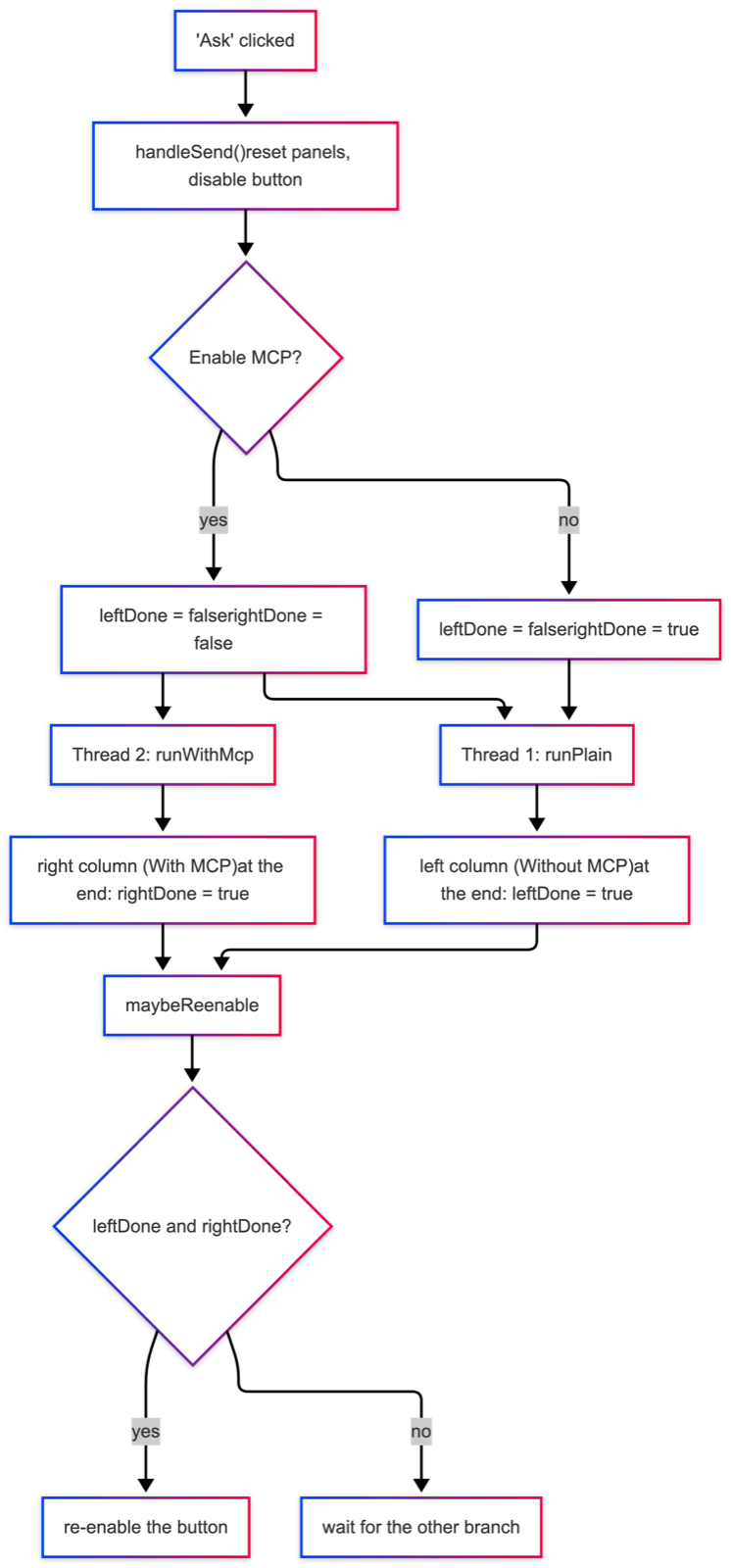
After resetting both panels and disabling the button, two mutually independent virtual threads are started — one for the plain request, one for the MCP-enabled one. Virtual threads are the fitting means here: they are so lightweight that one may be created for each request without hesitation, and they may block while waiting for the answer to arrive without tying up a platform resource. The plain request is always made; the MCP-enabled one only when the toggle is active. Otherwise the right column receives a plain note.
The division of labour behind the two threads deserves a remark of its own. The
plain request drives the method runPlain, the MCP-enabled one the method
runWithMcp; the latter makes use of the same WalkthroughEngine that also drives
the step-by-step view of the second part — here merely as an automatic loop with
no pauses between the phases. The actual protocol logic thus resides in exactly one
place, and only the drive differs. The bodies of both methods contain the
streaming callback that conveys the incoming text fragments into the interface; the
following chapter is devoted to it, which is why it is omitted here.
There remains the joining of the two strands. Each thread notes at its end that it has finished, and then calls a plain coordination method.
    private void maybeReenable(UI ui,
                               AtomicReference<Boolean> leftDone,
                               AtomicReference<Boolean> rightDone) {
        if (leftDone.get() && rightDone.get()) {
            ui.access(() -> sendButton.setEnabled(true));
        }
    }
Only once both flags are set is the button re-enabled. Since the two flags are set
and read in separate threads, they are realised as AtomicReference, whose value
is safely visible across thread boundaries. Here the initial assignment mentioned
earlier pays off: the right-hand flag is pre-set with !withMcp and therefore
counts as done at once when the toggle is inactive. Thus, in plain operation, the
single thread of the left column suffices to re-enable the button, whereas in MCP
operation both threads are awaited. No separate synchronisation is needed; the
logic carries itself.
The whole sequence can be read as a fork and a join.
Whereas the diagram shows the structure of the fork, the following figure makes the temporal side visible: both strands genuinely run within the same span of time, and the MCP-enabled lane lasts longer because it calls tools along the way.
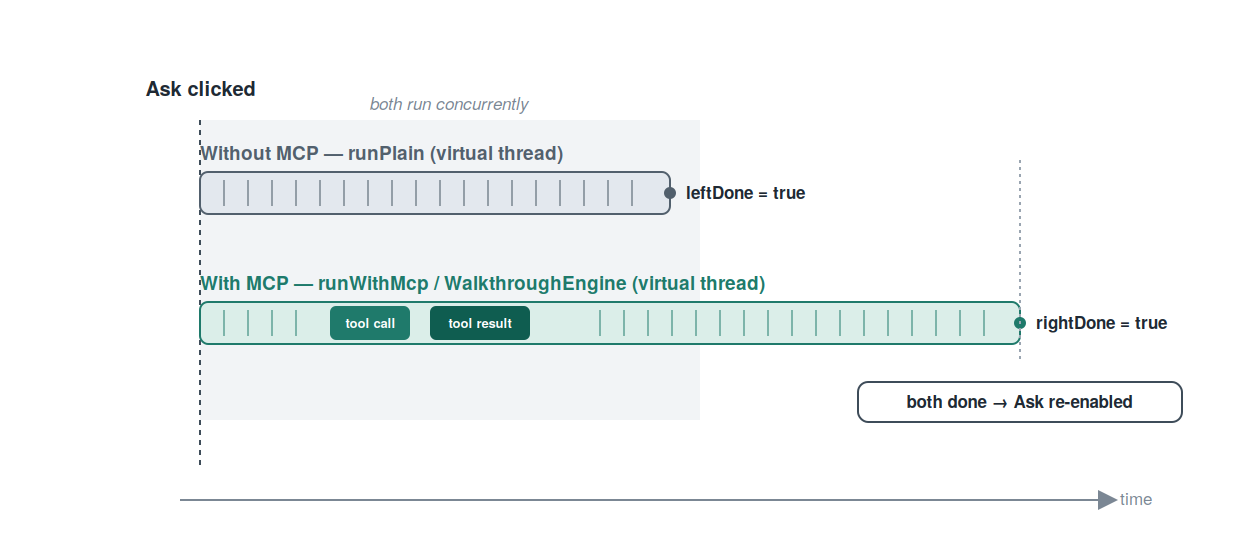
With that, the two conditions on which the juxtaposition rests are met. The symmetry of construction ensures that both answers arise under equal premises; the concurrent conduct over two virtual threads ensures that they do so at the same moment. What has remained open so far is the question of how the text fragments arriving in the background threads find their way into the server-side interface at all. It is to this very question that the following chapter turns.
4. Channelling a Character Stream into the Component Tree
The preceding chapter left a question open: how the text fragments arriving in the two background threads find their way into the interface at all. Three obstacles stand in the way. First, Vaadin keeps the component tree on the server; the model’s answer, however, does not arise there but arrives over the network. Second, the component tree may not be altered from an arbitrary thread, but only within the locked context of the associated session. Third, the browser does not poll for updates of its own accord; without further intervention the picture would stand still until the user reloads the page. This chapter shows how these three obstacles are overcome together — along the path that a single fragment travels.
At the beginning of this path stands the stream itself. The OllamaClient requests
the model’s answer with streaming enabled and reads it as Server-Sent Events. The
plain request of the left column runs through the method chatPlain, which joins
the system prompt and the question into a message list and then calls the inner
streaming method. The third parameter is noteworthy: a Consumer<String> to which
every incoming text fragment is handed.
  public void chatPlain(String systemPrompt, String userMessage,
                        Consumer<String> textChunk,
                        Consumer<ChatProgress> progress) {
    Instant start = Instant.now();
    progress.accept(ChatProgress.info("Sending request to Ollama",
                                      "model: " + model));
    List<ObjectNode> messages = new ArrayList<>();
    messages.add(message("system", systemPrompt));
    messages.add(message("user", userMessage));
    try {
      progress.accept(ChatProgress.stream("Streaming reply..."));
      StreamResult outcome = streamOnce(messages, null, textChunk);
      progress.accept(ChatProgress.success(
          "Reply complete (" + outcome.assistantText.length() + " chars)",
          Duration.between(start, Instant.now())));
    } catch (RuntimeException e) {
      progress.accept(ChatProgress.error(e.getMessage()));
      throw e;
    }
  }
The method is given two callbacks: one for the text fragments, the other for
structured progress events. The actual stream chatPlain leaves to the inner
method streamOnce, to which it passes the text callback unchanged; the null
supplied in place of the tool list marks the plain request.
The actual decomposition of the stream takes place in this inner method. It reads
the answer line by line; empty lines and lines not belonging to the stream are
skipped, and the sentinel line [DONE] ends the loop.
      try (BufferedReader reader = new BufferedReader(
          new InputStreamReader(response.body(), StandardCharsets.UTF_8))) {
        String line;
        while ((line = reader.readLine()) != null) {
          if (line.isEmpty()) continue;
          if (!line.startsWith("data:")) continue;
          String data = line.substring(5).trim();
          if ("[DONE]".equals(data)) break;
          JsonNode event;
          try {
            event = MAPPER.readTree(data);
          } catch (Exception parseError) {
            logger().warn("Skipping malformed SSE chunk: {}", data);
            continue;
          }
          JsonNode choice = event.path("choices").path(0);
          JsonNode delta = choice.path("delta");
          if (delta.hasNonNull("content")) {
            String piece = delta.get("content").asText();
            if (!piece.isEmpty()) {
              assistantText.append(piece);
              if (textChunk != null) textChunk.accept(piece);
            }
          }
          if (delta.hasNonNull("tool_calls")) {
            for (JsonNode tc : delta.get("tool_calls")) {
              int idx = tc.path("index").asInt(0);
              ToolCallAccumulator acc = calls.computeIfAbsent(idx,
                                                              k -> new ToolCallAccumulator());
              if (tc.hasNonNull("id")) acc.id = tc.get("id").asText();
              JsonNode fn = tc.path("function");
              if (fn.hasNonNull("name")) acc.name = fn.get("name").asText();
              if (fn.hasNonNull("arguments")) {
                acc.argumentsBuffer.append(fn.get("arguments").asText());
              }
            }
          }
          String finish = choice.path("finish_reason").asText(null);
          if (finish != null && !finish.isBlank()) {
            break;
          }
        }
      }
For the text path, only the middle section matters: if the delta carries content, that portion is appended to the gathered answer text and at the same time handed to the callback. In this way every fragment leaves the method at the very moment it arrives. The section that follows gathers the components of any tool calls; it is left undiscussed here and is the subject of the sixth chapter. The appearance of a finish reason ends the loop.
With that, the source is clarified: the Consumer<String> receives the fragment.
Before it can appear in the browser, however, the first of the named obstacles must
be taken — the browser must be allowed to be supplied unsolicited. This is what the
annotation @Push does, which hangs not on an individual view but on the central
AppShell and therefore applies to the whole application.
package com.svenruppert.mcp.ui;

import com.vaadin.flow.component.page.AppShellConfigurator;
import com.vaadin.flow.component.page.Push;
import com.vaadin.flow.theme.Theme;
import com.vaadin.flow.theme.lumo.Lumo;

@Push
@Theme(value = "recipe", variant = Lumo.LIGHT)
public class AppShell implements AppShellConfigurator {
}
The annotation permits the server to send changes to the browser of its own
accord — over the WebSocket channel that was configured expressly in the second
chapter. Because it sits on the AppShell, it applies to both views alike; the
second annotation merely determines the appearance.
There remains the second obstacle: the change in the correct context. The receiving
end in the main view is the method runPlain. It passes chatPlain a callback that
processes every fragment by way of UI.access.
    private void runPlain(UI ui, String question,
                          AtomicReference<Boolean> leftDone, AtomicReference<Boolean> rightDone) {
        try {
            services.ollama().chatPlain(Prompts.SYSTEM_PLAIN, question,
                    chunk -> ui.access(() -> {
                        leftBuffer.append(chunk);
                        leftBody.setContent(leftBuffer.toString());
                    }),
                    ev -> ui.access(() -> leftProgress.append(ev)));
        } catch (Exception e) {
            logger().warn("Plain chat failed", e);
            ui.access(() -> leftBody.setContent("**Error:** " + e.getMessage()));
        } finally {
            leftDone.set(Boolean.TRUE);
            maybeReenable(ui, leftDone, rightDone);
        }
    }
Here the threads come together. The reference to the UI was captured earlier in
the triggering thread and handed along into the background thread. Every incoming
fragment is not processed directly but wrapped in a UI.access call. This is
precisely the key: altering the component tree from a foreign thread would be
impermissible, since it would bypass the session’s lock and lead to race
conditions. UI.access instead enqueues the change into the locked context of the
session and, since @Push is active, at the same time sets its transmission to the
browser in motion. Thus a single call overcomes the second and the third obstacle
in one.
Within the callback, finally, the buffer pattern shows itself. Every fragment is
appended to a StringBuilder, and the entire accumulated content is set as the new
content of the Markdown component. That the whole text is set anew on every
fragment rather than appended to the existing content is deliberate: the approach
is plain, self-contained, and matches the interface of the component, which takes a
complete text. The progress callback proceeds in the same way. At the end the
method notes in the finally block that the left column is finished and calls the
coordination method considered in the previous chapter; the error path sets an
error message, likewise by way of UI.access.
The whole path of a fragment can be read as a sequence of a few steps.
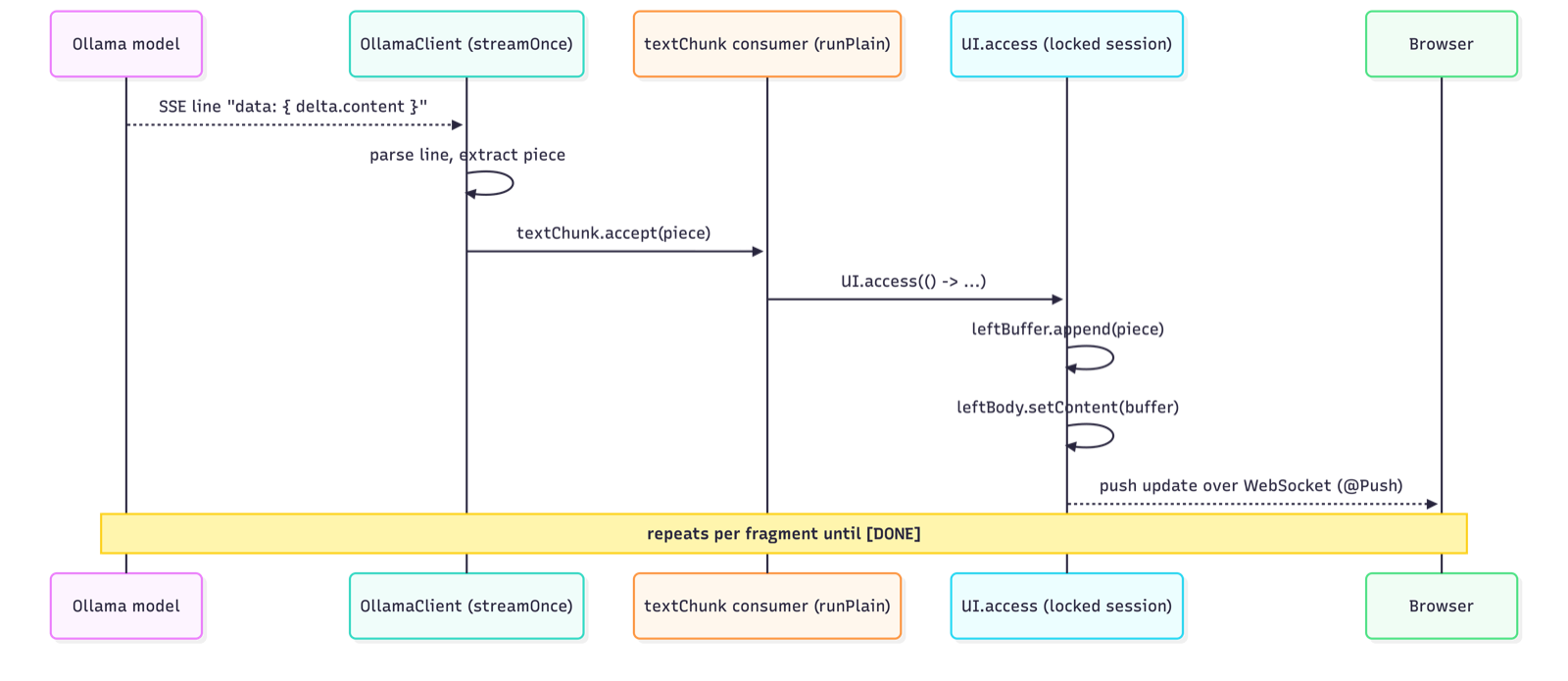
With that, the three obstacles named at the outset are taken together: the stream
is decomposed in the client, @Push permits the unsolicited supply of the browser,
and UI.access runs every fragment in the correct context and brings about its
transmission. One detail remains conspicuous: on every fragment the entire
accumulated text is set anew on the Markdown component, so that the component
displays an ever-growing, still-incomplete document. What the viewer perceives while
the document is incomplete — and whether this is the right thing — is the question
to which the following chapter turns.
5. Rendering the Stream as Markdown
The fourth chapter traced the path of a fragment into the component tree and, at
the end, singled out one detail: on every fragment the entire accumulated text is
set on the Markdown component. What stood there as an incidental observation is
the actual subject of this chapter. Where the previous chapter asked how a fragment
reaches the interface, this one asks what the interface visibly does with it. The
heart of the callback reads:
                    chunk -> ui.access(() -> {
                        leftBuffer.append(chunk);
                        leftBody.setContent(leftBuffer.toString());
                    }),
The field leftBody is a com.vaadin.flow.component.markdown.Markdown, not a plain
text component. Its setContent call replaces the previous content entirely; the
component discards its existing rendering and re-renders the whole accumulated text.
Since this happens on every fragment, the answer appears to the viewer not as
growing raw text but as a continuously rendered Markdown document.
For the viewer, this means that the answer builds itself up as a structured document. A heading appears as a heading as soon as its line is complete; a list appears as a list as soon as its entries arrive; an emphasis takes effect as soon as it is closed. The document thus comes into being not as a draft to be put into shape at the end, but already in its final form, step by step.
This approach has a price. As long as a piece of markup is still incomplete — an emphasis opened but not yet closed, a list begun but not yet finished, a code block that has arrived only halfway — the component renders that intermediate state just as it currently stands. If the missing part arrives shortly afterwards, the affected section rearranges itself. The viewer perceives this as a brief reordering that resolves itself as the remainder arrives.
The main view accepts this occasional reordering deliberately, and the reason lies in its purpose. It is the comparison view, and its entire persuasive force rests, as the introductory chapter set out, on the immediacy of the juxtaposition. The viewer should see both answers come into being vividly and at the very same moment; the progressive rendering serves precisely this vividness. The answers are, moreover, manageable recipe texts in which the reordering is rare and slight. The small price thus stands in a reasonable proportion to the impression of simultaneity that is gained.
It should not be passed over that the same matter can be solved differently — and is solved differently in the same project. The step-by-step view takes the opposite path: it shows the stream first as raw text and renders it as Markdown only after it has completed.
        if (query.toolCalls().isEmpty()) {
            result.remove(streamDiv);
            Markdown rendered = new Markdown(streamedText.isBlank() ? "_(no text)_" : streamedText);
            rendered.addClassName("recipe-walkthrough__rendered");
            result.add(rendered);
During the stream the text grows there in a plain area; only after completion is
that area removed and replaced by a freshly created Markdown component. The
corresponding phase description states it expressly: “Streaming is complete and the
text is rendered as Markdown.” The reason for this different choice lies in the
different purpose: a teaching view prefers a calm, stable picture of each phase that
the viewer can study at his own pace, without the rendered output rearranging itself
beneath his gaze. The closer examination of this counter-design belongs in the
second part; here the note suffices that these are two well-founded answers to the
same question.
The two strategies can be set side by side in brief.
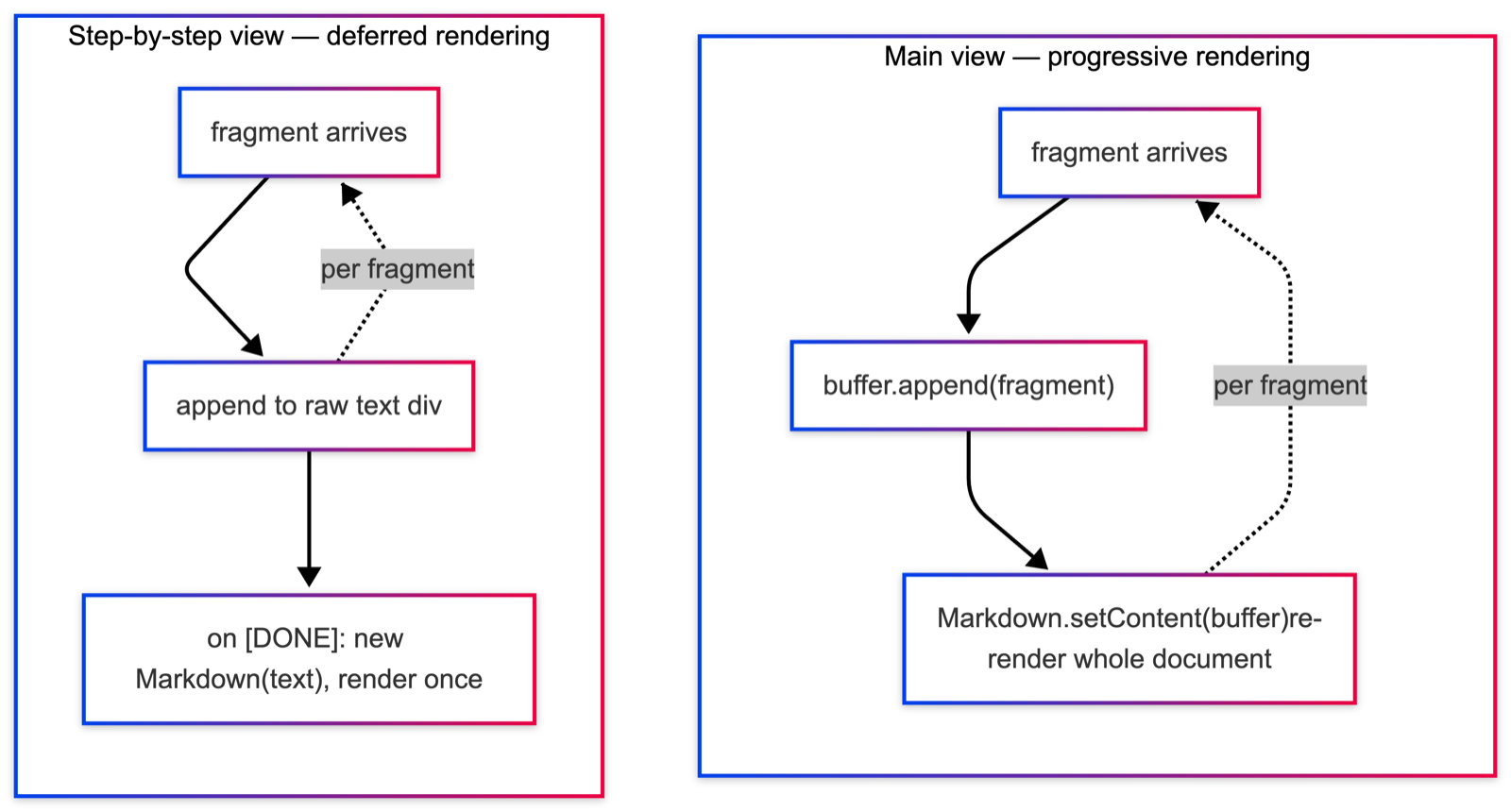
Both paths follow the same principle, that an interface should honestly reflect the state of its content — they merely draw different conclusions from it. The comparison view shows the document as it forms, because it cares about the simultaneity of its emergence. The teaching view shows each phase as it stands once complete, because it cares about the calm of study. What neither view has so far disclosed is the traffic that makes the right-hand answer possible in the first place — the calls to the tools and their results. It is to this very traffic, and to making it visible, that the following chapter turns.
6. Making the Protocol Visible
The previous chapter closed with an observation: what neither view had so far disclosed is the traffic that makes the right-hand answer possible in the first place. This traffic is precisely what MCP achieves — and at the same time what remains hidden in normal operation. The fetching of the tool list, the individual tool calls, their results and the repeated model runs all happen behind the scenes. Without making them visible, the right column would be a mere black box that delivers a better answer but does not show why. A comparison view meant to instruct cannot leave it at that. The main view therefore makes the traffic legible — by way of a vertical timeline that runs alongside each answer.
At the beginning stands a plain event model. Every step of the processing is
recorded as a ChatProgress, a record with a small, closed enumeration of event
kinds and a factory method for each.
public record ChatProgress(Kind kind, String label, String detail, Instant at) {

    public enum Kind {
        INFO,
        STREAM,
        TOOL_CALL,
        TOOL_RESULT,
        SUCCESS,
        ERROR
    }

    public static ChatProgress info(String label) {
        return new ChatProgress(Kind.INFO, label, null, Instant.now());
    }

    public static ChatProgress info(String label, String detail) {
        return new ChatProgress(Kind.INFO, label, detail, Instant.now());
    }

    public static ChatProgress stream(String label) {
        return new ChatProgress(Kind.STREAM, label, null, Instant.now());
    }

    public static ChatProgress toolCall(String label, String detail) {
        return new ChatProgress(Kind.TOOL_CALL, label, detail, Instant.now());
    }

    public static ChatProgress toolResult(String label, String detail) {
        return new ChatProgress(Kind.TOOL_RESULT, label, detail, Instant.now());
    }

    public static ChatProgress success(String label, Duration elapsed) {
        String d = "%.1fs".formatted(elapsed.toMillis() / 1000.0);
        return new ChatProgress(Kind.SUCCESS, label, d, Instant.now());
    }

    public static ChatProgress error(String message) {
        return new ChatProgress(Kind.ERROR, "Error", message, Instant.now());
    }
}
Six event kinds suffice to describe the whole course of an MCP run: a general notice, the beginning of a stream, a tool call, a tool result, the success and the error. Every event carries a concise label, an optional detail text and the moment of its creation. The detail text is the part decisive for the protocol, for it holds the arguments of a call and the returned result.
The display of these events is taken on by the ChatProgressView, a vertical
timeline. Its central method appends a row for each event.
    public void append(ChatProgress event) {
        Div row = new Div();
        row.addClassName("recipe-progress__row");
        row.addClassName("recipe-progress__row--" + event.kind().name().toLowerCase());

        Icon icon = new Icon(iconFor(event.kind()));
        icon.addClassName("recipe-progress__icon");

        Span time = new Span(TIME_FMT.format(
                LocalTime.ofInstant(event.at(), ZoneId.systemDefault())));
        time.addClassName("recipe-progress__time");

        Span label = new Span(event.label());
        label.addClassName("recipe-progress__label");

        Div head = new Div(icon, time, label);
        head.addClassName("recipe-progress__head");
        row.add(head);

        if (event.detail() != null && !event.detail().isBlank()) {
            Pre detail = new Pre(event.detail());
            detail.addClassName("recipe-progress__detail");
            row.add(detail);
        }

        add(row);
        getElement().executeJs("this.scrollTop = this.scrollHeight");
    }

    private static VaadinIcon iconFor(ChatProgress.Kind k) {
        return switch (k) {
            case INFO        -> VaadinIcon.INFO_CIRCLE_O;
            case STREAM      -> VaadinIcon.PAPERPLANE;
            case TOOL_CALL   -> VaadinIcon.COG;
            case TOOL_RESULT -> VaadinIcon.CHECK_CIRCLE_O;
            case SUCCESS     -> VaadinIcon.CHECK_CIRCLE;
            case ERROR       -> VaadinIcon.WARNING;
        };
    }
Each row consists of a head — an icon suited to the event kind, the time and the
label — and, if a detail text is present, a Pre block set beneath it. This very
Pre block carries the content in a monospaced and thus legibly arranged form:
here the arguments of a call and the result JSON appear in a shape that the viewer
can follow character by character. The event kind also determines a style class of
its own, so that calls, results and errors are distinguished by colour as well.
Finally, the method scrolls to the most recent entry by way of a small JavaScript
call, so that the bar always shows the current happening.
The events are created where the traffic actually takes place — in the method
runWithMcp, which drives the MCP-enabled request.
    private void runWithMcp(UI ui, String question,
                            AtomicReference<Boolean> leftDone, AtomicReference<Boolean> rightDone) {
        WalkthroughEngine engine = services.engine();
        Instant start = Instant.now();
        try {
            WalkthroughState state = engine.startRun(Prompts.SYSTEM_MCP, question);
            ui.access(() -> rightProgress.append(
                    ChatProgress.info("Fetching tool list from MCP server")));
            WalkthroughPhase.ToolCatalog catalog = engine.fetchToolCatalogue(state);
            ui.access(() -> rightProgress.append(
                    ChatProgress.info("Loaded " + catalog.toolNames().size()
                            + " tools from MCP server",
                            String.join(", ", catalog.toolNames()))));

            for (int safety = 0; safety < WalkthroughEngine.MAX_ITERATIONS; safety++) {
                final int iterNumber = state.iteration() + 1;
                ui.access(() -> rightProgress.append(ChatProgress.stream(
                        "Iteration " + iterNumber + ": streaming reply...")));
                WalkthroughPhase.ModelQuery query = engine.runModelQuery(state,
                        chunk -> ui.access(() -> {
                            rightBuffer.append(chunk);
                            rightBody.setContent(rightBuffer.toString());
                        }));
                if (query.toolCalls().isEmpty()) {
                    Duration elapsed = Duration.between(start, Instant.now());
                    int it = state.iteration();
                    ui.access(() -> rightProgress.append(ChatProgress.success(
                            "Reply complete after " + it + " iteration"
                                    + (it == 1 ? "" : "s"),
                            elapsed)));
                    return;
                }
                for (WalkthroughPhase.PendingToolCall pc : query.toolCalls()) {
                    ui.access(() -> rightProgress.append(ChatProgress.toolCall(
                            "Call " + pc.name() + "(...)", pc.argumentsJson())));
                }
                WalkthroughPhase.ToolExecution exec = engine.executeTools(state, query);
                for (WalkthroughPhase.ToolOutcome oc : exec.outcomes()) {
                    ChatProgress event = oc.error()
                            ? ChatProgress.error(oc.name() + ": " + oc.resultText())
                            : ChatProgress.toolResult("Result from " + oc.name(),
                                    oc.resultText());
                    ui.access(() -> rightProgress.append(event));
                }
            }
            ui.access(() -> rightProgress.append(ChatProgress.info(
                    "Reached max tool-call iteration limit. Stopping.")));
            ui.access(() -> rightBuffer.append(
                    "\n\n[Reached the maximum tool-call iteration limit. Stopping here.]"));
            ui.access(() -> rightBody.setContent(rightBuffer.toString()));
        } catch (Exception e) {
            logger().warn("MCP chat failed", e);
            ui.access(() -> rightProgress.append(ChatProgress.error(e.getMessage())));
            ui.access(() -> rightBody.setContent("**Error:** " + e.getMessage()));
        } finally {
            rightDone.set(Boolean.TRUE);
            maybeReenable(ui, leftDone, rightDone);
            ui.access(sidebar::refreshGrid);
            ui.access(sidebar::refreshProfileForm);
        }
    }
The method drives a loop whose inner steps — the fetching of the catalogue, the
model run, the tool execution — are performed by the WalkthroughEngine and are
examined more closely only in the second part. For this chapter, all that matters is
what happens between those steps: at every significant point a ChatProgress event
is created and appended to the timeline by way of UI.access. First an event
reports the fetching of the tool list, another the number and the names of the
loaded tools. In each run an event announces the beginning of the stream. If the
model requests no further tools, a success event reports the completion together
with the elapsed time. Otherwise the method creates, for each requested call, a call
event whose detail text carries the arguments, and after the execution, for each
result, a result event with the returned text — or, in the error case, an error
event. Thus, alongside the answer, a running, timestamped record of the whole
traffic comes into being.
The sequence of these events can be read as the timeline of a run.
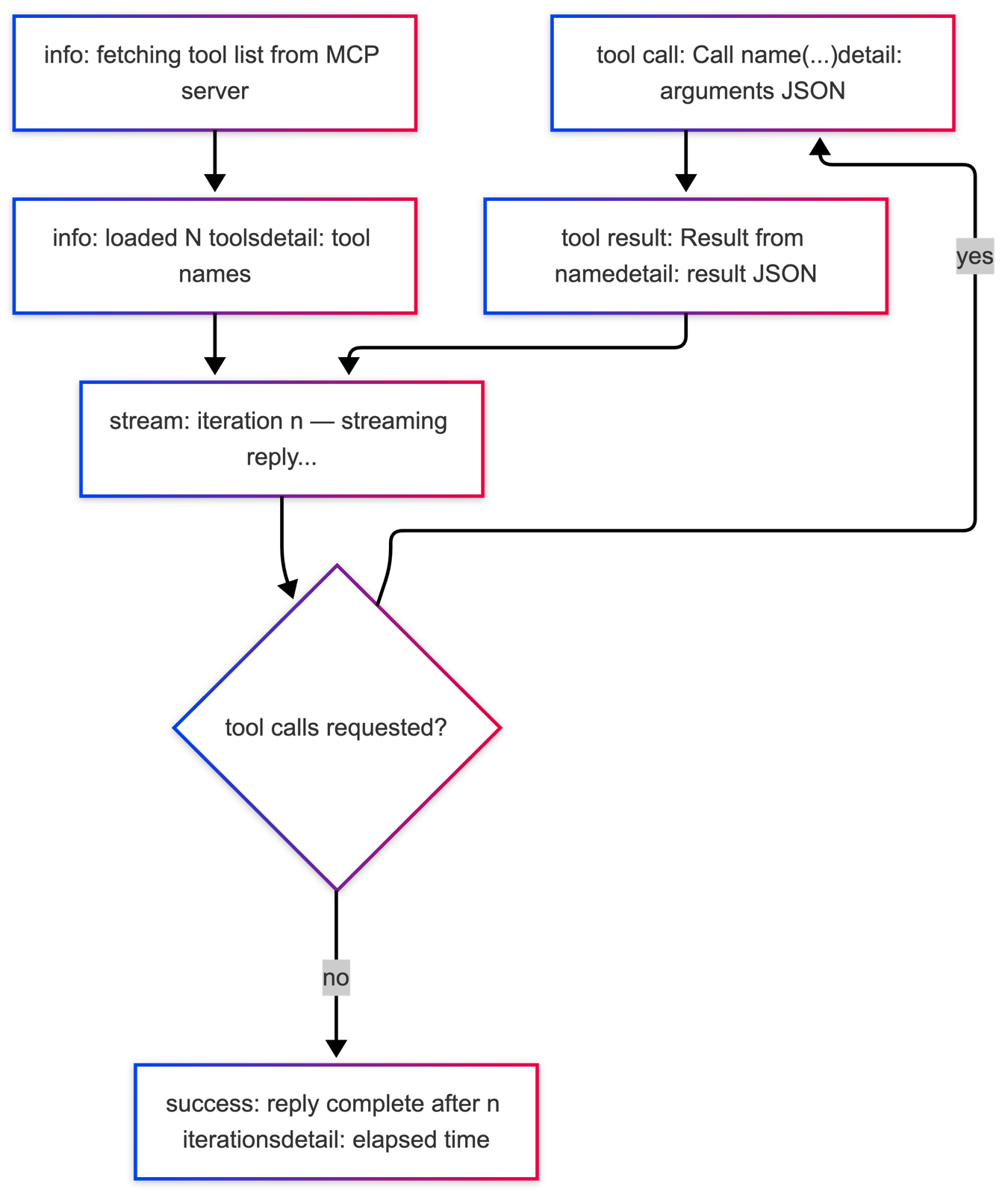
This is how the timeline looks during a run:
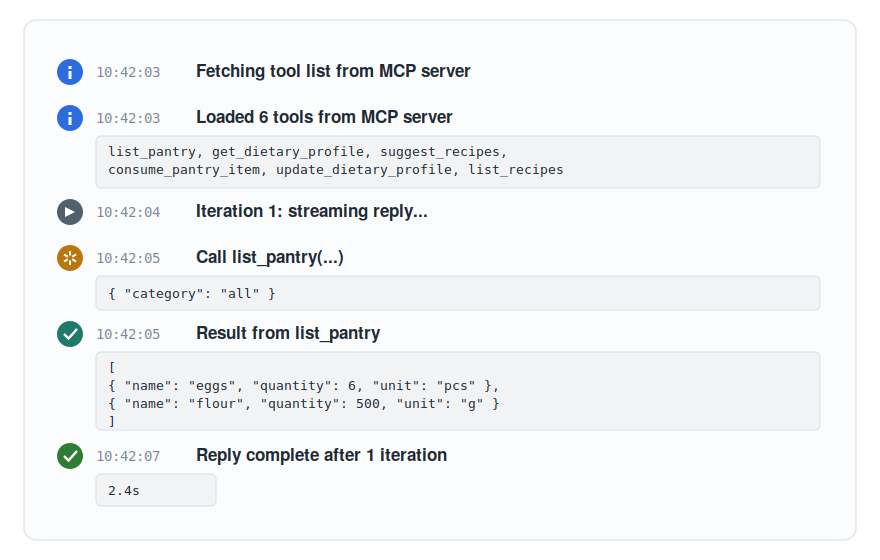
With that, the traffic is no longer hidden. Alongside the right-hand answer the viewer sees which tools the model requests, with which arguments it calls them and which results flow back — and he sees it at the very moment it happens. It should be noted that the step-by-step view presents the same traffic more elaborately still: with one card per phase and with concurrently executed calls as side-by-side lanes under a parallel marker. This richer, paused presentation is the subject of the second part; the main view contents itself with the compact, running timeline.
One detail of the method already points ahead: in the finally block the sidebar is
refreshed after every run. Behind this lies the question of how the display of the
pantry and the profile agrees with the actual state that the tools may have changed.
It is to this very question of state consistency that the following chapter turns.
7. Keeping the State Consistent
The previous chapter ended with a detail that pointed ahead: in the finally block
of runWithMcp the sidebar is refreshed after every run. Behind this lies a
consistency problem to which this chapter is devoted. For two writers act upon the
same business state — the pantry and the dietary profile. The operator changes it by
hand through the maintenance sidebar; the model changes it indirectly through the
MCP tools, for instance by striking out a consumed ingredient or adjusting the
profile. A display that is to do justice to both writers must therefore be conducted
with care.
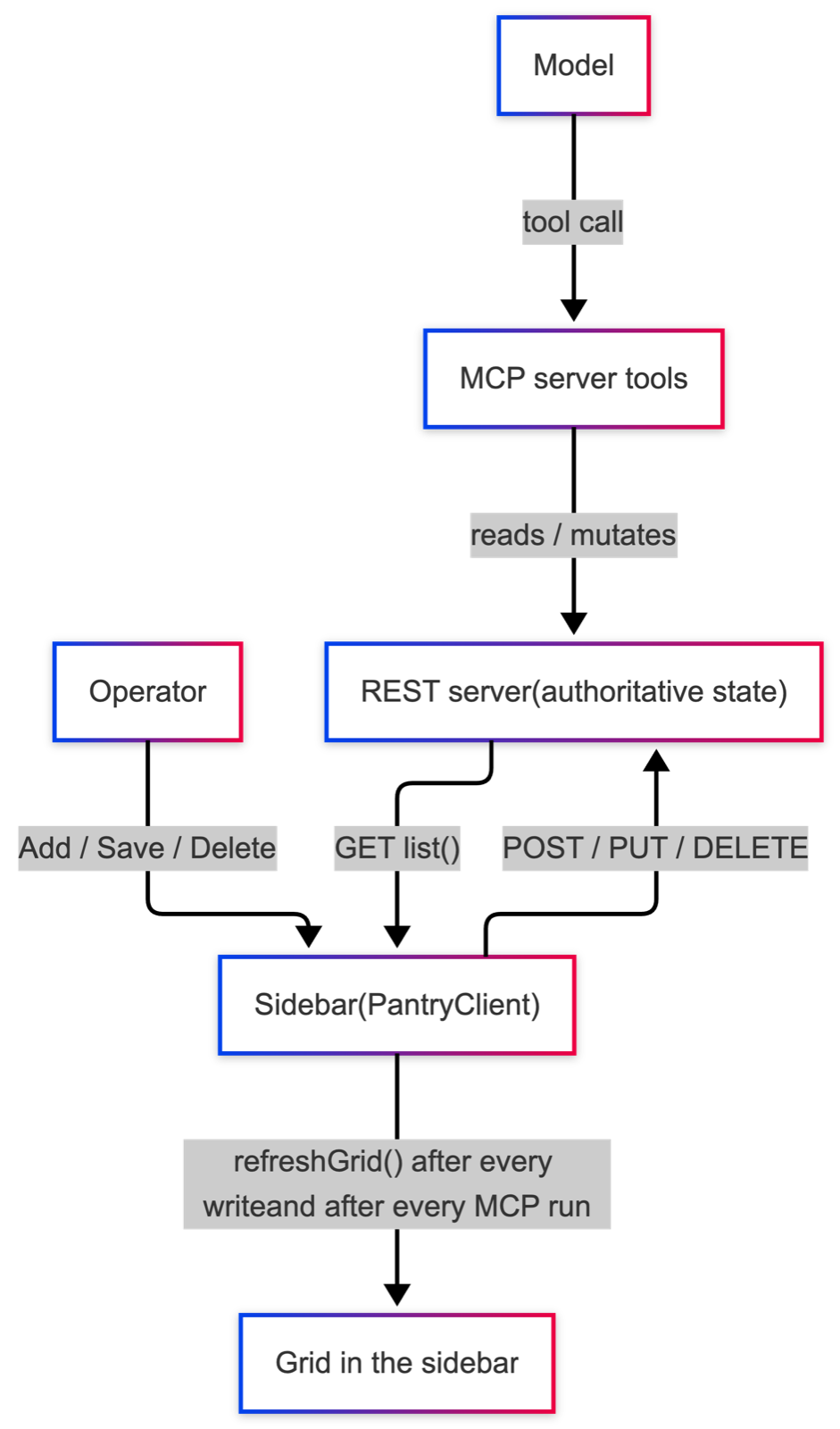
The first decision concerns the path the sidebar takes when writing. It writes directly against the REST server and deliberately bypasses the MCP server. The reason lies in its role: the sidebar is the operator’s instrument, not part of the model dialogue. The REST server holds the authoritative state; the MCP server accesses this very state only by reading and writing through its tools. It would be mistaken to route an operator’s action through the model’s tool channel. The pantry write shows this.
    private void saveItem() {
        try {
            String name = nameField.getValue();
            if (name == null || name.isBlank()) {
                Notification.show("Name is required", 2500, Notification.Position.MIDDLE)
                        .addThemeVariants(NotificationVariant.LUMO_ERROR);
                return;
            }
            Double qty = quantityField.getValue();
            if (qty == null) qty = 0.0;
            String unit = blankToDefault(unitField.getValue(), "piece");
            String category = blankToDefault(categoryField.getValue(), "Pantry");
            Optional<LocalDate> bestBefore = Optional.ofNullable(bestBeforeField.getValue());
            PantryItem item = new PantryItem(name, qty, unit, bestBefore, category);

            if (nameField.isReadOnly()) {
                pantryClient.replace(item);
                Notification.show("Updated " + name, 1500, Notification.Position.BOTTOM_START);
            } else {
                pantryClient.create(item);
                Notification.show("Added " + name, 1500, Notification.Position.BOTTOM_START);
            }
            clearForm();
            refreshGrid();
        } catch (Exception e) {
            Notification.show(e.getMessage(), 3000, Notification.Position.MIDDLE)
                    .addThemeVariants(NotificationVariant.LUMO_ERROR);
        }
    }
After a brief check of the name, a PantryItem is assembled from the fields.
Whether it is created or replaced is decided by the state of the name field: if it
is read-only, an existing entry has been loaded for editing, and the call replace
replaces it; otherwise create adds a new one. What is decisive is the turn at the
end of the successful branch: the form is cleared and the grid is reloaded. This
very turn recurs on deletion.
    private void deleteSelected() {
        Optional<PantryItem> sel = grid.getSelectionModel().getFirstSelectedItem();
        if (sel.isEmpty()) {
            Notification.show("Select an item first", 1500, Notification.Position.BOTTOM_START);
            return;
        }
        try {
            pantryClient.delete(sel.get().name());
            Notification.show("Removed " + sel.get().name(), 1500, Notification.Position.BOTTOM_START);
            clearForm();
            refreshGrid();
        } catch (Exception e) {
            Notification.show(e.getMessage(), 3000, Notification.Position.MIDDLE)
                    .addThemeVariants(NotificationVariant.LUMO_ERROR);
        }
    }
Here too the grid is reloaded after the write. With that, the actual consistency
principle shows itself, which resides in the method refreshGrid.
    public void refreshGrid() {
        try {
            grid.setItems(pantryClient.list());
        } catch (Exception e) {
            logger().warn("Could not refresh pantry grid: {}", e.getMessage());
        }
    }
The grid is not updated locally — the entry just created is not, say, added to the existing display — but refilled entirely from the server. After every change the display thus reflects the authoritative state and never a locally maintained, possibly diverging view. This principle is plain but consequential: as long as every change closes with a reload, the display cannot drift apart.
The writes themselves are carried out by a thin REST client using the platform’s own means. The replacing method may stand for them.
    public PantryItem replace(PantryItem item) {
        try {
            String body = MAPPER.writeValueAsString(item);
            HttpResponse<String> resp = http.send(
                    HttpRequest.newBuilder(URI.create(baseUrl + "/pantry/" + encode(item.name())))
                            .timeout(Duration.ofSeconds(5))
                            .header("Content-Type", "application/json")
                            .PUT(HttpRequest.BodyPublishers.ofString(body, StandardCharsets.UTF_8))
                            .build(),
                    HttpResponse.BodyHandlers.ofString(StandardCharsets.UTF_8));
            ensureSuccess(resp, "replace pantry item");
            return MAPPER.readValue(resp.body(), PantryItem.class);
        } catch (RuntimeException re) {
            throw re;
        } catch (Exception e) {
            throw new RuntimeException("Failed to replace pantry item " + item.name(), e);
        }
    }
An HttpRequest with the method PUT carries the entry, cast as JSON, to the
address of the REST server; a check of the status code ensures success. Creating and
deleting proceed with POST and DELETE respectively, after the same pattern. No
additional dependency is needed for this; the platform’s HttpClient suffices.
The profile section of the sidebar is built after the same pattern. Its write transmits the changed profile through the associated REST client, and its refresh likewise reloads the profile from the server into the form. What holds for the pantry therefore holds for the dietary profile as well: write, then reload.
There remains the opposite direction. The writes considered so far proceed from the
operator. The second writer is the model, which changes the same state through the
MCP tools. So that its changes too become visible, the main view refreshes the
sidebar after every MCP run — those very two calls in the finally block that the
previous chapter announced: the reloading of the grid and the reloading of the
profile form. Thus the circle closes in both directions. If the operator changes the
data, the next MCP-enabled answer reflects the change, because the model re-fetches
the state through the tools on every request. If the model changes the data, the
sidebar reflects it, because it reloads after the run.
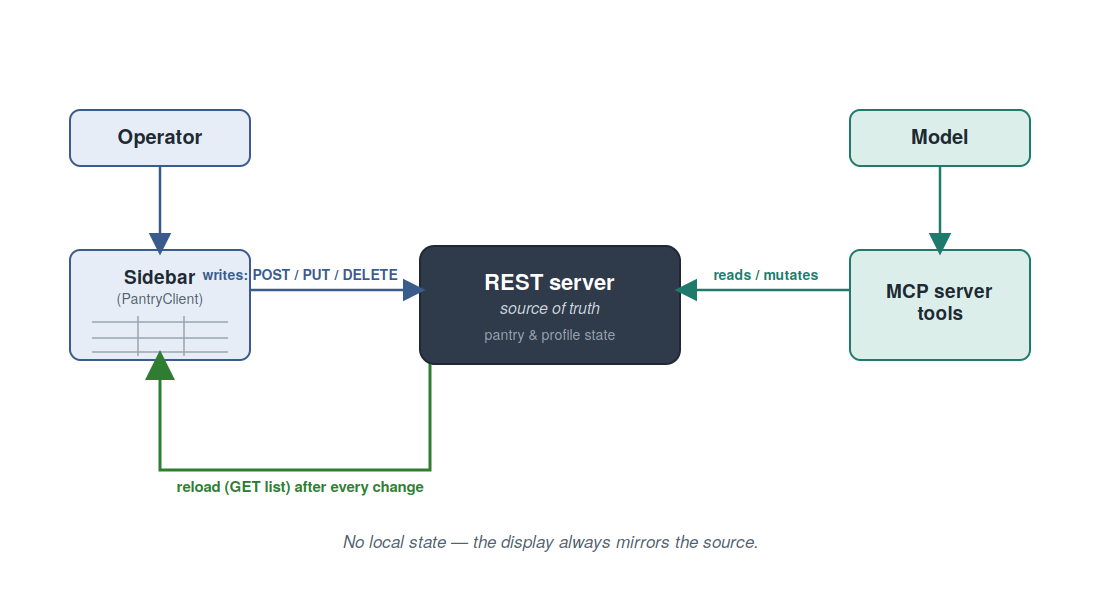
This very closed circle is the actual demonstration value of the sidebar. The operator can show, without a restart, how a change of data affects the next answer — for instance by switching the diet, adding an intolerance or striking out an ingredient — and he can at the same time observe how a change carried out by the model appears at once in the sidebar. The rigour with which everything is reloaded after every change is the condition for this demonstration to succeed reliably. With that, the constituents of the main view have been considered in full; the following and final chapter of this part draws the sum.
8. Conclusion
The introduction to this part presented the main view as a proof: the single image of two answers set side by side replaces the assertion about the value of MCP with immediate perception. The guiding observation was that the persuasive force of this juxtaposition rests less on the logic of the answers than on the discipline of their presentation. The tour through the concrete hurdles has made good on that observation.
Six hurdles had to be taken. Running without a starter laid the foundation by wiring
the start-up by hand and thereby disclosing what a starter otherwise conceals.
Conducting two requests concurrently created the simultaneity and, through the
symmetric construction of both columns, the equality of conditions. Channelling a
character-by-character stream into the component tree overcame the separation between
the background thread and the server-side interface, by having @Push and
UI.access work together. Rendering the stream as Markdown let the answer come into
being as a structured document before the viewer’s eyes. Making the protocol visible
turned the hidden tool traffic into a legible, running timeline. And keeping the
state consistent ensured that, after every change, the display reflects the
authoritative state, whether the operator or the model has changed it.
However different these hurdles are, a common thought connects them. An interface for model-driven tool use must not merely display results; it must keep the process of their emergence comprehensible. Each of the decisions discussed serves precisely this comprehensibility: the simultaneity, so that the difference between the answers becomes undeniable; the progressive rendering, so that the answer comes into being vividly; the timeline, so that the traffic does not remain hidden; the reloading, so that the display does not deceive. It is this very comprehensibility that turns a mere display into a proof.
It should not be passed over that, for all its disclosure, the main view conceals something. It sets the result of two requests side by side, yet it lets the mechanism that brings forth the right-hand answer vanish into the automatic run. The running timeline hints at it but does not halt it. It is precisely here that the second part begins. The step-by-step view reverses the relationship: it halts the pipeline, makes each phase individually triggerable, and turns the otherwise fleeting course into a legible, temporally ordered object. Where this part showed that the attached server makes a difference, the next will show how that difference comes about — the passage from the what to the how.
With that, the first part is concluded. The main view is no mere accessory to the MCP server, but the means by which its value becomes perceptible — and it is so precisely because it makes the discipline of its presentation its business.
Related on this site
- The next part of this series — Part 2: The Step-by-Step View — halts the same pipeline and turns the fleeting course into a legible object.
- nano-vaadin-jetty — the embedded Jetty launcher the demo builds on. Same “no Spring, no Jakarta EE” restraint as this article.
- caldav-testbench — a sister project in the same spirit: a deliberately small embedded server for TDD workflows.
- ChronoGrid — a Vaadin Flow CalDAV calendar component that follows the same architectural instincts (headless core + Vaadin add-on).


