

Basis: Vaadin 25.2 release post and the official security documentation at vaadin.com/docs/latest/flow/security.
Table of Contents
- Introduction: Vaadin 25.2 and the Significance of Secure Defaults
- The Foundation: Why Vaadin’s Server-Side Architecture Is Considered Inherently Secure
- 2.1 A Single Secured Endpoint and Server-Side State
- 2.2 Server-Side Validation That Cannot Be Bypassed on the Client
- Protection Against Unsafe URL Schemes (New in 25.2)
- 3.1 The
javascript:Attack Vector and the New Validation - 3.2 Permitted Schemes, Configuration, and Deliberate Exceptions
- 3.3 Placing the Measure Within the Existing XSS Protection Model
- Safe Rendering of Untrusted HTML with
Safelist(New in 25.2)
- 4.1 From the “Text Rather Than HTML” Default to Explicit HTML Allowance
- 4.2 The New
HtmlConstructors and the Serialisation Trap
- Safe Rendering of Untrusted HTML with
- Clickjacking Protection Through
X-Frame-Options: SAMEORIGIN(New in 25.2)
- 5.1 Threat Model and New Default Behaviour
- 5.2 The
frameOptionsParameter and the Interaction with Spring Security
- Clickjacking Protection Through
- Supply-Chain Hardening Against Compromised npm Packages (New in 25.2)
- The Existing Shield at a Glance, Into Which the Innovations Fit
- 7.1 Automatic CSRF Protection Following the Synchronizer Token Pattern
- 7.2 Navigation Access Control with Annotation-Based and Path-Based Checkers
- 7.3 Developer Responsibility for SQL Injection,
executeJs, and Templates
- Secure Configuration and Operation
- 8.1 Storing Sensitive Data Outside the Project Files
- 8.2 Strict Content Security Policy: Possibilities and Limits
- Migration Notes: Security-Driven Behavioural Changes When Upgrading to 25.2
- Conclusion: Security as a Default and Its Significance for Compliance Requirements
1. Introduction: Vaadin 25.2 and the Significance of Secure Defaults
With version 25.2, Vaadin presents the second feature release within the 25.x line. The release gathers a range of additions that span AI-assisted data views, access to native browser capabilities from plain Java, and tooling for load testing. As noteworthy as these enhancements may be for everyday development work, the present article deliberately directs its attention to an aspect that is easily overshadowed by the more conspicuous features, yet whose importance can scarcely be overstated: the hardening of the security-related defaults.
The guiding thesis of this article is that the security-related changes in 25.2 do not constitute a collection of isolated, individual measures, but rather follow a common design principle. They embody a shift towards secure defaults, commonly referred to as “secure by default”. Protective mechanisms that previously required explicit activation by the developer—and whose omission was, in practice, a widespread source of error—now take effect without any further intervention. The security posture of an application therefore depends less on the diligence of individual configuration decisions and rests more firmly on a foundation that the framework itself provides.
This shift is of particular relevance to organisations subject to regulatory or contractual security and compliance requirements. Where protective measures need not be set up deliberately but are already in effect in the delivered state, the likelihood that an application is operated in an unprotected condition by oversight is reduced. It is no coincidence that Vaadin published the second feature release simultaneously with the Vaadin Enterprise Edition, a separate edition aimed at organisations building business-critical Java applications. The hardened defaults address precisely this audience, for whom demonstrable security that does not hinge on individual configuration carries immediate value.
The article proceeds to examine three runtime-side innovations that integrate into the existing security model of Vaadin Flow and that the official documentation locates at the respectively appropriate points within its structure. These are the validation of URL schemes, by which script-capable and thus potentially abusable schemes such as javascript: are rejected by default; the controlled rendering of untrusted HTML by means of a jsoup Safelist, which is introduced directly into the Html component; and the automatically transmitted X-Frame-Options: SAMEORIGIN header, which prevents the abusive embedding of the application within foreign frames. A fourth measure is to be distinguished from these three mechanisms, and the article treats it separately: the hardening of the supply chain, whereby newly published npm packages are withheld for a defined grace period. It operates not at runtime but at the level of the build tooling, and for that reason alone warrants a distinct classification.
Before these innovations are discussed individually, it is worth considering the architectural foundation to which Vaadin Flow owes its reputation as an inherently secure framework. Only against this backdrop can one properly appreciate which gaps the innovations close and to which already established protective mechanisms they connect.
2. The Foundation: Why Vaadin’s Server-Side Architecture Is Considered Inherently Secure
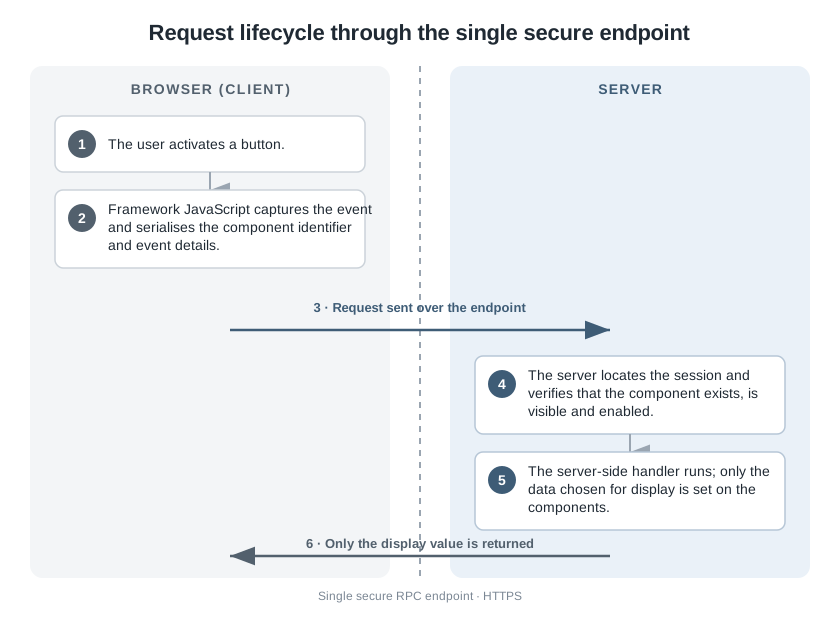
Before the individual innovations are discussed, it is worth considering the architectural foundation on which they rest. Vaadin Flow is a server-side framework: application state, business logic, and UI logic remain entirely on the server and never leave it. Unlike client-driven frameworks, a Flow application does not expose its internals to the browser, where an attacker might exploit vulnerabilities. The framework handles all communication between server and client through a single, secured endpoint that carries several built-in safeguards. It is from this design principle that Flow derives its reputation as an inherently secure framework—a reputation that nonetheless does not absolve the developer from observing established good practice.
How this principle plays out in the interplay between client and server can be traced through a typical operation, such as an authenticated user editing their own master data (see diagram 02-01). When the user activates a button, the framework’s client-side JavaScript intercepts the event and translates it into a few precisely delimited details: the identifier of the component in question, previously assigned by the framework, together with the type of interaction and its associated event details. These details reach the server by way of the single server endpoint, which uses the standard mechanisms of the servlet session to locate the relevant user session. Vaadin then checks the session information and confirms that a component with the transmitted identifier actually exists before the server-side handler is executed. If that handler loads confidential data from storage, the developer alone decides which parts of it are presented; everything else remains on the server and is discarded once processing is complete. Only the value intended for display is sent to the client—the browser is not even aware that a complete user object exists on the server.
2.1 A Single Secured Endpoint and Server-Side State
In a Flow application, no public web services arise. All communication runs through a single HTTP request handler, which processes remote procedure calls via the standard servlet interface. Because the business logic is therefore not opened up to the outside as a web service, the number of entry points available to an attacker is reduced.
Beyond this, the server is aware of the application state at all times and, in particular, knows what is currently visible on the user’s screen. From this follows an effective protective property: Vaadin refuses any interaction with components that are not visible or that have been disabled on the server. When the developer sets a component to disabled, this takes effect both on the server and on the client. In the browser, an attacker may well lift this disabling, since they have full control over everything that happens in the browser; the server, however, blocks any interaction with the component and records a corresponding warning in the server log.
Button button = new Button("Click me for effect!");
button.setEnabled(false);
button.addClickListener(event -> {
    // If the button is disabled, this listener does not run,
    // even if an attacker re-enables the button on the client side.
});
In addition, Vaadin recommends conducting all communication exclusively over HTTPS. Flow works with HTTPS without any additional configuration effort in the application code; setting up the secured endpoint is a matter for the respective servlet container.
2.2 Server-Side Validation That Cannot Be Bypassed on the Client
Vaadin’s data binding API supports validation on the server that cannot be circumvented by client-side attacks. The components do also offer client-side checking, which improves the responsiveness of the application; this, however, serves convenience alone and can be defeated in the browser. As with any web application, the governing principle is therefore that all data originating from the client must be checked again as soon as it reaches the server. Relying on client-side validation alone would not be safe. To this end, Vaadin provides ready-made server-side validators; beyond these, the developer is free to draw on any Java interface for validation, up to and including connecting to external services.
TextField nameField = new TextField("Name");
Binder<Account> binder = new Binder<>(Account.class);

binder.forField(nameField)
        // This validator runs on the server and cannot be
        // bypassed from the browser.
        .withValidator(name -> name != null && !name.isBlank(),
                "The name must not be empty")
        .bind(Account::getName, Account::setName);
A related consideration concerns data that originates from storage and is inserted as HTML into DOM elements. Such data must be escaped; the mechanisms pertinent to this are addressed in the chapter on cross-site scripting, into which the first of the three innovations fits directly. With that, the benchmark against which the following innovations are to be measured has been named.
3. Protection Against Unsafe URL Schemes (New in 25.2)
With the first of the three runtime-side innovations, the article turns to an area that the official documentation locates within its section on common vulnerabilities and that connects directly to the protection model against cross-site scripting named in the previous chapter. The matter at hand is the validation of the schemes with which URLs are set in the application. What previously fell to the developer, Vaadin takes on by default in version 25.2: URLs that are passed in are checked against a list of safe schemes, and an unsafe scheme leads to an immediate halt.
3.1 The javascript: Attack Vector and the New Validation
URLs that use a script-capable scheme constitute a common vector for cross-site scripting. The most prominent example is the javascript: scheme, which carries executable code in place of a link target; when such a URL is set as the target of a link or as the source of an embedded frame, it can, upon being triggered in the browser, bring arbitrary code to execution. It is precisely here that the innovation takes effect. The methods Anchor.setHref, IFrame.setSrc, and Page.open now check the URL passed to them against a list of schemes classified as safe. If the scheme proves to be unsafe, they throw an IllegalArgumentException and thereby prevent the problematic URL from entering the document at all.
Anchor anchor = new Anchor();

// A script-capable scheme such as "javascript:" is now rejected:
// this call throws an IllegalArgumentException instead of
// inserting the dangerous URL into the document.
anchor.setHref("javascript:alert('XSS')");
The advantage of this behaviour lies in the fact that the check takes effect not only at runtime in the browser, but already when the URL is set on the server. An unsafe URL therefore never reaches the client in the first place.
3.2 Permitted Schemes, Configuration, and Deliberate Exceptions
By default, the schemes http, https, mailto, tel, and ftp are considered safe. Relative URLs have no scheme and are always accepted, so that navigation within the application remains untouched by the check. The set of permitted schemes can be adjusted by way of the configuration parameter com.vaadin.safeUrlSchemes, which takes a comma-separated list. Depending on the operating environment, the parameter may be set, for instance, as a system property or as a context parameter of the application.
# Comma-separated list of schemes considered safe.
# An entry of "*" marks every scheme as safe and thereby
# disables the validation entirely.
com.vaadin.safeUrlSchemes = http,https,mailto,tel,ftp
A single entry of * marks every scheme as safe and disables the check entirely; this possibility should be used only with care, as it undoes the protection that has been gained. For the converse case, in which an individual URL is demonstrably under one’s own control and may be regarded as safe, dedicated setters are available that bypass the check in a targeted manner: Anchor.setUnsafeHref, IFrame.setUnsafeSrc, and Page.openUnsafe. They are intended as a deliberately chosen exception and carry the lack of safety in their very name.
Anchor anchor = new Anchor();

// Use only for URLs that are fully under your control and
// known to be safe; this deliberately bypasses the validation.
anchor.setUnsafeHref(trustedUrl);
3.3 Placing the Measure Within the Existing XSS Protection Model
The measure fits seamlessly into the overarching protection model against cross-site scripting that already characterised Vaadin beforehand. Content is rendered as text rather than as HTML by default, and permitting executable content remains, at all times, an explicit decision by the developer. The scheme validation now closes a gap that had hitherto remained open within this model: while the textual treatment of content prevented the injection of markup, the setting of a script-capable URL persisted as an independent avenue. By barring this avenue by default whilst still providing for a deliberate exception, the innovation follows the very principle of secure defaults that runs throughout this article: the protection takes effect without any action by the developer, and lifting it demands an explicit decision that is visible in the source code.
4. Safe Rendering of Untrusted HTML with Safelist (New in 25.2)
The second runtime-side innovation remains within the domain of XSS protection and takes up a thread already hinted at in the previous chapter: the handling of data that is to enter the document as HTML. Whereas the setting of a script-capable URL is barred by the scheme validation, the deliberate rendering of HTML content remains an independent operation, one that hitherto required manual sanitisation. Vaadin 25.2 moves this sanitisation into the component itself and thereby relieves the developer of an error-prone obligation.
4.1 From the “Text Rather Than HTML” Default to Explicit HTML Allowance
Vaadin renders content as text rather than as HTML by default, by drawing on browser interfaces that treat the value passed in as plain text. In this way no markup can be injected; a value set as text is not interpreted even when it contains markup such as <script> elements. Some components nevertheless explicitly permit HTML for certain content. Permitting unsafe HTML content is never the default, but always a deliberate decision by the developer. Those who made it previously had to sanitise the content themselves, for instance with the aid of jsoup and a suitable Safelist.
Div div = new Div();

// Rendered as plain text — the markup is not interpreted:
div.setText("<b>This will not be bold.</b>");

// The previous approach: sanitise the content manually before
// adding it as HTML.
String safeHtml = Jsoup.clean(dangerousText, Safelist.relaxed());
div.add(new Html(safeHtml));
This approach was effective, yet it placed the responsibility entirely on the developer. If the sanitisation step was forgotten, or omitted at one of several points at which content is assigned, an entry point opened up once again.
4.2 The New Html Constructors and the Serialisation Trap
Since version 25.2, the Html component can perform the sanitisation itself. The new constructors take a supplier for a jsoup Safelist and thereby sanitise both the initial content and any content assigned later. The responsibility for sanitisation thus migrates from the call site into the component, which applies it reliably on every content assignment.
Div div = new Div();

// Since 25.2: the Html component sanitises the content itself,
// for both the initial content and any content assigned later.
div.add(new Html(dangerousText, Safelist::relaxed));
One important pitfall deserves particular attention. What is to be passed is a supplier in the form of a method reference or a lambda expression that creates the Safelist afresh each time—not, however, a pre-built Safelist instance that the supplier merely captures. The reason lies in serialisation: a jsoup Safelist is not serialisable, and capturing such an instance within the supplier would corrupt the serialisation of the session. Passing a method reference such as Safelist::relaxed avoids this problem, since it is not the instance but the instruction for creating it that is stored. Finally, it must be noted that the safelist has to permit the root element of the fragment to be rendered; otherwise the very element that carries the content would be removed.
5. Clickjacking Protection Through X-Frame-Options: SAMEORIGIN (New in 25.2)
The official documentation lists the third runtime-side innovation within its section on frequently reported issues, since the absence of the relevant header was repeatedly raised as an objection in the past. With version 25.2, Vaadin now sends this header of its own accord and thereby counters, by default, a form of attack that aims at deceiving the user.
5.1 Threat Model and New Default Behaviour
In clickjacking, an application is embedded within a foreign frame and overlaid with a manipulated surface in such a way that the user unwittingly triggers actions within the embedded application whilst believing they are activating a harmless button on the surrounding page. The X-Frame-Options header is the established means by which a web page tells the browser that it should not be executed within a frame of another page. In this way it can be prevented that the application is embedded within a malicious page in which an attacker intercepts user actions (see figure 05-01).
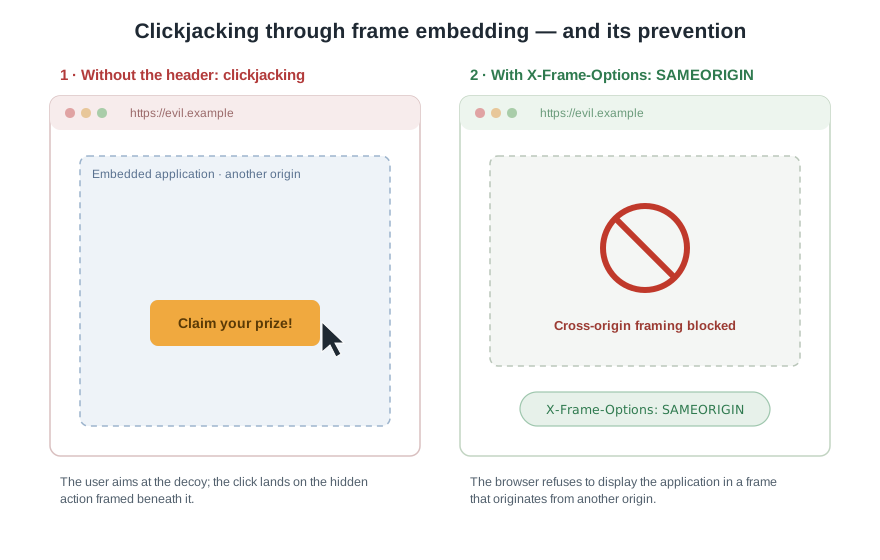
In version 25.2, Vaadin sends this header by default with the application page and assigns it the value SAMEORIGIN. As a result, the application can be displayed only within frames of the same origin, whilst embedding by foreign origins is suppressed.
X-Frame-Options: SAMEORIGIN5.2 The frameOptions Parameter and the Interaction with Spring Security
The default behaviour can be adjusted by way of the configuration parameter frameOptions. If the value is set to DENY, it forbids embedding within frames entirely, including by the same origin. If, on the other hand, an application is intentionally to be embedded within a frame of a foreign origin, the parameter must be set to an empty value, whereupon the header is omitted.
# Send "X-Frame-Options: DENY" to forbid framing entirely,
# or leave the value empty to omit the header for an application
# that is intentionally embedded in a cross-origin frame.
com.vaadin.frameOptions = DENY
Of particular importance is an interaction that also constitutes the most significant behavioural change upon upgrading: Vaadin sets the header only if the response does not already contain an X-Frame-Options header. A header that was set by another mechanism—for example, by Spring Security or a servlet filter—is not overwritten. Those who previously provided the protection by such a mechanism therefore retain the accustomed behaviour; in all other cases the new default takes effect, without displacing an existing configuration that has been set differently. Precisely because this change directly affects the behaviour of deployed applications, it warrants particular attention when moving to version 25.2.
6. Supply-Chain Hardening Against Compromised npm Packages (New in 25.2)
With the fourth security-relevant innovation, the article deliberately departs from the runtime-side Flow security model. It resides not in the realm of the application that processes requests at runtime, but at the level of the build tooling that assembles the application in the first place. This shift in the level of effect is the reason the measure is treated separately here; the reader should not confuse it with the three runtime mechanisms discussed previously.
The background is a risk that affects any application whose build draws on packages from a public registry. If such a package is compromised—for instance, because an attacker obtains a maintainer’s credentials and publishes a malicious version—the harmful code can enter the build, and thereby the deployed application, before the community has even noticed the incident. Such attacks on the supply chain unfold their effect precisely in the short window immediately after publication, during which the compromised version is already available but the abuse has not yet been detected.
Vaadin 25.2 counters this risk with a simple but effective default: by default, the framework does not install npm packages that were published within the last day (see diagram 06-01). The ecosystem is thereby granted the time to detect a compromised release and pull it before it reaches the build. The measure therefore deliberately delays the arrival of freshly published packages by a grace period and denies the attacker the very short window on which they depend.
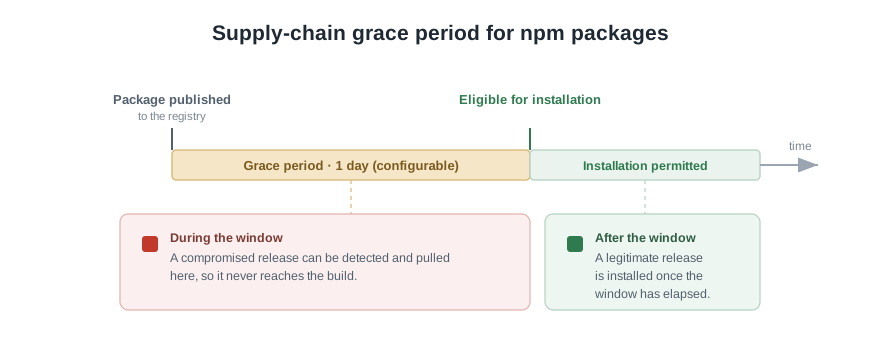
The length of this grace period is configurable and can be shortened or lengthened as required; the precise means of configuration is set out in the official documentation. As a default of the build tooling, the measure takes its place within the overarching leitmotif of the article, yet modifies it in one essential respect: whereas the three runtime-side innovations secure the application in operation, the supply-chain hardening already protects the application’s process of creation. Both levels complement one another, but take effect at different points—a distinction that matters for an understanding of the innovations as a whole.
7. The Existing Shield at a Glance, Into Which the Innovations Fit
The innovations discussed so far unfold their effect not in a vacuum, but fit into a web of established protective mechanisms that Vaadin already provides without any action by the developer. Only this overview makes visible which existing safeguards the innovations connect to and which gaps they close. Three areas deserve particular attention: the automatic protection against cross-site request forgery, the access control of navigation, and finally those fields in which responsibility deliberately remains with the developer.
7.1 Automatic CSRF Protection Following the Synchronizer Token Pattern
All requests between client and server carry a session-specific token for protection against cross-site request forgery. Because Vaadin handles all communication itself, the developer need neither insert these tokens manually nor verify them; the protection takes effect without their involvement. In doing so, Vaadin follows the Synchronizer Token Pattern, an established design pattern for warding off forged requests.
Two tokens are in use. Requests of the UIDL protocol are protected by the Vaadin-Security-Key token, connections over WebSocket by the Vaadin-Push-ID token. The security key is generated per UI instance and sent to the client exactly once per opened browser tab, as part of the bootstrap response; on a refresh of the page or the opening of a new tab, Vaadin generates a new key. The push identifier is generated per user session and serves to check whether the identifier transmitted in the WebSocket request matches that of the session. If it is missing, the request is discarded and the WebSocket connection is closed.
{
  "appConfig": {
    "uidl": {
      "Vaadin-Security-Key": "f0ef03d7-0cf4-4f32-834d-47b88a1034b7",
      "Vaadin-Push-ID": "ad3744de-2280-4531-84df-6a70a5fe958e"
    }
  }
}
7.2 Navigation Access Control with Annotation-Based and Path-Based Checkers
Navigation access control steps into the place of a single checking instance as the successor to the former ViewAccessChecker, and considerably expands its capabilities. It intercepts navigation events, evaluates the configured rules, and then decides whether the target view is displayed or access is denied. Its structure rests on three building blocks (see diagram 07-01): NavigationAccessControl forms the entry point, which observes the navigation events and evaluates the rules; the checkers, in the form of implementations of the NavigationAccessChecker interface, embody the individual security rules; and the AccessCheckDecisionResolver arrives at the final decision from their results.
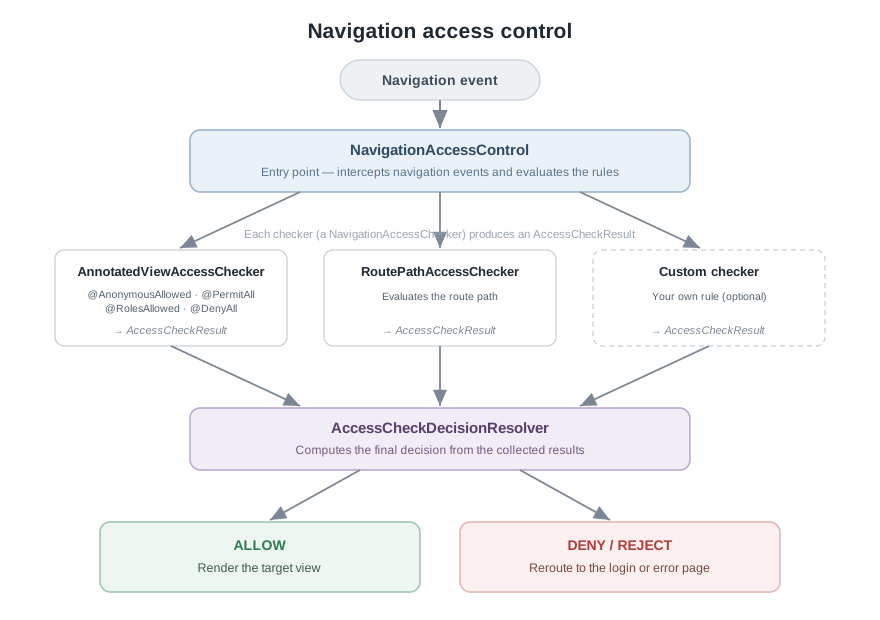
Vaadin ships two checkers. The annotation-based checker evaluates the security annotations @AnonymousAllowed, @PermitAll, @RolesAllowed, and @DenyAll on the target view; here, @AnonymousAllowed originates from Vaadin itself, whilst the role-based annotations stem from the standardised annotation interface that Vaadin recognises. The path-based checker, by contrast, evaluates the path used for navigation and, in Spring projects, relies on an implementation that connects to the Spring Security configuration.
@Route("admin")
@RolesAllowed("ADMIN")
public class AdminView extends Div {
    // Only users with the ADMIN role may navigate here.
}

@Route("")
@AnonymousAllowed
public class PublicView extends Div {
    // Open to everyone, including unauthenticated users.
}
When several checkers are in use, each contributes a result, and the decision resolver derives the final decision from them. The default implementation follows the rules set out below in the regular navigation case; each individual result may read ALLOW, DENY, NEUTRAL, or REJECT, where NEUTRAL denotes an abstention for want of sufficient information, and REJECT signals a critical configuration error.
| Checker results | Decision |
|---|---|
only ALLOW | ALLOW |
ALLOW and NEUTRAL | ALLOW |
only DENY | DENY |
DENY and NEUTRAL | DENY |
only NEUTRAL | DENY |
ALLOW and DENY | REJECT |
ALLOW, DENY, and NEUTRAL | REJECT |
If the checkers contradict one another—remaining abstentions aside—the default resolver therefore rejects the navigation, which throws an exception in development mode and so draws attention to a faulty security configuration. In the error-handling phase, almost the same rule applies, with the one deviation that uniform abstention there grants access, since the navigation target in that case is an error-handling view without information worthy of protection.
If the supplied checkers do not suffice, one’s own NavigationAccessChecker can be implemented, whose single method takes a NavigationContext and returns an AccessCheckResult. In plain Java projects there is no out-of-the-box path checking; the desired behaviour is instead set up by way of a VaadinServiceInitListener, which creates the NavigationAccessControl with the desired checkers and the resolver. For an orientation without Spring, it is therefore above all the annotation-based checker that is of relevance, as it requires no further frameworks.
7.3 Developer Responsibility for SQL Injection, executeJs, and Templates
In three fields, responsibility deliberately remains with the developer, since Vaadin, as a UI-side framework, can take no universally applicable protective measure here. The first concerns SQL injection. Vaadin does not access storage directly, so securing it falls to the chosen backend and the developer. If prepared statements are used, however, this form of attack can be excluded entirely, since the value passed in can no longer alter the structure of the query.
// Use a prepared statement so the user-supplied value cannot
// alter the structure of the SQL query.
String sql = "UPDATE app_users SET name = ? WHERE id = ?";
try (PreparedStatement statement = connection.prepareStatement(sql)) {
    statement.setString(1, value);
    statement.setLong(2, user.getId());
    statement.executeUpdate();
}
The second field concerns the execution of one’s own JavaScript by way of executeJs. Running arbitrary script is inherently unsafe, since the script has full access to the entire client side; it is especially delicate when the script does not reside in the application code but is loaded dynamically. Parameters can, however, be passed safely by supplying them as arguments rather than concatenating them into the script string.
// Parameters are passed safely as arguments; never concatenate
// untrusted values into the script string itself.
String script = "window.alert($0)";
UI.getCurrent().getPage().executeJs(script, untrustedValue);
The third field concerns templates. When using templates, heightened care is called for in inserting data into the DOM as well as in the use of JavaScript. Vaadin handles string values from the server-side model safely, but has no control over what happens within the template itself with HTML or JavaScript. As already with server-side validation, the governing principle is that values originating from the client must never be trusted.
8. Secure Configuration and Operation
The security level of a deployed application is decided not by the mechanisms of the framework alone, but also by operational aspects that lie within the responsibility of the operator. This chapter singles out two of them: the storage of sensitive data outside the project files, and the possibilities and limits of a strict Content Security Policy.
8.1 Storing Sensitive Data Outside the Project Files
It is considered bad practice to place sensitive details such as the address, the username, or the password of a database in the application’s configuration file. If such secrets enter project files or source code, they are liable to escape as soon as the project is taken into version control. The governing principle is therefore: passwords and other secrets must under no circumstances be committed to the version control system.
The documentation describes three ways to externalise sensitive data. For an orientation without additional dependencies, the first is the immediately viable one: setting the values as system environment variables. They belong to the operating system, require no library, and can be read from plain Java.
// Read secrets from the environment rather than from project files.
String dbUrl = System.getenv("DB_URL");
String dbUser = System.getenv("DB_USER");
String dbPassword = System.getenv("DB_PASSWORD");
On Unix-like systems the variables are set roughly as follows; for lasting effect, the commands are to be added to the profile file of the login shell.
export DB_URL=jdbc:postgresql://localhost:5432/postgres
export DB_USER=postgres
export DB_PASSWORD=secret
The two further documented ways are tied to Spring Boot and are therefore of secondary importance for a Spring-free application. One imports an external properties file by way of the Spring property spring.config.import, so that the secrets remain outside the project directory. The other stores the values encrypted by means of Jasypt: the plain-text values marked as DEC(...) are encrypted in place to ENC(...) and may then enter version control, since they are present only in encrypted form. Decisive here is the caveat that the master password used for encryption must itself never enter version control; should it fall into the wrong hands, all encrypted values are compromised as soon as the attacker also has read access to the encrypted file.
8.2 Strict Content Security Policy: Possibilities and Limits
The Content Security Policy is a browser standard that counters certain types of attack by allowing the application to define rules for how JavaScript may be loaded and executed. A strict form offers an additional layer of protection against cross-site scripting, data injection, data theft, defacement of the page, and the distribution of malware.
Vaadin Flow, however, is in general not readily compatible with strict CSP rules. The reason lies in the nature of the client-server communication, which makes use of dynamically generated JavaScript functions and of eval calls—both of which are incompatible with strict CSP rules. With some effort, a nonce-based strict CSP can nevertheless be employed. A nonce is a random identifier, generated afresh by the server for each HTTP request, that is included in the response headers; once this has been done, the browser loads only those script elements that bear this nonce, whilst dynamic functions and eval calls remain prohibited. This approach is available exclusively in production mode.
The generation of the nonce is undertaken by an IndexHtmlRequestListener, which creates the identifier and adds it both to the response of the index file and to all script elements.
String nonce = UUID.randomUUID().toString();

// Require the nonce on every script tag via the CSP header.
response.getVaadinResponse().setHeader("Content-Security-Policy",
        "script-src 'nonce-" + nonce + "'");

// Add the nonce to all script tags in the host page.
response.getDocument().getElementsByTag("script").attr("nonce", nonce);
That alone, however, does not suffice. In order to handle the dynamic functions, the eval calls, and the on-demand loading of code in a compliant manner, the application must provide its own JavaScript file that overrides the Function constructor and eval and offers equivalent, predefined functions for all calls made by the application. This effort is considerable and, in practice, justifiable only where a strict CSP is strictly required. The chapter thus makes both points plain: that a strict CSP is attainable with Vaadin Flow, and that it comes at a price.
9. Migration Notes: Security-Driven Behavioural Changes When Upgrading to 25.2
Since 25.2 is a feature release within the 25.x line, most applications take the version jump without difficulty. Nevertheless, the hardening of the defaults brings with it a number of security-driven behavioural changes that ought to be considered before raising the version. They are not shortcomings of the upgrade, but the direct consequence of the principle of secure defaults: where a protection now takes effect without any action, the behaviour changes relative to a state in which it was previously absent.
Three changes deserve attention. First, Vaadin now sends the X-Frame-Options: SAMEORIGIN header by default; applications that are deliberately embedded within a frame of a foreign origin must permit this explicitly by emptying the parameter. Second, Vaadin validates the schemes of URLs that are set; this becomes relevant for teams that previously used unconventional schemes, and there calls either for an adjustment of the permitted schemes or for recourse to the deliberate exception setters. Third, the build tooling withholds freshly published npm packages for a grace period, which can affect builds that depend on only recently published packages.
The following overview summarises the changed defaults and the exception or adjustment mechanisms provided for each.
| Innovation | New default behaviour | Exception or adjustment mechanism |
|---|---|---|
| URL scheme validation | Unsafe schemes such as javascript: are rejected | Adjust the permitted schemes via com.vaadin.safeUrlSchemes; exempt individual URLs via setUnsafeHref, setUnsafeSrc, or openUnsafe |
| Clickjacking protection | X-Frame-Options: SAMEORIGIN is sent | Tighten to DENY via frameOptions, or empty it for cross-origin embedding; a header already set by other means is left untouched |
| Supply-chain hardening | npm packages younger than one day are not installed | Shorten or lengthen the grace period as required |
A fourth innovation, the sanitising rendering of untrusted HTML by way of the new Html constructors, is not listed here, since it is additive: it adds a new, explicitly chosen possibility without altering existing behaviour, and thus constitutes no migration risk.
Before raising the version, the review of the official release notes and the upgrade guide is advisable in every case; the guide walks through the individual changes in detail—including those beyond the security area, such as those to the Signals API and to the build and tooling configuration. Those who are aware of the behavioural changes named here, and who deploy the provided exception mechanisms in a targeted manner, will, as a rule, carry out the upgrade smoothly.
10. Conclusion: Security as a Default and Its Significance for Compliance Requirements
At the end of this examination, the individual innovations come together into a coherent picture. Vaadin 25.2 augments the already robust server-side security model of Flow—whose inherent strength was outlined in the introductory architecture chapter—with three effective runtime-side defaults: the validation of unsafe URL schemes, the sanitising rendering of untrusted HTML by way of the new Html constructors, and the automatically transmitted clickjacking protection. Beyond these, it extends the model by a measure that secures the supply chain itself. None of these innovations reinvents the security model; each, rather, closes a hitherto open gap at precisely the point where the existing model anticipated it.
The real gain lies less in the individual mechanisms than in the principle that connects them. Secure defaults reduce that source of error which weighs most heavily in practice: the omission of a necessary configuration. Where a protection already takes effect in the delivered state, and lifting it requires an explicit decision visible in the source code, the burden of proof shifts in favour of security. An application is then protected not because someone remembered to make it so, but because the opposite would require a deliberate intervention.
It is precisely this reliability that lends the innovations significance beyond their purely technical value. For organisations subject to regulatory or business requirements, what counts is not merely that a protection is possible, but that it demonstrably takes effect independently of the diligence of individual configuration decisions. It is therefore consistent that Vaadin assigns the hardened defaults to the same audience addressed by the Enterprise Edition released alongside them: both aim at an operation in which security is understood not as a subsequent addition, but as a property of the foundation.
Those who put 25.2 into operation should be aware of the few security-driven behavioural changes and deploy the provided exception mechanisms in a targeted manner; for the rest, they may rely on the defaults doing their work without needing to set them in motion themselves. For a deeper engagement with the individual mechanisms and their configuration, the official security documentation remains the authoritative source.
Related on this site
- ChronoGrid — a real-world Vaadin Flow component that inherits every default described here. The CalDAV backend integration relies on the URL scheme validation and the safe HTML rendering.
- The MCP Recipe Assistant series — a two-part walk-through of a Vaadin Flow application whose UI benefits from the same secure defaults.
- nano-vaadin-jetty — an embedded Jetty launcher for Vaadin Flow apps; the security defaults discussed here apply to any app built on it.


