
Continuation of Part 1 of the series Vaadin – Deployment on Hetzner. From a local service to a publicly reachable application: Caddy, HTTPS, forwarded headers, Push — and day-to-day operations with updates and rollback. All commands, outputs, and measurements come from an actual run on a Debian 13 server.
Starting Point
This part picks up where Part 1 left off: a Vaadin application that runs as its own system service, hardened — and that nobody can reach.
The state everything builds on
| Building block | State at the end of Part 1 |
|---|---|
| Temurin JDK 26 | via SDKMAN in the service account’s home, no system-wide Java |
| Jetty 12.1.12 | servlet container, ee11, bound to 127.0.0.1:8080 |
ROOT.war | 21 MB, production build, served at / |
vaadinapp.service | starts at boot, logs to journald, hardening score 1.1 |
| Reachability | local only |
The cross-check on the server:
curl -s -o /dev/null -w '%{http_code}\n' http://127.0.0.1:8080/200From your own workstation, on the other hand: nothing. The service is bound to the loopback address, and the firewall from Part 0 only admits 22, 80, and 443 inbound anyway.
If you are joining at this point, you should at least have skimmed Part 1 — above all the chapters on the bind address and the unit file. The decisions made there are assumed here and exploited in several places.
The code state for this part
As in Part 1: the state this part describes lives on the tag
teil-02.
git clone https://github.com/svenruppert/Blog-Vaadin-Deployment-on-Hetzner
cd Blog-Vaadin-Deployment-on-Hetzner
git checkout teil-02
A single Maven module, built to target/ROOT.war. From Part 3 on, the project
is split into modules; the paths here apply to the single-module state.
What this part adds
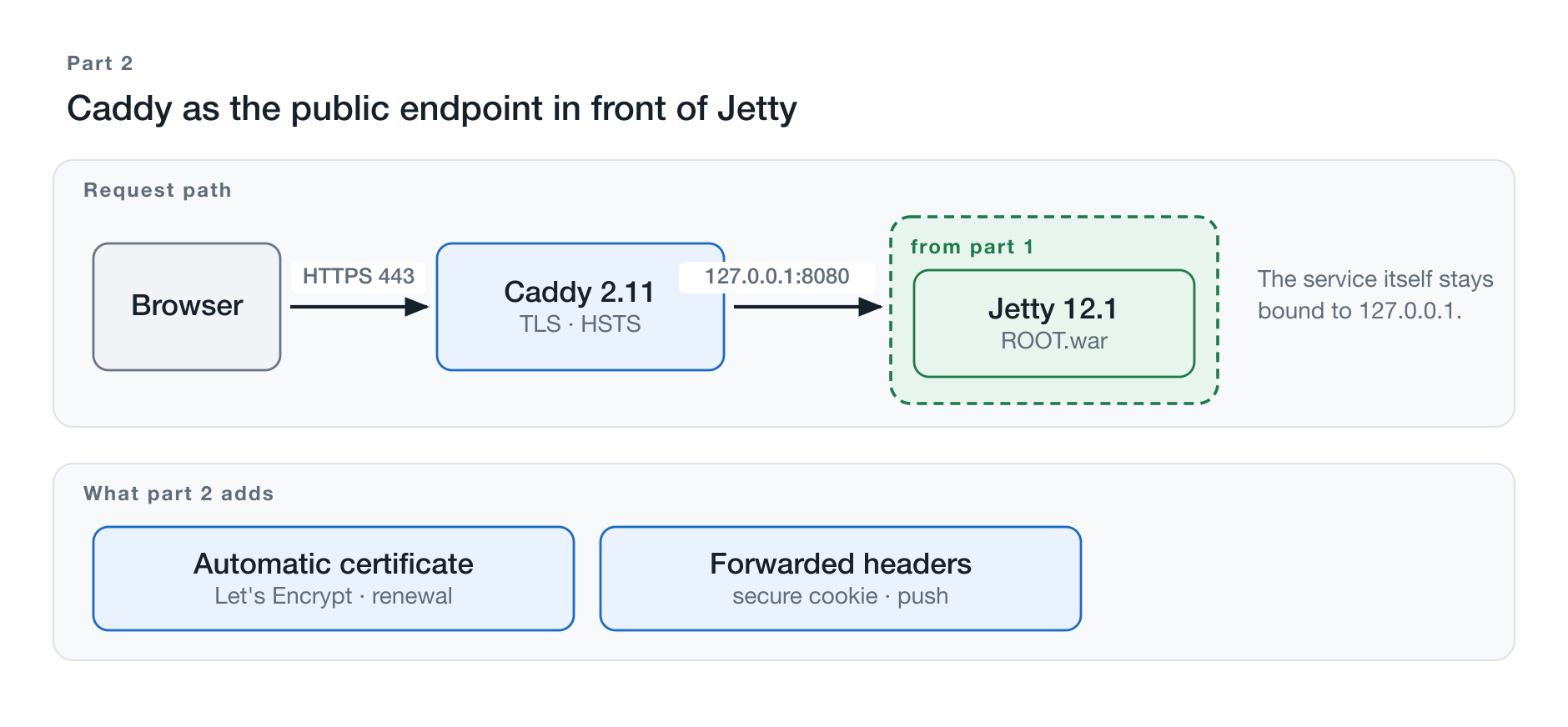
Figure 1: Caddy goes in front; the service from Part 1 remains unchanged.
Between a running service and a usable application lie more steps than a single line of proxy configuration suggests.
Caddy becomes the only service visible from the outside. It accepts the
requests, terminates TLS, obtains and renews the certificate itself, and passes
everything else through to 127.0.0.1:8080.
The application has to learn that it is behind a proxy. A request that
comes in through Caddy appears, from Jetty’s point of view, to originate from
127.0.0.1, is unencrypted, and carries a different hostname than the one the
browser called. Without correction, Vaadin sets session cookies without
Secure and builds redirects to http://. Chapter 4 deals with that.
Vaadin Push keeps a persistent connection open. It survives a reverse proxy only if the proxy explicitly passes it through.
After that, operations begin: configuration outside the archive, secrets and file permissions, a repeatable procedure for the next release, a controlled rollback — and the question of what happens to the running sessions during all of this.
The path from the outside
At the end of this part, the application is reachable under its own domain
name over HTTPS, set up, and updatable. The service itself stays exactly where
Part 1 parked it: bound to 127.0.0.1, hardened, unchanged. What is added
goes in front — not inside.
Installing Caddy
The role of the reverse proxy
Jetty listens on the loopback address and cannot be reached from the outside.
Caddy sits exactly in between: it accepts the requests from the internet,
terminates TLS, and forwards them unencrypted to 127.0.0.1:8080.
This separates two jobs that would otherwise have to be handled by the same process. The application server takes care of the application; everything related to public reachability — certificates, redirects, compression, access logging — sits in front of it.
Installation
sudo apt-get install debian-keyring debian-archive-keyring apt-transport-https curl

curl -1sLf 'https://dl.cloudsmith.io/public/caddy/stable/gpg.key' \
  | sudo gpg --dearmor -o /usr/share/keyrings/caddy-stable-archive-keyring.gpg

curl -1sLf 'https://dl.cloudsmith.io/public/caddy/stable/debian.deb.txt' \
  | sudo tee /etc/apt/sources.list.d/caddy-stable.list

sudo apt-get update
sudo apt-get install caddy
The difference from Part 1, Chapter 10
What is remarkable is what does not have to be done afterwards:
systemctl is-enabled caddy    # enabled
systemctl is-active caddy     # active
getent passwd caddy           # caddy:/var/lib/caddy:/usr/sbin/nologin
The service is already running, with its own system account and a finished unit definition. For Jetty, Chapters 9 and 10 required the same work by hand.
That is no coincidence but the difference between a distribution and an application runtime. Caddy is a finished program with a clear operating model; Jetty is a runtime whose operating model only emerges once an application is placed inside it.
Prepackaged does not mean hardened
systemd-analyze security caddy.service→ Overall exposure level for caddy.service: 8.8 EXPOSED 🙁The same treatment as in Part 1, Chapter 11 — but explicitly not the same file:
sudo mkdir -p /etc/systemd/system/caddy.service.d
sudo nano /etc/systemd/system/caddy.service.d/10-hardening.conf
The differences are the actual lesson:
| Directive | vaadinapp | caddy | Reason |
|---|---|---|---|
CapabilityBoundingSet | empty | CAP_NET_BIND_SERVICE | Caddy binds 80 and 443 |
IPAddressDeny=any | yes | no | certificate acquisition needs the network |
ReadWritePaths | /var/lib/vaadinapp/… | /var/lib/caddy /var/log/caddy | certificate storage, access log |
MemoryDenyWriteExecute | no | yes | Go program, no runtime code generation |
Two assumptions can be verified in practice.
Does Caddy get by without CAP_NET_ADMIN? The Debian package grants two
capabilities. Keeping only the one for binding privileged ports is enough:
grep -E '^Cap(Prm|Eff|Bnd)' /proc/$(systemctl show -p MainPID --value caddy)/statusCapPrm: 0000000000000400
CapEff: 0000000000000400
CapBnd: 00000000000004000x400 is exactly bit 10 — CAP_NET_BIND_SERVICE, nothing else. HTTPS,
HTTP/2, HTTP/3, and certificate acquisition keep working unchanged.
Does Caddy tolerate MemoryDenyWriteExecute? Yes. The directive that
dismantles every JVM in Part 1, Chapter 11 is unproblematic here.
→ Overall exposure level for caddy.service: 1.5 OK 🙂After this chapter, one thing holds: Caddy is the only process reachable from the internet. What it forwards is decided in Chapter 3.
Domain and HTTPS
DNS
The prerequisite is an A record pointing to the server’s public address:
dig +short A demo.svenruppert.com
#  95.216.150.155
Anyone who additionally publishes an AAAA record has to handle IPv6 end to end — firewall, Caddy, and application. An AAAA record in front of a firewall configured only for IPv4 produces partial outages that affect only some visitors and are therefore hard to track down.
Caddyfile
sudo nano /etc/caddy/Caddyfiledemo.svenruppert.com {
reverse_proxy 127.0.0.1:8080
}Two lines of substance. No certificate path, no ACME client, no
redirect rule, no listen 443 ssl.
sudo systemctl reload caddyAutomatic certificates
sudo journalctl -u caddy -n 30"msg":"using ACME account"
"msg":"trying to solve challenge","identifier":"demo.svenruppert.com","challenge_type":"http-01"
"msg":"authorization finalized","authz_status":"valid"
"msg":"certificate obtained successfully","identifier":"demo.svenruppert.com"Five seconds from configuration to a valid certificate. The challenge runs over port 80 — which is why it stands open in the firewall even though the application is meant to be reachable exclusively over HTTPS.
HTTP to HTTPS
curl -sI http://demo.svenruppert.com/ | head -3HTTP/1.1 308 Permanent Redirect
Location: https://demo.svenruppert.com/
Server: CaddyNobody configured this redirect. Caddy sets it up as soon as a hostname appears in the Caddyfile.
TLS
echo | openssl s_client -servername demo.svenruppert.com \
     -connect demo.svenruppert.com:443 2>/dev/null \
| openssl x509 -noout -subject -issuer -datessubject=CN=demo.svenruppert.com
issuer=C=US, O=Let's Encrypt, CN=YE1
notBefore=Sep 4 08:56:45 2026 GMT
notAfter=Dec 3 08:56:44 2026 GMTCaddy handles renewal itself, without a cron entry and without additional software.
CAA: who may issue at all
The A record determines where the domain lives. It says nothing about who may issue a certificate for it — by default, the answer is: any publicly trusted certificate authority.
svenruppert.com. CAA 0 issue "letsencrypt.org"The check is binding for all publicly trusted authorities. The record is resolved from the full name upwards; an entry on the registrable domain covers all subdomains as well.
A record that is too narrow locks you out — and the mistake only shows up at the next renewal, possibly months later. That is why setting it should be followed by an actual reissuance, not just a syntax check.
Sidebar: iodef — the record that does almost nothing
Besides issue, the standard knows a third property: iodef names
an address to which a certificate authority is supposed to send a report
when it has refused an issuance because of the policy. The idea is
compelling — you would learn about an attempt.
In practice, this does not hold up. The standard phrases the sending as optional, and Let’s Encrypt does not implement it. Anyone who sets the record and relies on it has an alarm system without a bell.
On top of that: the record is public in DNS and gets harvested by address collectors. A private email address ends up permanently on spam lists.
Recommendation: leave it out and set only issue.
A production-grade Caddyfile
The minimum works — for production operation, quite a bit is missing:
{
	admin off
}

demo.svenruppert.com {
	encode zstd gzip

	header {
		Strict-Transport-Security "max-age=31536000; includeSubDomains"
		X-Content-Type-Options "nosniff"
		Referrer-Policy "strict-origin-when-cross-origin"
		X-Frame-Options "SAMEORIGIN"
		Permissions-Policy "geolocation=(), microphone=(), camera=()"
		-Server
	}

	reverse_proxy 127.0.0.1:8080 {
		transport http {
			read_timeout 0
			write_timeout 0
		}
	}

	log {
		output file /var/log/caddy/demo.svenruppert.com.log {
			roll_size 10MiB
			roll_keep 10
		}
		format json
	}
}
-Server removes the Server: Jetty(12.1.12) identifier from the response. No
client needs the exact version, but every scanner does — Chapter 4 shows
that these scanners actually do come by.
admin off disables Caddy’s administration interface on 127.0.0.1:2019.
Through it, the entire configuration could be changed without authentication.
The price: systemctl reload caddy no longer works afterwards; changes
require a restart.
The timeouts in the transport block are the only item in this file that can
actively break Vaadin Push — Chapter 5 explains why.
The pitfall when validating
The obvious sequence is: validate first, then reload.
sudo caddy validate --config /etc/caddy/Caddyfile   # "Valid configuration"
sudo systemctl reload caddy # failsopen /var/log/caddy/demo.svenruppert.com.log: permission deniedThe message is misleading, because the directory does belong to caddy. A
look at the file explains it:
ls -l /var/log/caddy/
#  -rw------- 1 root root 0 demo.svenruppert.com.log
caddy validate instantiates the log writers and creates the file in the
process — under sudo, that means as root with 0600. The service
running as caddy cannot subsequently open its own log file.
The fix: delete the file, reload. Or run the validation as the service account:
sudo -u caddy caddy validate --config /etc/caddy/CaddyfileWhat is remarkable about the behavior: Caddy does not adopt a
configuration it cannot load — the old one kept running, the site stayed
reachable. Only a restart took the service down. With a reverse proxy, when
in doubt: reload, not restart.
Forwarded Headers and Scheme Behind Caddy
The application is reachable, the certificate valid. Yet at this point the installation is still wrong — and the mistake is invisible.
What the application sees
Caddy accepts an HTTPS connection from a client somewhere on the internet and establishes an unencrypted connection from the loopback address to Jetty. From the application’s point of view, every request therefore looks like this:
- Scheme:
http, nothttps - Client address:
127.0.0.1 - Port: 8080
Three consequences follow, and none of them announces itself as an error:
Absolute URLs are generated incorrectly. Wherever the application builds a
complete address — redirects, return addresses, links in emails — it contains
http:// and the internal port.
The access log is worthless. Every request apparently comes from
127.0.0.1.
Session cookies lose their protection. A cookie with the Secure flag
is only transmitted over encrypted connections. If the application believes
the connection is unencrypted, it does not set the flag.
Making the error visible
An access log in Jetty makes the state verifiable:
cd /opt/vaadinapp
sudo java -jar /opt/jetty/start.jar --add-modules=requestlog
sudo nano start.d/requestlog.inijetty.requestlog.filePath=/var/lib/vaadinapp/logs/yyyy_mm_dd.request.logsudo systemctl restart vaadinapp
curl -s https://demo.svenruppert.com/ > /dev/null
sudo tail -1 /var/lib/vaadinapp/logs/*.request.log127.0.0.1 - - [04/Sep/2026:09:56:48 +0000] "GET / HTTP/1.1" 200 198 "" "curl/8.7.1"Every request — from the office next door or from Australia — appears in
the log as 127.0.0.1.
The fix
cd /opt/vaadinapp
sudo java -jar /opt/jetty/start.jar --add-modules=forwarded
sudo systemctl restart vaadinapp
The module name has changed. In Jetty 12.1 it is called forwarded.
http-forwarded still exists but is explicitly marked as
deprecated — anyone following a guide written for Jetty 12.0 will pick the
old name.
The same request afterwards:
80.187.114.255 - - [04/Sep/2026:09:57:11 +0000] "GET / HTTP/1.1" 200 198 "" "curl/8.7.1"On the Caddy side there is nothing to do. Caddy sets X-Forwarded-For, X-Forwarded-Proto, and X-Forwarded-Host
with reverse_proxy on its own. No additional directive is needed —
all that is required is that Jetty actually evaluates these headers.
The proof that counts
The effect can be read directly from the real application’s response:
curl -sI https://demo.svenruppert.com/ | grep -i set-cookieset-cookie: JSESSIONID=node0pcg76yqw1hqd1btn7lkvwrmj66.node0; Path=/; SecureThe Secure flag is set. So Jetty knows that the connection is
TLS-terminated — and that is achieved exclusively by this module. Without it,
the flag would be missing, and the session cookie would also travel over
unencrypted connections.
The trust boundary
Forwarded headers are client-supplied claims. Whoever evaluates them believes what the request says — a client could assert any address.
Here that is harmless, because Jetty listens exclusively on the loopback address (Part 1, Chapter 8). Forged headers can only be sent by someone who is already on the server; everything from outside inevitably passes through Caddy, and Caddy sets the values itself.
Bind address and forwarded-header evaluation are therefore connected: the one
decision justifies the other. If you let Jetty listen on 0.0.0.0 while also
evaluating forwarded headers, you would have a log that anyone is allowed to write to.
An incidental finding that was not planned
A few minutes after the certificate was issued, external addresses appeared in the log:
64.227.32.66 - - [...] "GET /config.json HTTP/1.1" 404 ... "l9scan/2.0 (+https://leakix.net)"
64.227.32.66 - - [...] "GET /telescope/requests HTTP/1.1" 404 ...
64.227.32.66 - - [...] "GET /info.php HTTP/1.1" 404 ...
The certificate was issued at 09:55:17; the first external request arrived at 09:56:28 — one minute and eleven seconds later. After that, it came thick and fast:
09:56:56  GET /console/
09:56:57  GET /server
09:56:58  GET /server-status
09:57:00  GET /about
09:57:01  GET /login.action
09:57:02  GET /___proxy_subdomain_whm/login
09:57:02  GET /v2/_catalog
A cross-section of known vulnerabilities: /login.action looks for vulnerable
Confluence, /v2/_catalog for an open container registry,
/telescope/requests for a Laravel diagnostic tool left in production,
/server-status for an open Apache status page. In total, sixteen
different external addresses within a few minutes.
How did they know? From the Certificate Transparency logs. Every issued TLS certificate is published in a public, machine-readable registry — a security feature that makes misissuance detectable. It has a side effect: anyone looking for new hostnames simply reads along. A server is publicly known from the second its certificate is issued, not only once someone passes the address around.
Together with the numbers from Part 0, Chapter 7 — the first login attempt twenty-three seconds after boot — this adds up to a clear picture.
And without this chapter, none of it would have been seen. Before the
module was activated, every log line read 127.0.0.1. The accesses were there
the whole time, just invisible. A log that cannot distinguish the office next
door from a scanner network is not a log.
Vaadin Push Behind Caddy
Vaadin keeps the UI state on the server. Changes not triggered by a user action — an incoming record, a progress update, a notification — therefore need a path from the server to the browser. That path is provided by Vaadin Push.
WebSockets
Technically, a push connection begins as an ordinary HTTP request asking for a protocol upgrade:
GET /VAADIN/push?v-r=push HTTP/1.1
Connection: Upgrade
Upgrade: websocket
Sec-WebSocket-Version: 13
If the server answers with 101 Switching Protocols, the connection stays open
and both sides send whenever they want. Exactly this upgrade is what an
intermediate reverse proxy has to pass through.
On the Jetty side
The required module was activated in Part 1, Chapter 7:
ee11-websocket-jakartaIf it is missing, the upgrade fails, and Vaadin falls back to a technique that polls the server at regular intervals. The application then still works — just slower and with more load. That is the unpleasant kind of error: everything looks fine.
Proxying — and what Caddy needs for it
Nothing.
reverse_proxy 127.0.0.1:8080Caddy passes upgrade connections through transparently with reverse_proxy
on its own. There is no proxy_http_version setting, no
Upgrade and Connection headers to set manually, no separate location
block for the push path.
That is worth mentioning because the widespread guides for other reverse proxies contain exactly those lines — and because the official Vaadin documentation on reverse proxies covers only Apache HTTPD and nginx. Caddy does not appear there. Anyone copying from there will search for an equivalent that does not exist, because it is not needed.
Upgrade connections and timeouts
The only item in the Caddyfile that can actively break Push is time limits:
reverse_proxy 127.0.0.1:8080 {
	transport http {
		read_timeout 0
		write_timeout 0
	}
}
A push connection is normally silent. It exists without data flowing — until something happens. A read timeout of 30 seconds terminates it after 30 seconds of quiet.
The error does not show up as an error: the application re-establishes the
connection, and everything appears normal. But updates occasionally fail to
arrive, and short-lived connections pile up in the log. 0 means no limit.
Proof
The push endpoint responds:
curl -s -o /dev/null -w '%{http_code}\n' \
  'https://demo.svenruppert.com/VAADIN/push?v-r=push'
#  200
More reliable is the observation in the browser: in the developer tools, the
network requests show a connection to /VAADIN/push with status
101 and type websocket that stays open.
If it does not stay open, or if instead of 101 an ordinary
200 response appears and repeats every few seconds, the upgrade has
failed — then either the Jetty module is missing or a time limit is kicking in.
What this means for the following parts: The push connection is the most visible expression of what Chapter 10 deals with: the server holds the state of this UI. If the service is restarted, not only does the connection drop — the state behind it is gone.
Configuration Outside the WAR
The artifact from Part 1, Chapter 4 is the same on every server. Whatever differs — storage location, ports, addresses of neighboring systems — must therefore not live inside it.
The reason is not aesthetics. An artifact that contains environment values has to be rebuilt for every environment. Then the thing that was tested is not the thing that is shipped.
The resolution chain
The sample application resolves configuration values in three stages:
private static String resolve(String systemProperty, String envVariable, String fallback) {
  String fromSystem = System.getProperty(systemProperty);
  if (fromSystem != null && !fromSystem.isBlank()) return fromSystem;
  String fromEnv = System.getenv(envVariable);
  if (fromEnv != null && !fromEnv.isBlank()) return fromEnv;
  return fallback;
}
A system property beats an environment variable; an environment variable beats the default.
The order is deliberate: the system property is the path for the development machine — it can be passed individually at startup without changing the environment. The environment variable is the path for the server, because it can be fed from a file maintained by someone other than the person performing the start.
app.host      →  APP_HOST      →  built-in default
app.port      →  APP_PORT      →  built-in default
Environment
On the server, these values come from a file that the unit definition reads:
EnvironmentFile=-/etc/vaadinapp/environmentThe leading minus sign means: the file may be missing. Without it, the application starts with its defaults instead of aborting with an error.
sudo nano /etc/vaadinapp/environmentAPP_HOST=127.0.0.1
APP_PORT=8080sudo chown root:vaadinapp /etc/vaadinapp/environment
sudo chmod 640 /etc/vaadinapp/environmentroot:vaadinapp with 640: the service may read, not write. After a
change, restarting the service is all it takes; the artifact remains untouched.
Separating artifact and operational data
That puts three things in three places, each with a different lifecycle:
| Location | changes | |
|---|---|---|
| Artifact | /opt/vaadinapp/webapps/ROOT.war | with every release |
| Configuration | /etc/vaadinapp/environment | when the environment changes |
| Data | /var/lib/vaadinapp/data | continuously during operation |
A release swaps out only the first row. Chapter 8 turns this into a procedure.
One value breaks the pattern
The data location is not set through the environment file but in the unit definition:
-Dapp.storage.dir=/var/lib/vaadinapp/dataThe reason is an irregularity in the application: this one key is evaluated
only as a system property, not additionally as an environment variable. A
line APP_STORAGE_DIR=… in the environment file would have no effect.
For operations, this makes no difference — the value simply lives in the
unit definition instead of the environment file, and both belong to root.
It is still worth mentioning, because an exception without a substantive
reason costs the reader more than it explains: anyone who has understood the
chain from the first section expects it everywhere.
Part 1, Chapter 11 showed what happens when this value is not set at all.
What does not belong here: credentials. An environment variable appears in /proc/<PID>/environ and is
thus readable by anyone working as the same user. Chapter 7 covers
the difference.
Secrets and File Permissions
Configuration and credentials look similar and are therefore often treated the same. They are not: a misplaced port is an operational error; a misplaced access token is a security incident.
Two principles
No secrets in the WAR. The first principle is the simplest. An artifact travels across development machines, version control, staging areas, and backups. Whatever is inside it exists in many places at once.
No secrets as process arguments. The second principle is better known than it is followed. It can be demonstrated in two lines:
# NOT like this:
java -Dapi.token=s3cr3t -jar app.jar# From any other account on the same system:
ps aux | grep api.tokenThe process list is readable by every user on the system. That is not a misconfiguration but normal behavior — process arguments are public.
Three levels
This yields an ordering that leads from bad to good:
| Method | Who can get at it | |
|---|---|---|
| ❌ | -Dtoken=… as an argument | every user, via ps |
| ⚠️ | EnvironmentFile | anyone working as the same user, via /proc/<PID>/environ |
| ✅ | LoadCredentialEncrypted | only the service itself |
The middle level is where many stop — the file has
0640, belongs to root, and that feels safe. The detour via
/proc remains open nonetheless, and combined with
ptrace access to the process memory all the more so. Part 0, Chapter 8 therefore
set the corresponding kernel parameter to the strict value.
The third level
systemd can store credentials encrypted and deliver them to the service without them appearing as an environment variable or a readable file:
printf '%s' "$TOKEN" | sudo systemd-creds encrypt --name=api-token - \
     /etc/vaadinapp/api-token.cred
sudo chmod 600 /etc/vaadinapp/api-token.cred# /etc/systemd/system/vaadinapp.service.d/20-credentials.conf
[Service]
LoadCredentialEncrypted=api-token:/etc/vaadinapp/api-token.credThe service finds the value at $CREDENTIALS_DIRECTORY/api-token.
Proof
ps aux | grep -c "$TOKEN"                        # 0
tr '\0' '\n' < /proc/$(systemctl show -p MainPID --value vaadinapp)/environ \
  | grep -c "$TOKEN"                             # 0
And the delivery itself:
ls -l /run/credentials/vaadinapp.service/
findmnt -no FSTYPE,OPTIONS /run/credentials/vaadinapp.service-r--r-----+ 1 root root 28 api-token
tmpfs ro,nosuid,nodev,noexec,nosymfollow,size=1024k,mode=700,noswapA read-only tmpfs with noexec, mode=700, and noswap. The
value never touches the disk in plaintext and does not end up in the
swap file. A foreign account gets Permission denied.
Ownership and permissions
/etc/vaadinapp/api-token.cred     root:root        0600
/etc/vaadinapp/environment        root:vaadinapp   0640
/opt/vaadinapp/webapps/ROOT.war   root:vaadinapp   0640
/var/lib/vaadinapp/data           vaadinapp:vaadinapp  0700
Exactly one path belongs to the service, and it is the one it has to write to.
A caveat that belongs here
Credential secret file '/var/lib/systemd/credential.secret'
is not located on encrypted media, using anyway.
The virtual machine used here has no TPM. Without one, the decryption key sits as a host key on the same disk. The protection works against accidental disclosure, against plaintext backups, and against the two paths from the proof above — not against someone who already has root privileges on the running system.
That needs saying; otherwise the method promises more than it delivers.
What is not covered
Rotating credentials during operation. A change here means: encrypt a new file, restart the service — with the downtime from Chapter 8. Automated rotation is a topic of its own.
And one final sentence that is missing too often: whoever logs an access token has it in the journal. All the care in delivery is then wasted.
Manual Update
Keeping releases side by side
A deployment that overwrites the old file knows no way back. That is why every release gets its own directory:
/opt/vaadinapp/
├── releases/
│   ├── 2026-09-04-1200/ROOT.war
│   └── 2026-09-07-1442/ROOT.war
└── webapps/
└── ROOT.war ← the active versionsudo install -d -m 750 -o root -g vaadinapp /opt/vaadinapp/releasesThe archive belongs to root:vaadinapp. The service may read, not write —
anyone who takes over the application can alter neither the active artifact
nor its predecessors.
Staging the new WAR
mvn -Pproduction clean package
scp target/ROOT.war sven@demo.svenruppert.com:/home/sven/STAMP=$(date +%Y-%m-%d-%H%M)
sudo install -d -m 750 -o root -g vaadinapp /opt/vaadinapp/releases/$STAMP
sudo install -m 640 -o root -g vaadinapp /home/sven/ROOT.war \
/opt/vaadinapp/releases/$STAMP/
rm /home/sven/ROOT.warUp to this point, nothing has happened. The running application is untouched; the new release is merely staged.
Stop the service, swap the deployment, start the service
sudo systemctl stop vaadinapp
sudo install -m 640 -o root -g vaadinapp \
     /opt/vaadinapp/releases/$STAMP/ROOT.war /opt/vaadinapp/webapps/ROOT.war
sudo systemctl start vaadinapp
Three commands. install instead of cp, for the same reason as in Part 1, Chapter 9.
Why no swap during operation
Jetty’s monitoring of the webapps directory could detect a changed file on
its own and redeploy it. That is disabled here, and for good
reason: a swap during operation means that two versions of the
application briefly exist at the same time — with the same data store.
The explicit stop is more honest. It costs downtime, but the state is unambiguous at every point in time.
What it costs
sudo systemctl restart vaadinapp
# Measure the time until the first successful response| Value | |
|---|---|
| Artifact size | 21 MB |
| Downtime until the first response | around 5.7 seconds |
| of which Jetty startup, per the log | 4.1 seconds |
| Memory footprint at idle | 461 MiB of 1,536 MiB |
| Threads | 33 |
The downtime consists of three components: starting the JVM,
unpacking the archive to java.io.tmpdir, and starting the application
itself — for this application including opening its data store.
The values come from the run with the slimmed-down archive from Part 1, Chapter 4,
measured on 2026-09-07 at release 2026-09-07-1627. The
comparison with the previous state is instructive, because it refutes a
widespread expectation:
| 28 MB, 126 libraries | 21 MB, 86 libraries | |
|---|---|---|
| Downtime | 6.3 s | 5.7 s |
| Jetty startup | 4.2 s | 4.1 s |
| Memory at idle | 445 MiB | 461 MiB |
A quarter less archive shortens the startup by a good half second — that is the share contributed by unpacking and by scanning the libraries for annotations. Memory consumption, however, does not drop; within measurement noise it is even slightly higher. That is no contradiction: what an archive weighs says little about how many classes the application actually loads at runtime. What was removed were libraries that were never going to be loaded anyway. Shrinking a WAR buys transfer time, disk space, and clarity — not RAM.
For comparison: a minimal web application without its own data store was reachable on the same server after around 2 seconds. The difference is not Jetty; it is the application.
These numbers are the baseline for the parts that follow. It will be interesting to see whether embedded Jetty (Part 3) and the custom runtime from Part 6 measurably shorten the startup.
Four steps that could be automated: build, transfer, swap, restart. Exactly these four steps are what a deployment pipeline replaces — nothing more. Anyone who has run them by hand once knows afterwards where an automation can fail.
Rollback
Keeping the previous artifact
The way back is only possible because Chapter 8 kept the old releases. Without the archive there would be no rollback, only a fresh build from a hopefully matching state of version control — under time pressure, in the middle of an incident.
ls -1 /opt/vaadinapp/releases/How many releases to keep is a question of disk space. At 21 MB per artifact, ten releases are 210 MB — with 75 GB of disk space, not a serious consideration.
A controlled rollback
sudo systemctl stop vaadinapp
sudo install -m 640 -o root -g vaadinapp \
     /opt/vaadinapp/releases/2026-09-04-1200/ROOT.war /opt/vaadinapp/webapps/ROOT.war
sudo systemctl start vaadinapp
The same procedure as in Chapter 8, just with an older timestamp.
A rollback costs exactly as much as a deployment
That is the most important statement in this chapter, and it surprises many.
Both operations consist of the same three commands and the same downtime — around six seconds. There is no technical penalty for backing out.
Anyone hesitating because a rollback is supposedly costly hesitates without reason. What is costly is not the way back but the decision: recognizing that something is wrong, and making the call.
Which release is currently active can be determined at any time:
sha256sum /opt/vaadinapp/webapps/ROOT.war
sha256sum /opt/vaadinapp/releases/*/ROOT.war
The limit: the data does not come back
Here the symmetry ends, and this is the point that deployment guides like to leave out.
The rollback swaps only the artifact. The data under
/var/lib/vaadinapp/data stays as it is — it is not part of the release
and survives every swap.
As long as a new application version only reads and writes what the old one also understood, this is unproblematic. As soon as it changes the storage format — an additional field, a changed structure, a migration at startup — this no longer holds: the old version then encounters data it does not expect.
Two operational rules follow:
Before a release that changes the data, a backup belongs in place. A rollback is then artifact and data.
Whoever runs a migration at startup should know whether it is reversible. If it is not, there is no rollback anymore, only rolling forward — and that requires a working new version.
For the sample application with its embedded store, this means concretely: a rollback across a format change requires the backup of the data directory. Without it, the way back stays open exactly as long as the storage format remains unchanged.
Vaadin Sessions and Restarts
Chapter 8 put a number on the downtime: around six seconds. For a stateless application, that would be the whole story. For a Vaadin application, it is the smaller part.
Server-side UI state
Vaadin keeps the state of the UI on the server. Which view is open, what a form contains, which row of a table is selected — all of that lives in the session, not in the browser. The browser renders and reports events back.
That is the property that defines Vaadin: application logic in Java, without separate state management in the frontend. It has a price, and the price comes due at every restart.
Loss of running sessions
A restart terminates the process. With it, the entire session state disappears.
That is not a flaw of this deployment. It follows directly from the architecture: whoever keeps state in the server loses it with the server. A stateless REST backend loses nothing on a restart, because it has nothing to lose.
The difference deserves naming, because it shapes expectations. The sample application with login and roles makes it tangible: what is affected is not a counter but a logged-in session in the middle of work.
Impact on users
Concretely, it looks like this: the page reloads, the login is gone, unsaved input is lost. With Push active (Chapter 5), the open connection additionally drops, and the browser tries to re-establish it.
The stored data is unaffected — whatever was saved lives under
/var/lib/vaadinapp/data and survives. What is lost is exclusively what had
not yet been saved.
Session persistence — and why it is not used here
Jetty can serialize sessions and carry them across a restart. The prerequisite is that the entire session content is serializable.
With Vaadin, that is a well-known sore spot. The session content is the component tree of the UI along with all registered listeners. A single lambda capturing a non-serializable reference is enough to make the serialization fail — and not during development, but at restart in production.
It is doable, but it demands discipline across the entire application code and a test that covers this case. For this series, it is therefore named and not done.
Maintenance windows
The pragmatic answer with one server and manual deployment: restarts are scheduled, not endured.
Remarkably, this decision was already made in Part 0. Whoever enabled
unattended-upgrades with automatic reboot there has fixed their
maintenance window — namely 3:30 in the morning. Whoever did not enable it
has unpatched kernels. Both are defensible; staying undecided
is not.
Where this series draws a line
Two instances behind Caddy, updated alternately, would defuse the problem: while one restarts, the other serves. That is an established technique and particularly attractive for a Vaadin application, because it limits the session loss to half the users — provided the proxy keeps sessions on the same instance.
However, it breaks the constraints from Part 1, Chapter 2: one server, no orchestration. That is why it stands here as a boundary and not as a guide.
Why this chapter is in the title
Alongside Push from Chapter 5, this is the second place where a property of Vaadin shapes the deployment — and the only one that changes the operating procedure itself. Everything else — Jetty, systemd, Caddy, certificates, hardening — would apply equally to any Java web application.
Result
A Vaadin application is reachable under its own domain name over HTTPS. Four building blocks across two parts, each set up individually, each individually verifiable.
The last step: setting up the application
Deployed does not yet mean usable. The sample application ships with login and roles and therefore needs an initial administrator account — no deployment can deliver that, because it would contain a password.
On first start, the application instead writes a one-time token into its data directory:
sudo cat /var/lib/vaadinapp/data/jcustos/bootstrap.tokentoken=XXXX-XXXX-XXXX-XXXX-XXXX
createdAt=2026-09-07T12:44:10ZIn the browser, the application then walks through the setup: token, username, password. After that, the file is used up.
The procedure is more remarkable than it looks. The token exists
exclusively on the server, readable only by the service account and by root.
Whoever finds the application on the net before it is set up cannot complete
the setup — they would need access to the file system for that. Given the
scanners from Chapter 4, which come by within a minute, that is no
theoretical advantage: a setup page without such protection would be an
open door for exactly the span between certificate and first login.
This protection is a property of the application, not of the deployment. It belongs here because it makes the difference between a reachable and an operational installation — and because everyone following this guide will look for it at this point.
What is running now
| Building block | State |
|---|---|
| Caddy | public endpoint, TLS, automatic certificates, hardened (1.5) |
| Jetty 12.1.12 | servlet container, ee11, only on 127.0.0.1:8080 |
ROOT.war | 21 MB, production build, served at / |
| systemd | service starts at boot, confined (1.1), logs to journald |
| Temurin JDK 26 | via SDKMAN, no system-wide Java |
The numbers
| Downtime for restart, deployment, and rollback | around 5.7 seconds |
| of which Jetty startup | 4.1 seconds |
| Memory footprint at idle | 461 MiB of 1,536 MiB |
| Threads | 33 |
| Steps per release | 4 |
Hardening score vaadinapp | from 9.2 to 1.1 |
Hardening score caddy | from 8.8 to 1.5 |
These values are the yardstick that Parts 3 through 5 will have to measure up against.
Measurement status: All values in this part were taken on 2026-09-07 on the reference server, release 2026-09-07-1627. From Part 3 on, the same server runs the
embedded setup. For the comparison in Part 3, the state described here was
measured once more in full immediately before the switch —
with three restarts instead of one deployment, which explains the small
deviations.
What became visible along the way
Four observations carry beyond this part.
Individual measures only work in combination, even across parts. The bind address from Part 1, Chapter 8 justifies the forwarded-header evaluation from Chapter 4 — without the one, the other would be either ineffective or dangerous. The kernel parameter from Part 0, Chapter 8 closes the gap that Chapter 7 leaves open. None of these measures stands on its own, and none of them sits where you would look for it first.
Two services, two sets of directives. Caddy and the application run on the same server and still needed different hardening: what breaks the JVM does not bother a program written in Go, and vice versa. Copying a template from one to the other would have damaged both — one rendered inoperative, the other left needlessly exposed.
The certificate is a starting gun. One minute passed between the issuance and the first scanner probing the new name. A domain name in the certificate log is public the moment it comes into existence. Anyone who only starts thinking about hardening afterwards is thinking too late — which is why the service stood hardened at the end of Part 1 before anyone could reach it at all.
A rollback costs nothing. The same three commands, the same downtime. What is expensive is not the way back but the decision — and the data, which does not come along.
What this setup does not deliver
For honesty’s sake, because the following parts pick up exactly here:
There is downtime. Around six seconds per release, and all running sessions are lost in the process.
Four things have to be maintained separately: operating system, JDK, Jetty, and application. Each has its own update cycle, and only one of them is in the application developer’s hands.
The artifact is incomplete. A WAR does not run on its own; it needs a container of the right version with the right modules. What works on the development machine can fail on a differently configured server.
Part 3 starts at exactly this last point.
Outlook on Part 3
The boundary shifts
Part 1, Chapter 1 named the through line: in Parts 1 and 2, the application consists exclusively of the WAR. Jetty, the Java runtime, and the server are environment — present, maintained, updated independently.
Part 3 shifts this boundary for the first time. Jetty becomes a library of the application.
What changes as a result
Instead of an installed servlet container into which an archive is placed,
there is an application with its own main method. It creates the server,
configures the connector, mounts the Vaadin servlet, and starts.
Concretely, several things from Part 1 disappear:
| from Part 1 | in Part 3 |
|---|---|
/opt/jetty as an installation | a Maven dependency |
JETTY_HOME and JETTY_BASE | gone |
--add-modules=… | dependencies in pom.xml |
start.d/http.ini | Java code in the startup sequence |
webapps/ROOT.war | an executable artifact |
What stays
More remarkable than the differences is how little changes. Caddy remains
unchanged — it talks to 127.0.0.1:8080 and does not know what runs behind
it. The unit definition from Part 1, Chapter 10 essentially changes its
ExecStart line. The directory layout, the service account, the hardening, the
configuration, and the credentials stay as they are.
That is no coincidence but the result of the separation that Part 0 and Chapters 9 through 11 of Part 1 built up: the operational frame is independent of how the application starts internally.
What is gained and what is given up
Gained is an artifact that is more complete. The Jetty version becomes a decision of the application project and moves into version control — a server with a misconfigured container can no longer damage the application.
Given up is independence. From Part 3 on, a security update for Jetty is an application release: rebuild, redeliver, restart. In Part 1, it was a symlink and a restart, without touching the application.
Which of the two splits is the right one depends on who maintains the server and how often releases ship. Part 6 puts all five variants side by side at the end — with the numbers from Chapter 11 as the starting point.