Third installment of the series Vaadin – Deployment on Hetzner. Jetty turns from a separately installed server component into a part of the application: its own bootstrap, its own classpath, no module mechanism anymore. All commands, outputs, and measurements come from an actual run on a Debian 13 server.
Starting Point
At the end of Part 2, a Vaadin application runs as ROOT.war in a Jetty
12.1.12 installed under /opt/jetty, reachable over HTTPS behind Caddy,
as a hardened systemd service. Two things are maintained separately there:
the application and the server it runs in.
This part removes that separation. Afterwards, the application brings its server along itself — as a dependency, not as an installation.
What Shifts as a Result
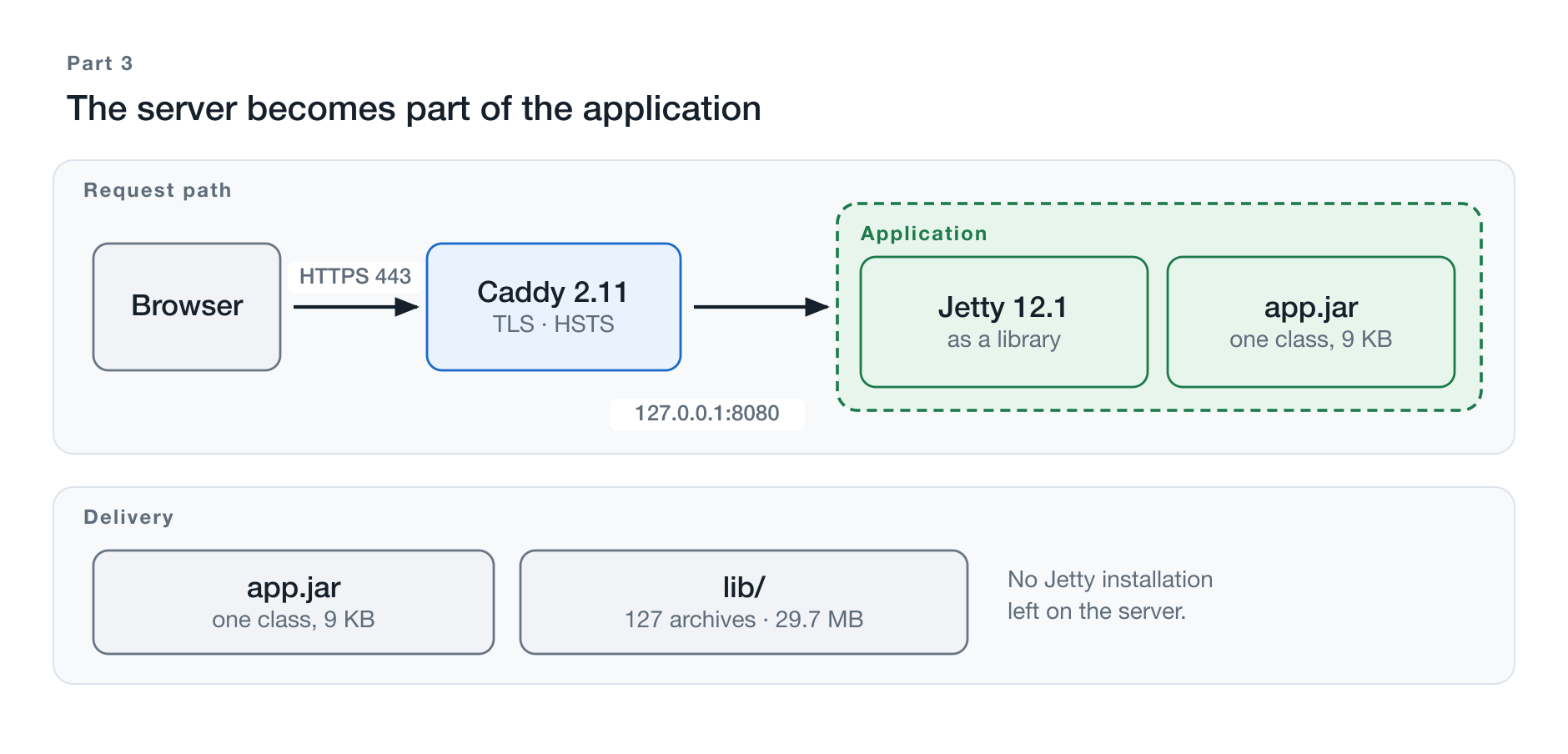
Figure 1: The dashed boundary now includes the server as well.
Part 1, Chapter 1 named the connecting thread of this series: the dashed boundary around what belongs to the application. In Parts 1 and 2, only the WAR lay behind this boundary. Now Jetty moves inside.
| Parts 1 and 2 | from here on | |
|---|---|---|
| Jetty | installation under /opt/jetty | Maven dependency |
| Startup | java -jar /opt/jetty/start.jar | its own main() method |
| Configuration | start.d/*.ini | Java code |
| Artifact | ROOT.war | application archive plus lib/ |
| Jetty version determined by | the server | the project |
The last row is the actual point. Anyone who wants to switch the Jetty
version afterwards changes a number in the pom.xml and ships the
application again — no longer a symlink on the server.
The Repository Becomes a Reactor
Up to this point, the demo application was one Maven module. That worked
as long as there was one delivery format. With the second one, it no longer
worked well: the starter for embedded operation lived in src/main/java and
was therefore compiled with every build — including the WAR build, where
nobody calls it. This is exactly where the finding from Part 1, Section 4.5
came from: the complete Jetty ended up in the WAR because a single
dependency stood there without a <scope>.
The remedy back then was a declaration. The cause only disappears now:
Blog-Vaadin-Deployment-on-Hetzner/     reactor
├── core/                              the application, the tests, the frontend bundle
├── war-jetty/                         ROOT.war for the external Jetty (parts 1 and 2)
└── embedded-jetty/                    own main() (this part)
One module per delivery format. The WAR module contains not a single line
of Java source code — only a web.xml. The embedded module contains exactly
one class. Everything else lives in the core and is used by both.
About the names: The directories are named after the delivery format,
not after the part number — the WAR module belongs to two parts. The
artifactIds additionally carry the prefix vaadinapp-, because a module
named core would collide with com.svenruppert:core, a dependency of
this application. A detail that is easy to overlook when splitting up a
project, and one the build acknowledges with an incomprehensible message.
The Code for This Part
git clone https://github.com/svenruppert/Blog-Vaadin-Deployment-on-Hetzner
cd Blog-Vaadin-Deployment-on-Hetzner
git checkout teil-03
The state of Parts 1 and 2 — one module, building to target/ROOT.war —
remains available on the tag teil-02. A git diff teil-02 teil-03 shows
exactly what this part describes.
What This Part Does Not Cover
Packaging. At the end of this part, an application archive sits next to a directory containing its libraries. Whether that becomes a single archive or a tidy directory structure is the question for Part 4 — and it can only be asked meaningfully once the unpackaged case has been seen standing on its own.
What Does Embedded Jetty Mean?
The term sounds like a variant of the same thing. In fact, it describes a reversal of responsibility.
A Library Instead of a Server Installation
In the setup so far, Jetty is a program. It lives under /opt/jetty, it has
its own directory structure, it is configured through files, and it starts
the application. The application is an archive this program reads in.
Embedded, Jetty is a library. It sits on the classpath next to Jackson and SLF4J, it has no directory structure of its own, it is configured through Java code, and the application starts it. The program that loads the application becomes a dependency the application uses.
Application Lifecycle Instead of Container Lifecycle
The practical difference shows in the startup sequence.
With the external Jetty, systemd starts the container, the container looks
for archives in webapps/, unpacks them, builds one web application context
each, and calls the initializers inside. The application has no entry point;
it gets found.
Embedded, systemd starts the application. Its main() method creates a
server, mounts a context, starts it, and waits. The entry point is ordinary
Java code that a narrative can walk along — and that is exactly what
Chapters 4 through 9 do.
What Becomes Visible in the Process
The external Jetty takes care of a whole series of things without any of
them showing up in the project. The module files under start.d/ numbered
sixteen in the reference setup. Sixteen decisions that someone once made and
that nobody sees afterwards.
Embedded, every one of them that is actually needed must appear in the code. That is more work — and it is the reason this part is instructive in the first place: what used to be configuration becomes readable.
Three of these decisions fail silently if you forget them. They get a chapter of their own in Chapter 10, because they make the difference between “runs” and “runs correctly”.
What Stays the Same
More remarkable than the differences is how little changes in operation.
Service account, directory layout, hardening, configuration outside the
artifact, credentials via systemd-creds, Caddy in front — all unchanged.
The unit file swaps one line.
That is no coincidence but the result of the separation that Part 0 and Chapters 9 through 11 of Part 1 built up: the operational framework does not know how the application starts internally, and it does not need to.
Maven Dependencies
The external Jetty was set up with --add-modules=server,http,ee11-deploy,ee11-annotations,ee11-websocket-jakarta.
Embedded, there are no modules — there are dependencies. Translating one
into the other is the subject of this chapter.
Four Entries
<dependency>
    <groupId>org.eclipse.jetty</groupId>
    <artifactId>jetty-server</artifactId>
</dependency>
<dependency>
    <groupId>org.eclipse.jetty.ee11</groupId>
    <artifactId>jetty-ee11-webapp</artifactId>
</dependency>
<dependency>
    <groupId>org.eclipse.jetty.ee11</groupId>
    <artifactId>jetty-ee11-annotations</artifactId>
</dependency>
<dependency>
    <groupId>org.eclipse.jetty.ee11.websocket</groupId>
    <artifactId>jetty-ee11-websocket-jakarta-server</artifactId>
</dependency>| Dependency | replaces the module | used for |
|---|---|---|
jetty-server | server, http | Server, ServerConnector, HttpConfiguration |
jetty-ee11-webapp | ee11-deploy | WebAppContext |
jetty-ee11-annotations | ee11-annotations | the scanner that finds Vaadin’s routes |
jetty-ee11-websocket-jakarta-server | ee11-websocket-jakarta | Vaadin Push |
No version numbers — those come from the two BOMs that were already imported
in Part 1. ${jetty.version} thus remains the only place where the Jetty
release is recorded, now for the build instead of for the installation.
The Servlet API Switches Sides
<dependency>
    <groupId>jakarta.servlet</groupId>
    <artifactId>jakarta.servlet-api</artifactId>
    <scope>compile</scope>
</dependency>
In the WAR module, this says provided: available for compilation, left out
at packaging time because the container supplies it. Here there is no
container supplying anything — the application is one. So the API has to
come along.
That is the same reasoning as in Part 1, Section 4.5, only applied in the
opposite direction. Anyone who reads provided as “does not belong in the
archive” has misunderstood it; it means “someone else provides this”. When
there is no someone else, the answer changes.
Four Entries Nobody Ordered
<dependency><groupId>org.ow2.asm</groupId><artifactId>asm</artifactId></dependency>
<dependency><groupId>org.ow2.asm</groupId><artifactId>asm-tree</artifactId></dependency>
<dependency><groupId>org.ow2.asm</groupId><artifactId>asm-commons</artifactId></dependency>
<dependency><groupId>org.ow2.asm</groupId><artifactId>asm-analysis</artifactId></dependency>
ASM is the library Jetty’s annotation scanner uses to read class files. It
appears here only to force a single version. Default resolution mixes
asm 9.8 (via j2objc-annotations) with asm-tree and asm-commons 9.9.1
(via Jetty). This mixture breaks on Java 26 bytecode:
java.lang.IllegalArgumentException: Unsupported class file major version 70The context then fails to start, and the message mentions neither Jetty nor Vaadin. It is included here because without prior knowledge it is almost impossible to place: class file version 70 is Java 26.
What Disappears
One dependency is removed from the core module without replacement — the
library that encapsulated the embedded startup until now. With it goes the
<scope>provided</scope> workaround from Part 1, Section 4.5, and the whole
profile machinery that squeezed an additional archive out of a WAR module.
The reason this works: the embedded module has jar packaging from the
start. Nothing needs to be worked around when the structure matches the
intent.
The Application’s Entry Point
A web application with a main() method looks unusual at first. It is the
core of this part.
The Class
public final class Application implements HasLogger {

  private static final String DEFAULT_HOST = "127.0.0.1";
  private static final int    DEFAULT_PORT = 8080;

  public static void main(String[] args) {
    new Application().launch();
  }
  …
}
It is the only class in the embedded-jetty module. Everything else —
views, security, persistence, translations — lives in the core and is pulled
in via a dependency. That is not frugality but the statement the split
makes: how the application starts is a question of the delivery format, and
nothing else.
Host and Port
private void launch() {
  String host = resolve("app.host", "APP_HOST", DEFAULT_HOST);
  int    port = resolvePort();
  …
}

private static String resolve(String systemProperty, String envVariable, String fallback) {
  String fromSystem = System.getProperty(systemProperty);
  if (fromSystem != null && !fromSystem.isBlank()) return fromSystem;
  String fromEnv = System.getenv(envVariable);
  if (fromEnv != null && !fromEnv.isBlank()) return fromEnv;
  return fallback;
}
Three sources in a fixed order: system property, environment variable,
default value. The external Jetty made the same decision in
start.d/http.ini; here it stands as a method you can read.
The default is 127.0.0.1, not 0.0.0.0. That is the same decision as in
Part 1, Chapter 8, and here it matters even more: a typo in a configuration
file gets caught during review, a wrong default in the code takes effect
everywhere nobody configured anything.
The Check That Comes Before Everything Else
if (Application.class.getClassLoader().getResource(BUNDLE_MARKER) == null) {
  abort("Vaadin production bundle missing from the classpath (expected " + BUNDLE_MARKER
        + "). Build with `mvn -Pproduction package` before starting; without it the "
        + "server starts, answers 200 and serves a blank page.");
  return;
}
Five lines that catch one of the most annoying failure modes. Chapter 8 describes it in detail; the short version: if the built frontend is missing, the server starts anyway, answers with 200, and serves a white page. The error then shows up not in the server log but in the browser console — and anyone who does not look there searches in the wrong place.
The check turns this into a startup message with instructions for action.
Failing with a Statement
@SuppressFBWarnings(value = "DM_EXIT",
    justification = "intentional — main-class launcher exits non-zero so a process supervisor sees the failure")
private void abort(String message) {
  if (message != null) logger().error(message);
  System.exit(1);
}
System.exit(1) in an application is normally a warning sign. In a launcher
class it is the right answer: systemd distinguishes a service that
terminates with an error code from one that simply does not respond. Without
this call, the JVM would keep running, Restart=on-failure would not kick
in, and the service would count as “running”.
Creating and Configuring Jetty
Four lines bring the server up. Two of them deserve an explanation.
Server server = new Server();

HttpConfiguration httpConfig = new HttpConfiguration();
httpConfig.addCustomizer(new ForwardedRequestCustomizer());
httpConfig.setSendServerVersion(false);

ServerConnector connector = new ServerConnector(server, new HttpConnectionFactory(httpConfig));
connector.setHost(host);
connector.setPort(port);
server.addConnector(connector);
Server Without a Thread Pool
new Server() creates a QueuedThreadPool with default values behind the
scenes. A custom pool would be possible:
QueuedThreadPool pool = new QueuedThreadPool(200, 8);
Server server = new Server(pool);
Here, deliberately, there is none. The reference setup drew the limit
elsewhere: TasksMax=256 in the systemd unit from Part 1, Chapter 11. Two
upper limits for the same thing are one upper limit too many — the smaller
one wins, and whoever changes the other wonders why nothing happens.
Measured in operation, 30 threads are running; the defaults are sufficient
by a wide margin.
ForwardedRequestCustomizer — the Line Whose Absence Nobody Notices
This single line replaces --add-modules=forwarded from Part 2, Chapter 4.
What it does and why its absence is dangerous is covered in Chapter 10; here,
only the place where it belongs: on the HttpConfiguration, before the
connector is created. Added afterwards, it no longer takes effect, because
the HttpConnectionFactory has already captured the configuration.
setSendServerVersion(false)
Without this line, Jetty sends a Server: Jetty(12.1.12) header entry with
every response. That is not a security hole, but it is free information for
every scanner about which release to attack. The external Jetty switched
this off via start.d/http-config.ini; here it is one line of Java.
Bind Address: the Same Decision, a Different Place
connector.setHost(host); // 127.0.0.1Part 1, Chapter 8 explained why the application server listens exclusively on the loopback address: what cannot be reached does not have to be defended. The reasoning holds unchanged — only now it lives in the source code instead of a configuration file.
And it is the precondition for the line above it. Evaluating forwarding
headers is only defensible because the only party able to set them is the
reverse proxy on the same machine. If the connector were bound to 0.0.0.0,
anyone on the network could claim the request arrived over HTTPS from any
address they like.
These two lines belong together, and in the embedded setup they stand
visibly side by side for the first time. In the external Jetty they lived
in two different .ini files.
Configuring the Servlet Context
The server alone does not answer any request. It needs a context — the counterpart to what the external Jetty created when unpacking a WAR.
WebAppContext webapp = new WebAppContext();
webapp.setContextPath("/");
webapp.setBaseResource(webResources(webapp));

String scanPattern = System.getProperty("app.scan.pattern", DEFAULT_SCAN_PATTERN);
webapp.setAttribute(MetaInfConfiguration.CONTAINER_JAR_PATTERN, scanPattern);
webapp.setAttribute(MetaInfConfiguration.WEBINF_JAR_PATTERN, scanPattern);
webapp.setParentLoaderPriority(true);
WebAppContext or ServletContextHandler?
Jetty offers both. ServletContextHandler is the leaner path: no scan, no
separate class loader, less startup time. For many embedded applications it
is the right choice.
For a Vaadin application it is not. Vaadin finds its @Route classes
through the RouteRegistryInitializer — a ServletContainerInitializer
announced via META-INF/services and searched for by the container.
Take that search away, and you have to register the routes by hand. The
effort does not disappear; it merely changes location.
WebAppContext brings the search along. The price is in the next line.
The Scan Pattern Is a Tuning Knob
private static final String DEFAULT_SCAN_PATTERN = ".*\\.jar$";This pattern says: open every archive on the classpath and search it for initializers with ASM. In the reference setup, that is 127 of them.
That is why the pattern does not sit in the code as a constant but behind a system property:
java -Dapp.scan.pattern='.*(vaadinapp|flow|vaadin|jcustos)-.*\.jar$' …Narrowing it down shortens startup measurably — and buys you a list that wants to be maintained with every new dependency. The reference setup therefore leaves it wide; the option is in the code anyway, because otherwise nobody would find it.
How much the scan accounts for can be quantified with involuntary precision: a start without the scan takes 139 ms, with the scan 1,523 ms. How this measurement came about is told in Chapter 12 — it was a failure.
setParentLoaderPriority(true)
WebAppContext comes with its own class loader, which normally searches the
web application first and only then the parent. In the WAR model that is
correct: an application may bring its own release of a library without the
container interfering.
Embedded, this separation no longer exists. Application and server sit on
the same classpath; a class loader that continues to assume two worlds only
creates confusion — in the worst case the same class loaded twice, with a
ClassCastException nobody understands. true switches back to the
ordinary Java order.
It is the same issue that Part 1, Section 4.5 described from the other side: there, Jetty’s precedence rules protected the installed Jetty from being displaced by a bundled one. Here there is no installed Jetty left to protect.
Integrating Vaadin
The context is in place. Now the application goes in — and in the process, a file resurfaces that was taken for granted in the WAR model.
ServletHolder holder = new ServletHolder(new AppServlet());
holder.setInitParameter("i18n.provider", "com.svenruppert.flow.i18n.AppI18NProvider");
holder.setAsyncSupported(true);
holder.setInitOrder(1);
webapp.addServlet(holder, "/*");
Five lines that do exactly what the web.xml does in the WAR module:
<servlet>
    <servlet-name>Vaadin Servlet</servlet-name>
    <servlet-class>com.svenruppert.flow.AppServlet</servlet-class>
    <async-supported>true</async-supported>
    <load-on-startup>1</load-on-startup>
    <init-param>
        <param-name>i18n.provider</param-name>
        <param-value>com.svenruppert.flow.i18n.AppI18NProvider</param-value>
    </init-param>
</servlet>
<servlet-mapping>
    <servlet-name>Vaadin Servlet</servlet-name>
    <url-pattern>/*</url-pattern>
</servlet-mapping>
Line for line the same. That is no coincidence — the deployment descriptor and programmatic registration are two notations for the same Servlet API.
The Parameter That Costs a Language
i18n.provider looks like a nicety and is not. Vaadin V25 does not look
up the I18NProvider via META-INF/services but exclusively through this
init parameter. If it is missing, the framework uses DefaultI18NProvider —
and that one has a defect Part 1 already mentioned: it falls back to the
JVM’s default language. On a German machine, every request for English then
returns German text.
The application starts without complaint. The language switcher appears, it can be operated, and it changes nothing. Whoever discovers this in production searches for a long time.
It is the first of three values that get lost silently during the migration — Chapter 10 covers the other two.
setInitOrder(1)
The counterpart to <load-on-startup>1</load-on-startup>. Without it, the
container creates the servlet only on the first request. The application
still runs — but the first visitor pays for the entire initialization:
building the Vaadin services, opening the datastore, and wiring the security
layers.
For a service behind a reverse proxy this means: the first request after
every restart runs into a timeout, and the access log records a 502 with no
explanation. The number 1 moves this work into startup, where it belongs and
where systemctl start waits for it.
AppServlet Stays Where It Is
What is remarkable is what does not appear here: no modified servlet
class. It is the same AppServlet as in the WAR, unchanged, from the core
module.
Both delivery formats register the same class with the same parameters — one through a descriptor, the other through five lines of Java. The difference between Parts 2 and 3 is not in the application. It is in who starts it.
Production Resources
A WAR has a root directory. Everything inside it is served by the container. An application archive has none — and that is exactly where the migration fails most often.
Two Kinds of Files, One Problem
The application serves two kinds of static files:
| where they come from | |
|---|---|
| the built Vaadin frontend | build-frontend, under META-INF/VAADIN/webapp/ |
| images and icons | maintained by hand, in the WAR under src/main/webapp/ |
The first kind was never a problem: Vaadin puts it in a place it finds again on its own. The second kind lived in the WAR root — and that root no longer exists.
The Solution Is in the Servlet Specification
An archive may contribute web resources if they sit under
META-INF/resources. The container serves them as if they were in the web
application’s root directory. That is precisely what this mechanism is for,
and it applies to both delivery formats.
core/src/main/resources/META-INF/resources/
├── images/portrait-sven.jpg
└── icons/github-mark.svg, linkedin-mark.png
This keeps the references in the source code unchanged:
new Image("images/portrait-sven.jpg", …)One source, two packagings, the same URLs. The WAR gets the files through
WEB-INF/lib/vaadinapp-core.jar, the embedded setup through the classpath.
The Four Lines Without Which It Is Not Enough
For the WAR, the container takes care of the rest. Embedded, the context must learn where its base is — and one lookup is not enough:
private Resource webResources(WebAppContext webapp) throws IOException {
  ResourceFactory factory = ResourceFactory.of(webapp);
  List<Resource> roots = Collections
      .list(Application.class.getClassLoader().getResources("META-INF/resources/"))
      .stream()
      .map(url -> factory.newResource(url.toString()))
      .filter(Objects::nonNull)
      .toList();
  logger().info("Serving static web resources from {} classpath root(s)", roots.size());
  return ResourceFactory.combine(roots);
}getResources, plural, not getResource. In the reference setup, this line
reports at startup:
Serving static web resources from 5 classpath root(s)Five, not one: the core module contributes images and icons, the Vaadin archives their themes and the client engine. Take only the first root, and you get an application in which either your own images or the Vaadin theme is missing — depending on which archive the class loader finds first.
The Failure Case, Demonstrated Once
The most expensive mistake in this part does not look like one at all. A build without the production profile:
mvn clean package # without -PproductionAfterwards, the built frontend is missing. The server starts anyway:
[main] INFO org.eclipse.jetty.server.Server - Started oejs.Server@… @1123mscurl reports 200. The access log is unremarkable. In the browser the page
stays white, and the only hint sits in the developer console: references
to VAADIN/build/… that return 404.
That is why Application contains the check from Chapter 4:
private static final String BUNDLE_MARKER = "META-INF/VAADIN/webapp/index.html";

if (Application.class.getClassLoader().getResource(BUNDLE_MARKER) == null) {
  abort("Vaadin production bundle missing from the classpath (expected " + BUNDLE_MARKER
        + "). Build with `mvn -Pproduction package` before starting; without it the "
        + "server starts, answers 200 and serves a blank page.");
}
A mute browser error becomes a startup message with instructions for action, and the service terminates with an error code instead of appearing to run.
Five lines against a lost evening. Part 1, Chapter 4 described the same trap for the WAR; there it remained a warning. Here it is caught, because embedded there is nobody left who would complain.
Where the Bundle Is Built
One point that surprises when splitting into modules: build-frontend runs
not in the packaging module but in the core.
The Vaadin documentation is unambiguous here. The build generates the
frontend files in the module that configures the plugin; with jar
packaging they end up under target/classes/META-INF/VAADIN/webapp/ and
thus travel into the core archive. Both packagings fetch them from there via
the classpath.
The cross-check after the build:
unzip -l core/target/vaadinapp-core-*.jar | grep -c 'META-INF/VAADIN/webapp'137Put the plugin into a packaging module instead, and you build the bundle where the other packaging cannot see it — and find the mistake only on the first page load.
Lifecycle
The server is assembled. What remains is the question of who stops it — and what happens when nobody thinks of it.
Server server = server(host, port);
server.start();
logger().info("Embedded Jetty serving http://{}:{}/", host, port);
server.join();
start() Returns, join() Does Not
start() brings the server up and returns control. Without the last line,
main() would then run to its end, the JVM would exit, and the service
would be gone again after one second.
join() blocks until the server stops. This one line is the difference
between a program that gets something done and a service that runs.
The message in between is not decoration. It is the only place where the journal records which address the service actually listens on — and thus the first thing you look for when Caddy reports 502.
Stopping Without Damaging the Datastore
The application keeps an Eclipse Store datastore open. A process that simply gets killed leaves it unchanged in the best case and incomplete in the worst.
server.setStopAtShutdown(true);With this, Jetty registers its own shutdown hook with the JVM: on SIGTERM,
the server shuts down in an orderly fashion, the contexts are stopped, and
the application gets the opportunity to close its resources.
The counterpart in the systemd unit has been in place since Part 1:
KillSignal=SIGTERM
TimeoutStopSec=30
systemd sends SIGTERM and waits thirty seconds before getting tougher.
Both sides have to match — a service with a shutdown hook and
KillSignal=SIGKILL would have the hook for nothing.
The Line That Was Not Needed in the WAR Model
SuccessExitStatus=143143 is 128 + 15, that is, “terminated by signal 15”. A service that shuts
down properly on SIGTERM exits with exactly this value — and without this
line, systemd would consider that a failure. With Restart=on-failure, that
would lead to a service that restarts itself after every planned stop.
The line dates from Part 1 and continues to apply unchanged. It appears here because it is easy to overlook in the embedded setup: whoever rewrites the unit instead of adapting it leaves it out and wonders.
Failure at Startup
} catch (Exception e) {
  logger().error("Failed to start embedded Jetty on {}:{}", host, port, e);
  stop(server);
  abort(null);
}
stop(server) before abort(...): if the server has already claimed a port
and something went wrong only afterwards, this call releases it. Without it,
the port would stay occupied until the process ends — and on the automatic
restart five seconds later, the next attempt would fail with a
BindException whose cause then looks like an entirely different problem.
What the Module Mechanism Used to Take Care Of
The server runs, the application responds, the pages render. This is where a migration usually stops — and this is exactly where the most important part is still missing.
Part 2 spent two chapters setting up the external Jetty for operation behind Caddy. Both happened through modules:
sudo java -jar /opt/jetty/start.jar --add-modules=forwarded
sudo java -jar /opt/jetty/start.jar --add-modules=ee11-websocket-jakarta
Embedded, there are no modules. Both have to go into the code — and both fail silently if you forget them. No error, no log entry, no complaint.
First: The Request Does Not Come from Where It Comes From
Behind Caddy, every request reaches the application server via 127.0.0.1,
unencrypted, with a different hostname than the one the browser called. From
the application’s point of view, this looks like local access over HTTP.
The consequence is not an error message but a wrong conclusion: Vaadin sets
the session cookie without the Secure flag, because the connection
appears to be unencrypted. A cookie without this flag may also be sent by
the browser over unencrypted connections.
One line fixes this:
httpConfig.addCustomizer(new ForwardedRequestCustomizer());The proof takes two calls — without and with the header Caddy sets:
curl -s -D- -o /dev/null http://127.0.0.1:8080/login | grep -i set-cookieset-cookie: JSESSIONID=node0…; Path=/curl -s -D- -o /dev/null -H 'X-Forwarded-Proto: https' \
http://127.0.0.1:8080/login | grep -i set-cookieset-cookie: JSESSIONID=node0…; Path=/; SecureSame server, same application, one difference in the result. Checked via the public address:
curl -s -D- -o /dev/null https://demo.svenruppert.com/login | grep -i set-cookieset-cookie: JSESSIONID=node01ggmnynrf3f7q162xs5dytkyna5.node0; Path=/; SecureWhy Evaluating Them Is Defensible at All
Forwarding headers are claims made by the sender. Whoever evaluates them believes a stranger about where the request comes from and over which protocol.
What makes this defensible is a decision from Part 1, Chapter 8: the
connector listens on 127.0.0.1. The only party able to set these headers
is thus a process on the same machine — the reverse proxy. If it were bound
to 0.0.0.0, anyone on the network could claim their request arrived over
HTTPS from any address, and the application would write it into the log and
into its access decisions.
In the external Jetty, these two decisions that belong together lived in two
different .ini files. In the code, they are seven lines apart.
Second: Push Needs a Container That Nobody Brings Along
JakartaWebSocketServletContainerInitializer.configure(webapp, null);Vaadin Push keeps a persistent connection open. For that, the servlet context needs WebSocket support, which is not present on its own in the embedded setup. The call must happen before the context starts; afterwards it is too late, and no message tells you so.
Without it, Vaadin falls back to long polling, or the connection fails. The application remains usable — server-initiated updates just no longer arrive, or arrive late.
The proof is a connection upgrade:
curl -s -o /dev/null -w '%{http_code}\n' \
     -H 'Connection: Upgrade' -H 'Upgrade: websocket' \
     -H 'Sec-WebSocket-Version: 13' -H 'Sec-WebSocket-Key: dGhlIHNhbXBsZSBub25jZQ==' \
'http://127.0.0.1:8080/VAADIN/push?v-r=push&X-Atmosphere-transport=websocket'101101 Switching Protocols — the upgrade succeeds. A 200 here would be the warning sign: then ordinary request processing would have answered, and the upgrade would not have happened.
Third: The Language Provider from Chapter 7
The i18n.provider parameter belongs to the same family. It, too, used to
live in a file the container read — the web.xml —, its absence, too,
produces no error, and its consequence, too, only shows in operation.
The Pattern Behind It
Three values, three failures without a symptom. That is no coincidence but the nature of configuration that exists as a default: if it is missing, a default value applies, and default values are made for the simple case — directly reachable server, no encryption, no persistent connections, one language.
The embedded setup is therefore no less secure than the external one. It merely shifts where the decision lives: from a file someone once created into code that gets compiled. What is missing in both cases is feedback — which is why these three points are paired with the three checks from this chapter, and why those checks belong in the operating procedures and not only here.
Configuring the Embedded Server
Part 2, Chapter 6 established the rule: configuration does not belong in the artifact. It applies here unchanged — only the artifact is a different one.
Three Sources, Fixed Order
private static String resolve(String systemProperty, String envVariable, String fallback) {
  String fromSystem = System.getProperty(systemProperty);
  if (fromSystem != null && !fromSystem.isBlank()) return fromSystem;
  String fromEnv = System.getenv(envVariable);
  if (fromEnv != null && !fromEnv.isBlank()) return fromEnv;
  return fallback;
}| Source | how it is set | used for |
|---|---|---|
| system property | -Dapp.port=8081 in the unit | one-off deviation, clearly visible |
| environment variable | EnvironmentFile=/etc/vaadinapp/environment | the standard case on the server |
| default in the code | — | the development machine |
The order is not arbitrary. The system property wins because it lives in the unit and thus under the server’s version control; the environment variable comes from a file that someone else can maintain as well; the default only applies where nobody said anything.
What Is Deliberately Absent Here
No configuration file format. It would be possible to read an
application.properties. The reference setup does not, because every
additional source makes the question “where does this value come from”
harder to answer — and because systemd, with EnvironmentFile, already
provides an answer that needs no library.
No reloading at runtime. The service reads its configuration at startup. Whoever changes it restarts — four seconds of downtime, measured in Chapter 12. An application that picks up configuration while running has to answer, for every value, what happens to the requests that are in flight at that moment. That is effort that does not pay off here.
The Difference from the WAR Model
Exactly one: app.storage.dir. This property has been in the unit since
Part 1, because the application’s default is a relative path and
ProtectSystem=strict makes the working directory read-only. Nothing
changes here — the finding from Part 1 applies to both delivery formats
alike.
Everything else — credentials via systemd-creds, EnvironmentFile, file
permissions — is carried over unchanged from Part 2. That is the actual
message of this chapter: the operational framework does not care who starts
the server.
Embedded Jetty Under systemd
The unit from Part 1 changes one directive. The rest stays, line for line — and that is the outcome the separation from Part 0 was aiming at.
Before and After
 ExecStart=/var/lib/vaadinapp/.sdkman/candidates/java/current/bin/java \
-    -Djetty.home=/opt/jetty \
-    -Djetty.base=/opt/vaadinapp \
     -Djava.io.tmpdir=/var/lib/vaadinapp/work \
     -Dapp.storage.dir=/var/lib/vaadinapp/data \
     --add-exports java.base/jdk.internal.misc=ALL-UNNAMED \
     --enable-native-access=ALL-UNNAMED \
     -XX:MaxRAMPercentage=75 \
     -XX:+ExitOnOutOfMemoryError \
-    -jar /opt/jetty/start.jar
+    -cp /opt/vaadinapp/app.jar:/opt/vaadinapp/lib/* \
+    com.svenruppert.flow.Application
Two lines go, two come in. Both hardening drop-ins remain untouched — the same directives, the same hardening score of 1.1.
The asterisk in lib/* is not a shell glob. systemd does not expand it, and
that is a good thing: Java knows this notation in the classpath itself and
resolves it at startup.
The Directory on the Server
/opt/vaadinapp/
├── app.jar            8,908 bytes — just the launcher class
├── lib/               127 archives, 29.74 MB
├── logs/
└── releases/          archive of the shipped releases
The application archive is nine kilobytes. It contains one class. Everything else sits next to it — including the application’s core, as one of the 127 archives.
⚠️ The First Start Fails
It actually did fail, with a 503:
java.lang.RuntimeException: Unable to create FileSystem for /opt/vaadinapp/lib/._jspecify-1.0.0.jar
Caused by: java.util.zip.ZipException: zip END header not found
._jspecify-1.0.0.jar — with a leading dot and underscore. That is not a
library but a companion file macOS creates for files with extended
attributes. When packing with tar, they travel into the archive; the hint
is already there at unpack time:
tar: Ignoring unknown extended header keyword 'LIBARCHIVE.xattr.com.apple.provenance'Eleven such files ended up in lib/. And Java’s classpath wildcard lib/*
picks up every file ending in .jar — it checks nothing, it only
expands.
The remedy when packing:
COPYFILE_DISABLE=1 tar czf paket.tgz app.jar libor on the target system:
find /opt/vaadinapp -name '._*' -deleteWhy this could not happen with the WAR: a WAR is a single archive written by Maven. Only a classpath built from a directory makes the application depend on that directory containing nothing but valid archives. The delivery format brings a new source of error that has nothing to do with Jetty.
⚠️ Why There Is No java -jar
The obvious idea: use addClasspath to write a Class-Path into the
application archive’s manifest, and java -jar app.jar will do.
That works — apparently. The class loader resolves the archives, the server starts, the application responds. Every request, however, then ends with:
java.lang.NullPointerException: Cannot invoke
"com.vaadin.flow.server.StaticFileHandler.serveStaticResource(…)"
The reason sits one level deeper. With java -jar, the java.class.path
property contains a single entry — the application archive. The
manifest’s Class-Path entries are not in it. And this is precisely the
property Jetty’s MetaInfConfiguration reads to decide which archives the
annotation scanner opens.
No scan, no RouteRegistryInitializer, no StaticFileHandler. The server
is healthy; the servlet is not.
The telltale measurement is the startup time. With the identical 127 archives:
| Start | Jetty’s own timestamp |
|---|---|
java -jar app.jar | 139 ms |
java -cp 'app.jar:lib/*' | 1,523 ms |
The missing second is the scan. Whoever does not know the difference takes the faster start for a win.
That is why the manifest deliberately carries no Class-Path, and the
launch command is explicitly:
java -cp 'app.jar:lib/*' com.svenruppert.flow.ApplicationThe Teardown
After the switch, the Jetty installation becomes superfluous:
sudo rm -f  /opt/jetty                      # Symlink
sudo rm -rf /opt/jetty-home-12.1.12         # the installation
sudo rm -rf /opt/vaadinapp/{start.d,webapps,resources,environments}| Directory | Size |
|---|---|
/opt/jetty-home-12.1.12 | 53 MB |
/opt/vaadinapp/webapps | 21 MB |
start.d, resources, environments | 80 KB |
| total | 71.1 MB |
What is remarkable about the 53 MB: the distribution contains 232 archives, of which 26 were on the classpath in operation. That is not a defect but the way a server distribution is built — it ships all modules, some get activated. Embedded, this reserve disappears, because the dependencies are named.
Afterwards, /opt contains nothing but vaadinapp.
Caddy Remains Unchanged
The shortest chapter of this part, and one of the most telling.
The File
demo.svenruppert.com {
    reverse_proxy 127.0.0.1:8080
    …
}
Unchanged. No restart, no reload, no adjustment. Caddy talks to
127.0.0.1:8080 and does not know what runs behind it — previously an
installed servlet container with an archive inside, now an application with
its own server.
Why This Cannot Be Taken for Granted
Because it could easily have gone differently. The embedded setup could have
- listened on a different port,
- bound to
0.0.0.0, - ignored the forwarding headers,
- refused WebSocket connections.
In all four cases Caddy would have needed adjustment, or the application would have worked incorrectly. That none of this was necessary is the result of the decisions from Chapters 5, 7, and 10 — they are all aligned to offer the same interface as before.
The Cross-Check
curl -s -o /dev/null -w '%{http_code}\n' https://demo.svenruppert.com/
curl -s -D- -o /dev/null https://demo.svenruppert.com/login | grep -i set-cookie
curl -s -D- -o /dev/null https://demo.svenruppert.com/ | grep -i strict-transport200
set-cookie: JSESSIONID=node01ggmnynrf3f7q162xs5dytkyna5.node0; Path=/; Secure
strict-transport-security: max-age=31536000; includeSubDomainsThe same three lines as at the end of Part 2.
The Boundary That Becomes Visible Here
Caddy and the application have a contract: HTTP on 127.0.0.1:8080, with
forwarding headers. As long as both sides keep it, each side is replaceable
for the other.
That is why the series chose this order. Had the reverse proxy not already been set up and described in Part 2, this part would have to cover it as well — and the claim “none of this changes” would not be verifiable, because there would be no before.
Security Implications
The switch shifts a responsibility, and an uncomfortable one at that.
The Jetty Version Now Belongs to the Application
Before: when a security advisory for Jetty appears, someone downloads the new distribution, moves the symlink, restarts the service. The application is not touched, not rebuilt, not retested.
After: the same advisory means changing a number in the pom.xml,
rebuilding, running the test suite, and shipping a release.
| external Jetty | embedded | |
|---|---|---|
| Who decides on the version | the server maintainer | the application project |
| Effort for a security update | symlink and restart | build and release |
| Who notices that one is needed | whoever maintains the server | whoever checks the dependencies |
The last row is the dangerous one. With the external Jetty, the
installation sits visibly under /opt/jetty; it shows up in every
inventory. Embedded, Jetty is one line among 127 in a dependency tree. A
server whose operating system is well maintained can contain a
three-year-old Jetty release without anyone noticing.
What helps against this is not a decision about the setup but one about the
process: a dependency check in the build that reports known
vulnerabilities. The project generates a bill of materials
(CycloneDX-SBom) with every build — so the foundation for that is in
place.
What Gets Better
There is no second release anymore. Part 1, Section 4.5 described the
case of a WAR bringing its own Jetty, with the installed release shadowing
it. As long as the two match, all goes well; after that, the wrong class
wins at some unshielded spot. This source of error disappears: there is only
one Jetty left, and it is recorded in the pom.xml.
What was built is what runs. A WAR is an incomplete artifact — it needs a container of matching release with matching modules. A classpath is complete. What starts on the development machine also starts on the server, because both use the same list.
The server’s attack surface shrinks. 71 MB less installed software, 232 fewer archives on disk, no deployment directory that a process with write permissions could fill. The teardown from Chapter 12 is not just tidying up.
What Stays the Same
The hardening score. systemd-analyze security vaadinapp reports 1.1
before and after, with the same directives in the same drop-in.
That is expected and still worth mentioning: hardening describes what the process may do — which directories it may write, which system calls it may issue, which privileges it may escalate. These questions are independent of who starts the server inside the process. A hardening score that changed with the launch method would have been attached at the wrong place.
External Versus Embedded Jetty
Both setups ran on the same machine, with the same application, behind the same Caddy. What follows is measured, not estimated.
The Numbers
| Metric | WAR on external Jetty | embedded |
|---|---|---|
| Downtime until first response | 5,461 ms | 4,685 ms |
Jetty uptime until Started Server | 3,969 ms | 3,634 ms |
Memory at idle (MemoryCurrent) | 448 MiB | 336 MiB |
| RSS | 443 MiB | 361 MiB |
| Threads | 34 | 30 |
| Archives on the classpath | 112 | 127 |
| Delivery size | 21.78 MB | 29.75 MB |
| additionally required on the server | 53 MB installation | — |
| Hardening score | 1.1 | 1.1 |
Each value is the mean of three runs. Individual downtime values for the embedded setup: 4,517, 4,868, and 4,670 ms.
The Row That Contradicts Expectation
Part 2, Chapter 8 ended with an observation: an archive smaller by a quarter had not reduced memory consumption. The explanation back then: what was removed had never been loaded in the first place.
Here it is the other way around, and the explanation is the same. The delivery grows from 21.78 to 29.75 MB, the classpath lengthens from 112 to 127 archives — and memory consumption still drops by 112 MiB.
Both times, what was measured was not the amount of bytes shipped but the amount of loaded classes. The external Jetty brings its module system, its deployment scanner, and its own startup machinery; the embedded setup loads only what the application calls.
Whoever takes an artifact’s size as a measure of its resource consumption is wrong in both directions.
What the Numbers Do Not Show
Downtime drops by roughly 780 ms, which is less than the elimination of unpacking would suggest. The reason is in the measurement from Part 2: over forty percent of the startup time goes to Vaadin initialization — to the application itself. Changing the launch mechanism cannot change that.
Whoever expects a dramatically faster start from embedded operation will be disappointed. Four seconds remain four seconds.
Responsibility, Maintenance, Tooling
| external Jetty | embedded | |
|---|---|---|
| Install the server | yes, once and at every upgrade | no |
| Configure the server | start.d/*.ini, 16 files | Java code, one class |
| Update the server | move the symlink, restart | build and release |
| Server version visible in | a directory on disk | the dependency tree |
| One server for several applications | possible | no, one per application |
| Development run | start the container | start main() |
The second-to-last row is often overlooked. An installed Jetty can serve several archives at once. Whoever runs three small applications on one server pays the base footprint of a JVM three times when embedded. With one application per server — the case of this series — that is not an argument.
What Stays the Same in Both Cases
Directory layout, service account, hardening, journald, configuration
outside the artifact, credentials via systemd-creds, Caddy, update and
rollback. Everything Parts 0 and 2 built survives the switch unchanged.
That is not a side note but the argument for the order of this series: whoever builds the operational framework first and keeps it independent of the delivery format can swap that format later without touching everything else again.
When Does Your Own Embedded Jetty Make Sense?
The answer hangs on a single question: who maintains the server?
In Favor
When the same person is responsible for the application and the server.
Then the separation between the two is artificial, and a number in the
pom.xml is the shorter path than a symlink on a machine.
When the application ships frequently. A security update for Jetty is then no special case; it travels with the next release anyway.
When the target server is supposed to contain as little as possible. A JVM suffices. No server installation, no deployment directory, no module configuration — 71 MB less and one software component fewer that someone has to keep an eye on.
When the setup is supposed to be reproducible. A classpath is complete. A WAR is not: it presupposes a container of matching release with matching modules, and this precondition is recorded nowhere in the artifact.
Against
When several applications run on one server. An installed Jetty serves several archives from one JVM. Embedded, every application pays its own base footprint — with three small applications, that is the decisive point.
When the server is maintained by someone else. Then the separation is not an inconvenience but a boundary of responsibility. A maintainer who can update Jetty without having every application rebuilt is an advantage, not an obstacle.
When nobody checks the dependencies. An embedded server disappears into the dependency tree. Without a check in the build that reports known vulnerabilities, the switch is a step backwards — not technically, but organizationally.
When the application needs container features that otherwise come for free: JNDI resources, several contexts, a deployment directory for third-party archives. All of it can be rebuilt in an embedded setup, and none of it is worth the effort when it is available ready-made.
The Honest Summary
For the case of this series — one application, one server, one responsible person, regular releases — the embedded setup is the better fit. It is not faster in operation and not leaner as an artifact; it is more complete, and it moves a decision to where it is being made anyway.
For a server hosting several applications from several teams, the answer is the reverse. Both setups are correct; they answer different questions.
Outlook on Part 4
The boundary has shifted for the first time. Jetty now belongs to the application. What is still open lies in plain sight on the server.
What This Part Cost
The bootstrap from Chapters 4 through 10 comes to about 60 lines — and three of them are the ones you would not write without this text:
ForwardedRequestCustomizer, otherwise the session cookie loses itsSecureflag,- the WebSocket initialization, otherwise Push fails,
- the
i18n.providerparameter, otherwise the language switcher has no effect.
None of these three failures announces itself. Whoever writes the bootstrap themselves takes on a duty of care that previously sat in sixteen module files maintained by someone else.
What Still Lies Next to It
/opt/vaadinapp/
├── app.jar     8,908 bytes — one class
└── lib/        127 archives, 29.74 MB
An application archive of nine kilobytes and a directory with 127 libraries. The launch command names both:
java -cp 'app.jar:lib/*' com.svenruppert.flow.ApplicationThat works, and it is inconvenient. A deployment consists of two parts that belong together and lie apart; a rollback has to wind both back; and whoever passes the application on passes on a directory, not an artifact.
What Part 4 Makes of It
Bootstrap and packaging are two different decisions. This part answered the first: who starts the server? Part 4 answers the second: how does the result get onto the target machine?
Two answers stand against each other there:
| Fat JAR | everything in one archive. One java -jar, one file, one rollback |
| Thin distribution | application archive and libraries separate, but shipped in an orderly manner |
The chapters there: how a fat JAR is built, where it causes problems — Chapter 12 of this part has already given a foretaste —, what a thin distribution gains, and what releases with symlink and rollback look like on top of it.
The choice is not obvious. A fat JAR is one file and therefore
convenient; but it turns every update of a single library into a complete
rebuild, and it has a known breaking point in META-INF/services. A thin
distribution stays decomposable, but demands a directory that has to be
correct — as Chapter 12 showed with eleven wrong files.
The Boundary Keeps Moving
| Part | What moves into the application |
|---|---|
| 1 and 2 | only the WAR |
| 3 | Jetty becomes a library of the application |
| 4 | the kind of packaging (fat JAR or thin distribution) |
| 5 | the Java runtime (jlink) |
At the end of Part 6, the application runs on a server with no Java installed.
Why the intermediate state deliberately looks like this: a fat JAR would have been possible in this part. It would have obscured the question of what distinguishes bootstrap from packaging — and precisely this distinction is the first sentence of Part 4.