
Fifth part of the series Vaadin – Deployment on Hetzner. The two packagings from Part 4 go onto the server: releases in numbered directories, a current symlink, a rollback in two lines — and the measurement that decides between them. All values come from an actual run on a Debian 13 server.
The State After Part 4
Part 4 built two packagings of the same application. What now sits in the build directory:
embedded-jetty/target/
├── vaadinapp-00.01.00-thin.tar.gz      130 files, 127 archives
└── vaadinapp-00.01.00-fatdist.tar.gz     3 files, 1 archive with 17,904 entries
Both share the same shape — VERSION, bin/, app/, plus lib/ for the Thin
Distribution — and the same start script, byte-for-byte identical. It puts
app/*:lib/* on the classpath; if lib/ is missing, the second half resolves
to nothing, and the one complete archive satisfies the annotation scan.
This sameness is no accident but the precondition for everything this part does. Because the releases share the same shape, the systemd unit does not distinguish them. And because it does not distinguish them, switching between the forms is the same operation as any release switch: a symlink and a restart.
What Part 4 Left Open
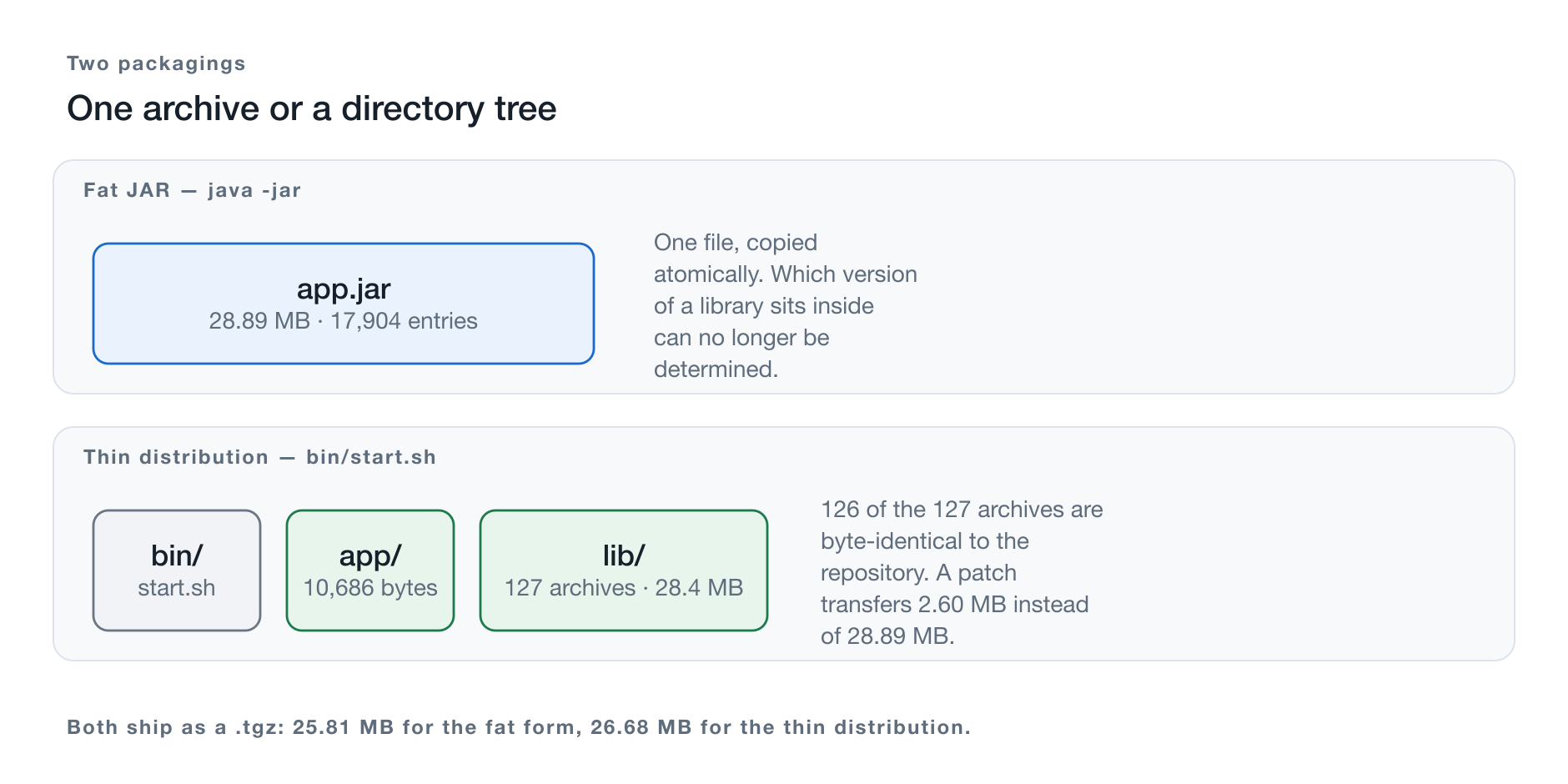
Figure 1: Both forms as releases of the same shape — only lib/ distinguishes them.
Two things.
The delivery. A directory cannot be copied like a file. What comes into being on the server comes into being from 128 files, and there is no way to replace 128 files in a single step.
The answer. The original title of this part was “Fat JAR or Thin Distribution?” — the question is answered only here, with measurements from the reference server. This much can be said in advance: one of the two metrics I had previously assumed to be equal is not.
A Promise from Part 1
Part 1, step 29 explicitly decided against the symlink for updates — releases are archived, the WAR is copied. Alongside that stood the sentence that the symlink approach would come later, “where it unfolds its purpose with the directory distribution.” Part 3, chapter 17 repeated it.
Chapter 4 redeems that promise — and explains why it would indeed have gained nothing for the WAR.
The Code State for This Part
The same as for Part 4: tag teil-04. The split into two articles concerns
the text, not the repository — git diff teil-03 teil-04 shows both
together.
git clone https://github.com/svenruppert/Blog-Vaadin-Deployment-on-Hetzner
cd Blog-Vaadin-Deployment-on-Hetzner
git checkout teil-04
At tag teil-04, no bill of materials ships inside the release yet. The
project does generate an SBOM, but it stays in the build directory. Why that is
a deficiency and how it gets fixed is the subject of a separate article.
Building the Distribution with Maven
The components become a deliverable. For that, a second step joins
copy-dependencies from Part 4, chapter 8.
Assembly — the Right Tool Here
The maven-assembly-plugin was eliminated as a route to the fat JAR in Part 4, chapter 3,
because its jar-with-dependencies descriptor does not merge service providers. For
a directory, this problem does not arise: nothing is merged, because nothing
is flattened. Every archive remains an archive with its own META-INF.
The descriptor lives at src/main/assembly/thin.xml:
<assembly>
    <id>thin</id>
    <formats>
        <format>dir</format>
        <format>tar.gz</format>
    </formats>
    <includeBaseDirectory>true</includeBaseDirectory>
    <baseDirectory>vaadinapp-${project.version}</baseDirectory>

    <fileSets>
        <fileSet>
            <directory>${project.basedir}/src/main/dist/bin</directory>
            <outputDirectory>bin</outputDirectory>
            <fileMode>0755</fileMode>
        </fileSet>
    </fileSets>

    <files>
        <file>
            <source>${project.basedir}/src/main/dist/VERSION</source>
            <outputDirectory>.</outputDirectory>
            <filtered>true</filtered>
        </file>
        <file>
            <source>${project.build.directory}/${project.build.finalName}.jar</source>
            <outputDirectory>app</outputDirectory>
            <destName>vaadinapp.jar</destName>
        </file>
    </files>

    <dependencySets>
        <dependencySet>
            <outputDirectory>lib</outputDirectory>
            <useProjectArtifact>false</useProjectArtifact>
            <scope>runtime</scope>
        </dependencySet>
    </dependencySets>
</assembly>
Four places carry a decision.
dir and tar.gz at the same time. The directory afterwards sits in target/ and
can be transferred with rsync or inspected directly. The .tgz is
the transport form for everything else. Both come from the same descriptor so they
cannot drift apart.
tar.gz, not zip. A ZIP archive knows no execute permission in the
POSIX sense. The start script would arrive without its x bit, and the service would not start.
For the case of long file names among the dependencies,
<tarLongFileMode>posix</tarLongFileMode> is set in the plugin configuration — the
default ustar aborts on paths longer than 100 characters.
useProjectArtifact=false. Without this line, the application archive would end up in
lib/, among the dependencies. Instead it is placed into app/
by hand — exactly the separation from Part 4, chapter 7.
filtered on the VERSION file. Maven substitutes ${project.version} at build time.
The same number thus appears in the archive and in the directory name without
having to be maintained twice.
What Comes Out
$ mvn -Pproduction,thin package
$ ls -l embedded-jetty/target/
    26676831  vaadinapp-00.01.00-thin.tar.gz
       10686  vaadinapp-embedded-jetty-00.01.00.jar
              vaadinapp-00.01.00-thin/

$ find embedded-jetty/target/vaadinapp-00.01.00-thin -maxdepth 2 -not -path '*/lib/*'
    vaadinapp-00.01.00-thin/vaadinapp-00.01.00
    vaadinapp-00.01.00-thin/vaadinapp-00.01.00/VERSION
    vaadinapp-00.01.00-thin/vaadinapp-00.01.00/bin
    vaadinapp-00.01.00-thin/vaadinapp-00.01.00/app
    vaadinapp-00.01.00-thin/vaadinapp-00.01.00/lib

$ ls -l …/bin/start.sh
    -rwxr-xr-x  2608  start.sh
The execute permission is preserved. The proof that the delivery is complete is starting it from the unpacked directory:
[main] INFO  Serving static web resources from 5 classpath root(s)
[main] INFO  Started oejs.Server@17bffc17{STARTING}[12.1.12,sto=0] @1709ms
[main] INFO  Embedded Jetty serving http://127.0.0.1:8099/
HTTP 200 on / and /login, five resource roots, 1,709 milliseconds until
the server is up. The last value is the telling one: it is in the same order of
magnitude as the 1,523 ms from Part 3 and thus far above the signature of a
scan that did not run.
The Same Shape for the Other Form
The fatjar profile uses a second descriptor, fat.xml, which is identical
except for two lines: it takes the shaded archive instead of the application
archive, and it has no dependencySet — there is nothing to copy into
lib/, because everything already sits in the one file.
<files>
    <file>
        <source>${project.build.directory}/vaadinapp-${project.version}-fat.jar</source>
        <outputDirectory>app</outputDirectory>
        <destName>vaadinapp.jar</destName>
    </file>
</files>
<!-- no dependencySet -->
The fileSet for bin/ stays unchanged — the same start script, the same
file. With that, both forms share the same shape:
vaadinapp-00.01.00/          vaadinapp-00.01.00/
├── VERSION                  ├── VERSION
├── bin/start.sh             ├── bin/start.sh
├── app/vaadinapp.jar        └── app/vaadinapp.jar
└── lib/  127 archives
This is not an end in itself. Because the script puts app/*:lib/* on the
classpath and a missing lib/ resolves to nothing, the same file starts both
forms. The systemd unit therefore does not distinguish them, and switching from
one to the other is a symlink and a restart — which is what allows chapter 6
to measure them under equal conditions in the first place.
Two Profiles, One Module
Both packagings are profiles of the same module, for the reason from Part 4, chapter 1:
mvn -Pproduction,thin   package     # bin/, app/, lib/, and a .tgz
mvn -Pproduction,fatjar package     # bin/, app/, and a .tgz, without lib/
mvn package                         # just the application archive
-Pproduction is required in both cases. Without this profile,
build-frontend does not run, the production bundle is missing, and the bootstrap
aborts with its own check — instead of offering a server that serves an empty
page.
The third invocation without a profile is not an oversight. It produces an application archive for development in seconds, without copying 127 files or writing a 28 MB archive. Whoever builds the full deliverable on every development cycle gets used to waiting times nobody needs.
Delivering a Thin Distribution
Delivering a directory is more cumbersome than delivering a file. This chapter shows what the complications are and which of them can be resolved.
Restructuring the Target Directory
After Part 3, the reference server carries a flat layout: app.jar and lib/
directly under /opt/vaadinapp. Before releases can sit side by side,
this has to become the structure from chapter 4:
sudo install -d -m 750 -o root -g vaadinapp /opt/vaadinapp/releasesThe existing state is not converted into a release. It comes from
a delivery without bin/ and without VERSION and could not be started with
the new ExecStart. It stays in place as the last path of retreat until the
first release runs, and is removed afterwards.
The Transfer
Two routes are available, and they differ in more than notation.
As an archive:
scp embedded-jetty/target/vaadinapp-00.01.00-thin.tar.gz \
    sven@demo.svenruppert.com:/tmp/

ssh sven@demo.svenruppert.com '
  STAMP=$(date -u +%Y-%m-%d-%H%M)
  sudo install -d -m 750 -o root -g vaadinapp /opt/vaadinapp/releases/$STAMP
  sudo tar -xzf /tmp/vaadinapp-00.01.00-thin.tar.gz \
           -C /opt/vaadinapp/releases/$STAMP --strip-components=1
  sudo chown -R root:vaadinapp /opt/vaadinapp/releases/$STAMP
  sudo find /opt/vaadinapp/releases/$STAMP -type f -exec chmod 640 {} +
  sudo chmod 750 /opt/vaadinapp/releases/$STAMP/bin/start.sh'
With rsync:
rsync -a --delete \
  embedded-jetty/target/vaadinapp-00.01.00-thin/vaadinapp-00.01.00/ \
  sven@demo.svenruppert.com:/tmp/release/
The archive transfers everything every time. rsync transfers what has
changed — and for this form, that is the essential point, which chapter 6
quantifies in bytes. For the first release this makes no difference; for
every subsequent one it does.
In return, the archive route has a property rsync does not: the
transfer is one file and therefore atomic. What comes into being on the server
comes into being only on unpacking, and that happens alongside the running
operation. This combination — transfer an archive, operate a directory — is the
third option from chapter 7.
Two Pitfalls Part 3 Learned the Hard Way
AppleDouble files. macOS’s tar creates companion files following the
pattern ._name for files with extended attributes and takes them along. Eleven
of them ended up in lib/ in Part 3, and Java’s classpath wildcard picks up every
file with the .jar extension — including these, which are not valid archives. The
first start ended with HTTP 503.
COPYFILE_DISABLE=1 tar czf paket.tgz app lib binWith delivery via the maven-assembly-plugin, this no longer arises:
the archive is created inside the JVM from the files of the build directory, not via
macOS’s tar. The pitfall concerns manual operation, and that does occur when
individual files are updated by hand.
The permissions on the start script. A zip would lose the execute permission; a
chown -R followed by a blanket chmod would as well. That is why the
commands above contain a dedicated line for bin/start.sh — and why chapter 2
builds the deliverable as tar.gz with an explicit <fileMode>0755</fileMode>.
The Smoke Test
Before the symlink is repointed, the new release can be checked without touching the running operation:
sudo -u vaadinapp \
  JAVA_HOME=/var/lib/vaadinapp/.sdkman/candidates/java/current \
  JAVA_OPTS='-Dapp.port=8099 -Dapp.storage.dir=/tmp/probe' \
  /opt/vaadinapp/releases/$STAMP/bin/start.sh
A second port, a different data directory, the same service user. Two indications from the log decide:
Serving static web resources from 5 classpath root(s)— the resources are complete,- a startup time in the range of seconds — the annotation scan took place.
A startup time in the double-digit millisecond range means the opposite, regardless of whether the server responds. This signature has now appeared twice: in Part 3 through an incomplete classpath, in Part 4, chapter 5 through a destroyed service provider directory.
Only once this check passes does the switch from chapter 4 follow.
Releases and the current Symlink
Part 1 explicitly decided against the symlink for updates: releases are archived, the WAR is copied. Alongside that stood the sentence that the symlink approach would come in Part 4, “where it unfolds its purpose with the directory distribution.” This chapter redeems that promise — and begins with the question of why it was not worthwhile back then.
Why the Symlink Was Mere Decoration for the WAR
A WAR is a file. mv replaces a file atomically: either the old
directory entry points to the old content or the new one to the new; there is no
state in between. A symlink would merely have wrapped the same atomicity a
second time.
A Thin Distribution consists of 128 files. There is no way to replace 128
files in a single step. An rsync over the live tree leaves behind,
for the duration of the transfer, a classpath in which some
archives are new and others old. Whether that goes well depends on whether,
during that window, a class is loaded that exists in both versions.
This is where the symlink earns its place: it relocates the atomicity from the
files to the name. ln -sfn rewrites a single directory entry
— all or nothing.
The Directory Layout
/opt/vaadinapp/
├── current -> releases/2026-09-09-1200
├── releases/
│   ├── 2026-09-08-1730/{VERSION,bin,app,lib}
│   └── 2026-09-09-1200/{VERSION,bin,app,lib}
└── logs/
Timestamp instead of version number. The directories are named after the
moment of delivery, not after the version. They therefore sort themselves and
remain unambiguous when the same version is delivered twice —
which happens regularly when a configuration is updated. Which version a
release contains is stated in its VERSION file.
logs/ and the data live outside. Logs and
/var/lib/vaadinapp/data outlive the release switch. If the data directory
sat under current, a rollback would lose the data — a routine move
would turn into an incident.
Permissions as with the WAR: root:vaadinapp, mode 750. The service may read,
not write. A compromised process can thus neither modify its current
release nor write itself a next one.
The Switch
STAMP=$(date -u +%Y-%m-%d-%H%M)
sudo install -d -m 750 -o root -g vaadinapp /opt/vaadinapp/releases/$STAMP
sudo tar -xzf /tmp/vaadinapp-00.01.00-thin.tar.gz \
         -C /opt/vaadinapp/releases/$STAMP --strip-components=1
sudo chown -R root:vaadinapp /opt/vaadinapp/releases/$STAMP

sudo ln -sfn releases/$STAMP /opt/vaadinapp/current
sudo systemctl restart vaadinapp
Six lines, two of which constitute the actual switch. Everything before that happens alongside the running operation: the new release is laid down in full while the application keeps running from the old one.
ln -sfn with both switches is no ornament here. Without -n, ln follows the
existing symlink and creates the new one inside the target directory —
the result is releases/2026-09-08-1730/2026-09-09-1200, and current still
points to the old release. The command reports no error.
What Happens to the Running Process When the Symlink Is Repointed: Nothing
This is the property the whole procedure rests on, and it can be
demonstrated. Two releases side by side, current points to the first, the
application is running. Then the symlink is repointed, without a restart:
$ ls -l current
current -> releases/2026-09-09-1200
$ curl -o /dev/null -w '%{http_code}\n' http://127.0.0.1:8095/
200

$ ln -sfn releases/2026-09-09-1400 current
$ ls -l current
current -> releases/2026-09-09-1400

$ curl -o /dev/null -w '%{http_code}\n' http://127.0.0.1:8095/
200
$ lsof -p 71775 | grep -c 2026-09-09-1200
139
$ lsof -p 71775 | grep -c 2026-09-09-1400
0
The process keeps serving requests and holds 139 open files in the old release, not a single one in the new. The reason lies below Java: a path is resolved on open, not on every access. Whatever happens to the name afterwards no longer concerns the open descriptor.
Two things follow from this at once:
- The switch needs a restart. Without one, the old version would keep running indefinitely while the symlink claims otherwise.
- The rollback is safe. The old release sits untouched on disk — not as an archive that would first have to be unpacked, but ready to start.
Cleanup
At roughly 30 MB per state, releases/ grows faster than one notices. The
last five are enough:
ls -1d /opt/vaadinapp/releases/*/ | sort | head -n -5 | \
    xargs -r sudo rm -rf
This line belongs at the end of the rollout, not at its beginning: first the new release is proven to run, then old ones are cleared away. The other way around, you would be left without a rollback target in case of failure.
Rollback
The rollback is the reason the procedure of the previous chapter is operated at all. It consists of two lines:
sudo ln -sfn releases/2026-09-08-1730 /opt/vaadinapp/current
sudo systemctl restart vaadinapp
This is the same motion as the switch, just with a different target. There is no separate procedure for the failure case, no unpacking from an archive, no restoring from a backup.
Measured on the reference server — from repointing the symlink to the first request answered again: 4,938 milliseconds. That is the same order of magnitude as an ordinary restart (4,653 ms on average), because nothing else takes place. The duration does not depend on how large the application is or how far back the rollback reaches.
Why That Is Enough
Because the old release was never touched. Chapter 4 showed that a running process holds its files through open descriptors and notices nothing when the symlink is repointed — 139 open files in the old release, none in the new. The flip side of the same property is that the old release remains ready to start as long as it is not cleared away.
The time to recovery therefore does not depend on the size of the application, only on the duration of a restart. That is the real gain over the procedure from Part 1, where a WAR had to be copied back from the archive.
What the Rollback Does Not Take Back
Three things, and all three need to be considered beforehand.
The sessions. They live in memory, as they have since Part 2. A restart discards them, and logged-in users land on the login page — on a switch as on a rollback. This is not a property of this procedure but a consequence of how sessions are held, and it could only be avoided with persistent sessions.
The data. /var/lib/vaadinapp/data lives outside the releases and is not
reset. That is intentional: a rollback is meant to take back the application,
not the users’ work. It does mean, however, that a release
that changed the data — a migration — cannot be taken back
this way. The symlink makes the code reversible, not the schema.
The unit. It lives under /etc/systemd/system and belongs to the machine.
This is exactly why the cut from Part 4, chapter 9 is placed where it is: because
the release’s JVM options live inside the release, the rollback brings them along.
If they lived in the unit, someone would have to remember to take them back as well —
and would forget in the heat of a failure.
The Procedure When It Gets Serious
# 1. Which releases are available?
ls -1 /opt/vaadinapp/releases/

# 2. What does current point to right now?
readlink /opt/vaadinapp/current

# 3. Which version is in the target?
cat /opt/vaadinapp/releases/2026-09-08-1730/VERSION

# 4. Switch back and restart
sudo ln -sfn releases/2026-09-08-1730 /opt/vaadinapp/current
sudo systemctl restart vaadinapp

# 5. Verify, do not assume
systemctl is-active vaadinapp
curl -s -o /dev/null -w '%{http_code}\n' https://demo.svenruppert.com/
journalctl -u vaadinapp -n 20 --no-pager
Step 3 is the one that gets skipped, and the one that justifies the VERSION file from
Part 4, chapter 7. The directory names are timestamps; which of them contains the
version to roll back to, only this file can say.
Step 5 is the one that runs through the whole series: the symlink can point correctly and the service still fail to run, for instance because the old release has a start script that expects an environment variable removed in the meantime. A rollback is proven only when a request is answered.
The Measured Comparison
Unlike in Parts 2 and 3, it is not the server that changes here. Both forms load the same classes from the same archives with the same bootstrap. A table in which half the rows show identical numbers proves nothing — which is why there are five rows, and two of them have not appeared in this series before.
Measurements were taken on the reference server, as in all previous parts: Debian 13, Temurin 26, the same unit, the same hardening. Both forms sit side by side as releases; switching between them is a symlink and a restart — only that makes the numbers comparable.
The hypotheses were written down before the measurement. Two of them were not confirmed, and both times the opposite is the more instructive result.
Delivery Size
Both forms are delivered as releases and transferred as .tgz for that purpose —
same structure, same transport form, so the numbers are comparable.
| Form | Size |
|---|---|
Fat distribution as .tgz | 25,807,851 Bytes |
Thin distribution as .tgz | 26,676,831 Bytes |
| raw fat JAR, unpackaged | 28,890,183 Bytes |
| Thin distribution unpacked | 28.4 MB in 128 files |
The hypothesis was: the fat JAR is somewhat smaller, because 127 archives each carry their own central directory. Confirmed — the fat form is smaller by 868,980 bytes, or 3.3 percent.
The third row deserves a warning, because it invites a fallacy.
Compare the raw fat JAR with the .tgz of the Thin Distribution and the
result reverses: 28.89 versus 26.68 MB. But that is not a comparison of two
delivery forms; it is a comparison of once-compressed and twice-compressed data.
A JAR compresses each entry on its own; gzip over the tar stream
compresses once more on top and exploits repetitions across
file boundaries. Whoever measures this way measures the packaging of the packaging.
The amount is small in both directions. For the choice between the forms, size yields nothing — it is listed here mainly because the obvious mismeasurement leads so easily to a false statement.
Startup Time
Three runs per form on the reference server, Jetty’s own timestamp up to
Started Server, plus the downtime from restart to the first
answered request:
| Thin Distribution | Fat JAR | |
|---|---|---|
| Uptime, individual runs | 3,621 / 3,563 / 3,538 ms | 3,641 / 3,319 / 3,487 ms |
| Uptime, mean | 3,574 ms | 3,482 ms |
| Downtime, individual runs | 4,747 / 4,671 / 4,540 ms | 4,754 / 4,365 / 4,618 ms |
| Downtime, mean | 4,653 ms | 4,579 ms |
The hypothesis was: the fat JAR starts faster, because Jetty’s MetaInfConfiguration
opens one archive instead of 127. Not confirmed. The difference is 92
milliseconds against a spread of 83 and 322 milliseconds, respectively,
within the runs — the ranges overlap completely. The same
measurement on the development machine yielded 1,654 versus 1,671 milliseconds, that is,
the opposite direction at an equally small amount.
That is the more instructive finding. It says where the time actually goes: not into opening the archives, but into the ASM pass over the class files inside them. Their number is the same in both forms. Creating 127 file handles carries no weight next to that.
This also puts the number from Part 3 into perspective. The 139 milliseconds versus 1,523 milliseconds there were not the price of 127 opened archives, but the difference between a scan that happens and one that does not. Whoever derives from it the expectation that fewer archives would bring a faster start has misread the measurement — and this chapter is the cross-check on that.
Memory Footprint
This is where the most definite hypothesis stood, and it is the second one to fall.
| Thin Distribution | Fat JAR | |
|---|---|---|
MemoryCurrent, individual runs | 358 / 353 / 362 MiB | 407 / 403 / 408 MiB |
MemoryCurrent, mean | 358 MiB | 406 MiB |
| RSS | 382 MiB | 430 MiB |
| Threads | 31 | 31 |
The hypothesis was: no difference — same classes, same bootstrap. Refuted. The fat JAR needs 48 MiB more, which is 13 percent. The values per form sit close together (358 to 362 versus 403 to 408); the ranges do not touch. That is not noise.
For context: Part 3 measured 336 MiB for the flat layout; the Thin Distribution as a release, at 358 MiB, is in the same order of magnitude.
Where the 48 MiB Come From — and Where They Do Not
The obvious explanation would be that a 28 MB archive is mapped into memory
as a whole. A look at /proc/<pid>/maps refutes that:
                              Thin      Fat
file-backed mappings
on .jar files                    0        0
mappings total                 332      331
open archive descriptors       139        4
Not a single archive is memory-mapped — in neither form. The JVM reads the archives’ directories into ordinary memory; it does not map the files.
/proc/<pid>/smaps_rollup shows where the difference sits instead:
                    Thin        Fat
Rss              384 MiB    436 MiB
Private_Dirty    358 MiB    410 MiB     ← the entire difference
Private_Clean     23 MiB     23 MiB
Shared_Clean       2 MiB      2 MiB
The increase sits entirely in anonymous, dirty memory — heap or natively requested JVM memory, not in file mappings and not in the page cache.
This narrows the cause down, but does not determine it. What it is not is stated above; what it is, this measurement does not yield. The number was taken ten seconds after startup in each case, that is, before garbage collection has settled — a larger retained set immediately after the scan is conceivable and would have to be examined separately.
What the finding says for certain: the statement from Part 3 — that what is measured is not the number of bytes shipped but the number of loaded classes — falls short. Here the classes are the same, and the footprint differs anyway. The form of delivery is not without consequence for memory.
Change Volume for a Patch Release
The first of the two new rows — and the only one with a clear difference.
Of the 127 archives in lib/, 126 are byte-identical to the files in the
local Maven repository. They come from there unchanged and do not change
between two builds. Only the project’s own archives are
rewritten.
So if only the application code changes:
| Form | To transfer |
|---|---|
| Thin Distribution | app/vaadinapp.jar (10,686 B) + lib/vaadinapp-core-…jar (2,590,109 B) = 2,600,795 B |
| Fat JAR | the entire archive = 28,890,183 B |
| Ratio 11.1 to 1 |
rsync transfers even less in both cases, because it matches blocks within
changed files. That changes nothing about the ratio: with the fat JAR,
every change is a change to the same 28 MB file.
A note on this application: the 2.59 MB is the core module, which contains the
entire application code and the Vaadin production bundle. In a
project without this separation, the application archive would stand here alone — ten
kilobytes. The ratio would then not be 11 to 1 but 2,700 to 1.
Diagnostic Effort
The second new row, without a number, but with a demonstrable difference.
# Thin Distribution
$ ls /opt/vaadinapp/current/lib | grep bcprov
bcprov-jdk18on-1.84.jar

# Fat JAR
$ unzip -l /opt/vaadinapp/current/app.jar | grep -i bouncycastle
(nothing — the classes live under org/bouncycastle/, the version nowhere)
The difference is not that the second question is harder to answer. It cannot be answered. The classes are there; the provenance is gone. The only substitute is the SBOM from build time — which for the fat JAR is thus not an accessory but the only remaining source.
What the Measurement Does Not Yield
Threads were collected (53 versus 49) and are not reported: there was no hypothesis stated in advance, and without one, a deviation between two runs is not a finding but noise.
Build time differs — Shade writes a 28 MB archive,
copy-dependencies copies files. It is a property of the
development machine, not of the delivery, and this series measures at the server.
Summary
| Metric | Thin Distribution | Fat JAR |
|---|---|---|
Delivery as .tgz | 26.68 MB | 25.81 MB |
| Startup time (server) | 3,574 ms | 3,482 ms — no difference |
Memory (MemoryCurrent) | 358 MiB | 406 MiB |
| Patch release | 2.60 MB | 28.89 MB |
| “Which version is deployed?” | ls | not answerable |
Size goes narrowly to the fat JAR, startup time to no one, diagnostic effort and the patch release clearly to the Thin Distribution. None of these rows decides the choice on its own — and the fat JAR’s real strength appears in none of them, because it cannot be captured in a number. Chapter 7 draws the conclusion.
Recommendation
Both forms run. Both deliver HTTP 200. Startup time does not differ; delivery size differs by three percent in the fat JAR’s favor. Up to that point, a measurement would yield little for a recommendation.
Two rows from chapter 6 do after all, and both point in the same
direction: the fat JAR needs 48 MiB more memory (406 versus 358
MiB), and a patch release transfers eleven times as many bytes with it. Add
to that what cannot be measured but affects every day of operation: with the
Thin Distribution, the question “which version is deployed?” is answered with an ls;
with the fat JAR, not at all.
The Recommendation Depends on the Operational Situation
| Situation | Form | Reason |
|---|---|---|
| A server you manage yourself — the situation of this series | Thin Distribution | The classpath is visible, a patch transfers one eleventh of the bytes, the service needs 48 MiB less, and “which version is deployed?” is answered with ls. |
| Handing off to someone who does not know the machine | Fat JAR | One file, one command, no structure that can fall apart while being copied. |
| Container image | Fat JAR | The image is immutable anyway. Partial updates and inspecting lib/ lead nowhere there. |
| CI intermediate build, test environment | Fat JAR | One artifact that can be archived and restored as a whole. |
The sentence it comes down to:
A fat JAR hides its components; a Thin Distribution shows them. Whoever manages the machine themselves needs the visibility; whoever merely ships does not.
The Third Option
The juxtaposition “one archive or many files?” contains an assumption that does not hold: that the answer for transferring and for running would have to be the same. It does not.
On the reference server, both forms are transferred as .tgz and unpacked into a
release directory. The transfer is thus one file in both cases —
atomic, verifiable with a checksum, without the danger of 128
files arriving halfway. What sits in the directory afterwards is independent of that.
Both releases share the same shape:
vaadinapp-00.01.00/          vaadinapp-00.01.00/
├── VERSION                  ├── VERSION
├── bin/start.sh             ├── bin/start.sh      ← same file
├── app/vaadinapp.jar        └── app/vaadinapp.jar    (28,89 MB)
└── lib/  127 archives
The start script is byte-for-byte identical. It puts
"$APP_HOME/app/*:$APP_HOME/lib/*" on the classpath; if lib/ is missing, the
second half resolves to nothing, and the one complete archive in app/ is all
the annotation scan needs — exactly the property from Part 4, chapter 4, that
the fat JAR rests on.
The consequence is practical: the systemd unit does not distinguish the two forms. Switching from one to the other is a symlink and a restart, that is, the same operation as any release switch. That is the reason the two forms could be measured under equal conditions in chapter 6 at all.
What this third option is not: a size advantage. As .tgz, both sit
at roughly 25 to 26 MB, and the fat form is even the slightly
smaller one. The gain lies solely in the fact that the question of atomicity
in transfer and the question of visibility in operation can be answered
separately.
What Does Not Work as a Justification Here
“Modern” or “best practice.” The fat JAR is, thanks to Spring Boot, the more common route. That does not make it the better one — it makes it the expected one, and that is an argument about habits, not about technology.
“The proper Unix way.” The opposite direction is just as unfit. bin/,
lib/, and a start script are an old and proven form, but their lineage
proves nothing about their suitability for this case.
Both forms are old, both are in use, and the choice follows from the situation, not from fashion.
What Runs on the Reference Server
The Thin Distribution, transferred as .tgz and unpacked into a release
directory — that is, the third route. This is not hedging in all directions,
but the consequence of the same reasoning: the machine is managed in-house, so
visibility into its components counts. And the transfer should still be
atomic.
The state after this part:
/opt/vaadinapp/
├── current -> releases/2026-09-09-thin
├── logs/
└── releases/          seven releases, from the WAR archives of part 1
                       up to both forms of this part
Both forms remain in place as releases. Switching between them is thus, at any time, a symlink and a restart — measured: 4,938 milliseconds.
That Part 6 builds on this is a bonus, but decides nothing. A recommendation that follows from the next part instead of from the matter at hand would be none.
Outlook on Part 6
Parts 4 and 5 have not moved any boundary. They packaged and delivered what Part 3 built, and in doing so answered two questions that had been open since then: what the delivery looks like, and how a release is switched and taken back.
What the application still expects from the target system has thereby melted down to a single thing: a Java runtime, installed and maintained by someone else. On the reference server that is a Temurin 26, set up via SDKMAN under the service user, reachable through a symlink — the same mechanism Part 1 used for Jetty, and which has since been dropped there.
Part 6 takes the runtime along as well. jlink builds, from the modules
of the JDK, an image that contains only what this application calls, and places
it next to the distribution. ExecStart=…/current/bin/start.sh remains the same
line — only JAVA_HOME then points into the release instead of at the machine. The
server no longer needs an installed Java after that.
Two things need to be said up front so they do not appear as
surprises. jlink does not make the application modular: it builds an image
of the platform modules; the application code stays on the classpath. The
recommendation from chapter 7 is untouched by this — whoever chose the fat JAR
gets ahead just the same. And jdeps will not deliver the list of required modules
completely: Vaadin loads via reflection, Jetty via ServiceLoader,
and static analysis does not see that.
This is the same finding that holds this part and the previous one together, for the third time: what is decided at build time about runtime must go beyond what the compiler sees. In Part 3 it was the classpath that fell short. In Part 4, chapter 5 it was the service provider directory that a merge without knowledge of its contents would have destroyed. In Part 6 it will be the module list.