Sixth and final part of the series Vaadin – Deployment on Hetzner. The application now brings along not only Jetty but also its own Java runtime: 16 modules instead of 68, 65 instead of 309 MB — and a module list that cannot be fully derived. All figures come from an actual run on a Debian 13 server.
The state after Part 5
For five parts, the boundary between application and machine has been moving in one direction. Part 1 handed a WAR to a Jetty that someone else had installed. Part 3 turned that Jetty into a library of the application. Part 4 packaged the result, Part 5 shipped it and demonstrated the rollback.
What sits on the reference server after Part 5 looks like this:
/opt/vaadinapp/
├── current -> releases/2026-09-09-thin
├── logs/
└── releases/
    ├── 2026-09-09-thin/
    │   ├── VERSION
    │   ├── bin/start.sh
    │   ├── app/vaadinapp.jar        16 KB
    │   ├── lib/                     127 archives, 29 MB
    │   └── sbom.json
    └── 2026-09-09-fat/
And next to it, outside this directory:
/var/lib/vaadinapp/.sdkman/candidates/java/current -> 26.0.2+1.1-tem 309 MBThis is the last remnant. A Java, installed and maintained by someone else, 309 MB in size, eleven times as large as the application it runs. The systemd unit reaches it through a symlink — the same mechanism that Part 1 used for Jetty and that Jetty has not needed since Part 3.
What this part changes
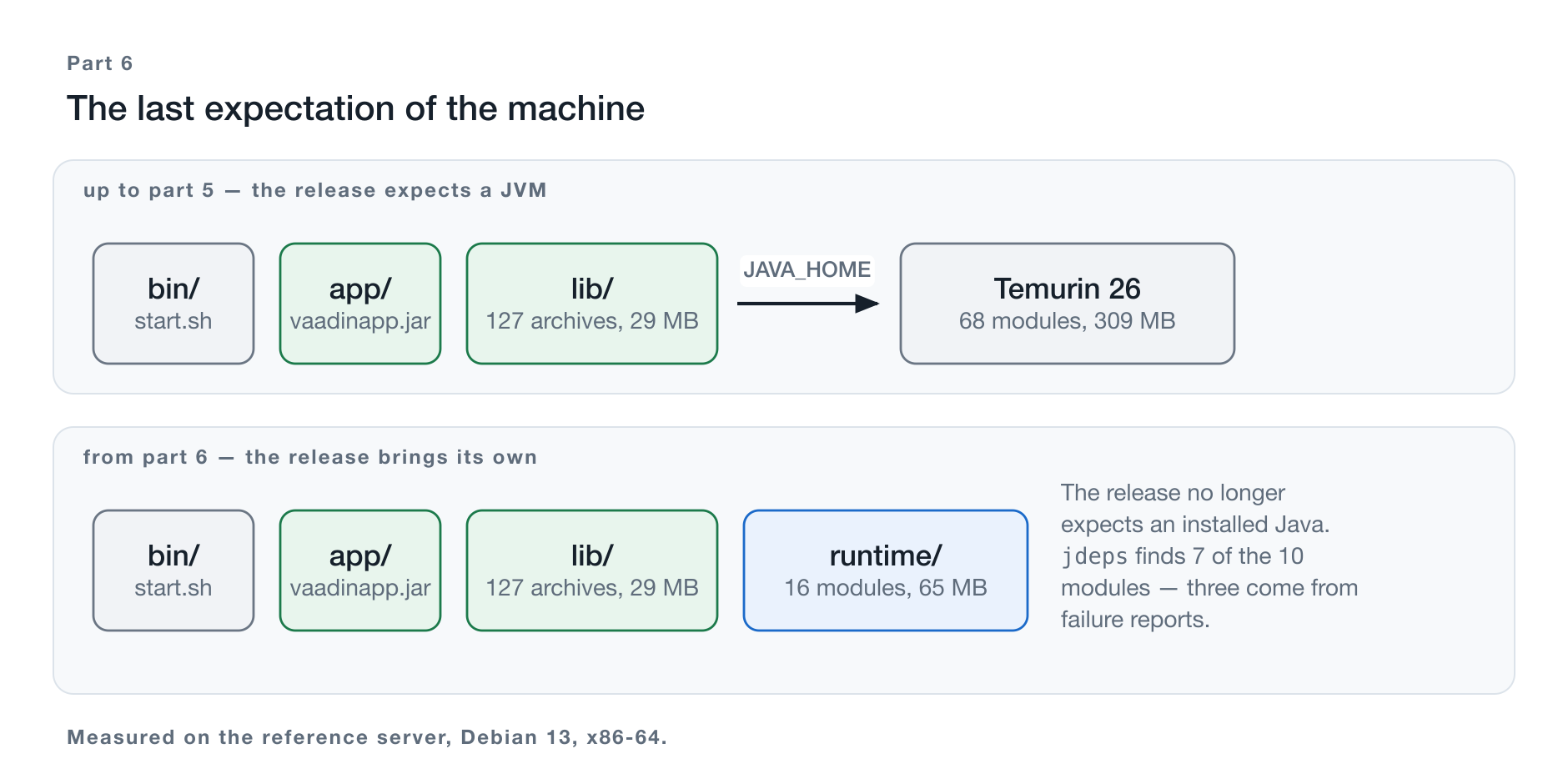
Figure 1: The same release, once without and once with its own runtime.
jlink takes the modules of a JDK and produces a runtime image that contains
only what this one application calls. The image goes into the release, next to
app/ and lib/. The start script finds it there, and the server no longer
needs an installed Java.
On the reference server that means 65 instead of 309 MB and 16 instead of 68 modules. The image contains two executables:
runtime/bin/
├── java
└── keytool
No javac, no jdeps, no jlink, no jcmd, no jstack. What sits on the
server can start the application and manage keystores — nothing else. That is
the property Chapter 10 discusses as a security gain, and it is a by-product:
nobody removed the tools, they were never part of what the application needs.
What this part does not change
Three things stay as they are, and it is worth saying so up front.
The systemd unit. ExecStart still points to current/bin/start.sh. No
path, no variable, not a single line changes. The trial run on the server
executed with JAVA_HOME unset and found its JVM anyway.
The application. No module-info.java, no restructuring, no new dependency.
Chapter 3 explains why that is not a coincidence but jlink’s design.
The recommendation from Part 5. Anyone who chose the fat JAR can continue just the same; the image sits next to it, not inside it.
The code state for this part
Tag teil-06. Compared to teil-04 there are two changes: one in the
start script, one in the assembly of the distribution. Both appear in Chapter 7.
git clone https://github.com/svenruppert/Blog-Vaadin-Deployment-on-Hetzner
cd Blog-Vaadin-Deployment-on-Hetzner
git checkout teil-06
The module this part works in is embedded-jetty — it carries the main()
and the assembly that builds the distribution.
Why a runtime of your own?
The obvious answer is: because the image is smaller. It is correct and at the same time the weakest of the three answers.
Size
65 instead of 309 MB is 79% less. That sounds impressive and means little in practice: a server with a 40 GB disk does not notice the difference, and the transfer over the network barely registers next to the 29 MB of application libraries.
Where size does matter is a different setting — wherever the image is multiplied. A container image that carries the full JDK carries it in every layer, in every registry, on every node. For this series that is no argument, because no container runs here; Chapter 11 comes back to it.
Attack surface
A full Temurin 26 ships 68 modules, 22 from the java. namespace and 46 from
the jdk. namespace. This application calls 16 of them. The remaining 52 are
code that sits on the server, can be loaded, and is never needed — among them
a compiler, a scripting tool, and the entire toolchain for process
inspection.
That is not a theoretical argument. Anyone who has compromised an application
far enough to execute code finds a complete development environment on a
server with a full JDK. On one with a jlink image, they find
java and keytool.
The second half of the same argument concerns vulnerability reports. A CVE against a module that is not contained in the image does not affect this release — verifiably so, not as a matter of judgment. Chapter 10 shows how to prove it.
The division of responsibility
This is the answer that carries this series.
As long as a Java is installed on the server, there are two places where decisions about the application’s runtime are made: the release and the machine. A release built and tested with Java 26 runs on a machine whose Java someone has raised to 27. Maybe it works. Nobody has verified it, because the two decisions were made in different places.
With its own image, the Java version is part of the release and travels with it — forward on update, backward on rollback. The rollback from Part 5, Chapter 5 takes the runtime along without anything having to change for it.
It is the same idea that carried Part 3. There it was about Jetty: a server whose Jetty someone else maintains has a second place where decisions about the application’s behavior are made. Part 6 applies it to the last remaining component.
What speaks against it
Three things, and they are not small.
The build becomes platform-bound. An image for Linux x86-64 can only be produced on Linux x86-64. Chapter 6 describes what that means for the build process and concedes that the solution on the reference server is a compromise.
Java updates become releases. A security update of the JDK used to be
sdk install, sdk default, restart — three steps without a new build. With
your own image it is a new release. Chapter 10 works through the numbers.
The module list has to be right. And it cannot be fully derived. That is the core of Chapters 4 and 5 and the actual reason this part is longer than the tool suggests.
What jlink does — and what it does not require
A misconception circulates about jlink that is persistent enough to derail
entire projects: that you have to modularize your application to use
it. That is wrong, and the distinction is worth clearing up before the first
line of tool invocation appears.
Two class paths that have nothing to do with each other
Since Java 9 there have been two ways for the JVM to find classes.
The module path (--module-path) carries modules: archives with a
module-info.class that declare what they export and what they require.
The class path (-cp) carries everything else — it works the way it has
worked since Java 1.0, and everything that sits on it ends up in the so-called
unnamed module.
jlink operates exclusively on the first. It builds an image from
platform modules — java.base, java.sql, jdk.zipfs, and so on. What the
application brings along does not interest it.
And that is exactly why nothing changes about the application:
exec "$JAVA_BIN" $APP_OPTS $JAVA_OPTS -cp "$CLASSPATH" com.svenruppert.flow.Application "$@"That is the start line from Part 4, unchanged. The class path still points to
app/*:lib/*, the 127 archives still carry no module-info.class, and the
JVM still loads them as the unnamed module. The only thing that changes is
which JVM that is.
The sentence that matters: jlink trims the platform, not the
application. An image of 16 modules runs a class path of 127
non-modular archives without any of them knowing about it.
Why the story is often told differently
Because jlink demands a module list, and the obvious way to obtain a
complete module list is to make the application itself modular.
Then module-info.java writes down what it needs, and
jlink can follow that declaration.
Anyone who does not modularize the application — and with 127 dependencies,
nobody does — has to determine the list some other way. That is what jdeps is
for, that is what Chapter 4 is for, and that is what the uncomfortable finding
in Chapter 5 is for.
So the effort does not disappear, it shifts. You save yourself the restructuring of the application and pay with a list that has to be maintained.
What ends up in the image
jlink takes the named modules, resolves their requires relationships, and
writes the result out as a runtime image. On the reference server, 10 named
modules become 16:
java.base              java.datatransfer      java.desktop
java.instrument        java.logging           java.management
java.naming            java.net.http          java.prefs
java.security.jgss     java.security.sasl     java.sql
java.transaction.xa    java.xml               jdk.unsupported
jdk.zipfs
The six unnamed ones come in transitively: java.desktop requires
java.datatransfer, java.sql requires java.transaction.xa and java.xml,
java.security.jgss requires java.security.sasl. You name the roots; the
resolver takes care of the rest.
java.desktop in a server application looks like a mistake but is
correct: that is where java.beans lives, and flow-server, flow-data,
and Jetty’s servlet layer use it. Chapter 4 shows how to verify that.
What does not end up in the image
Everything else — and that is more than the number 60 suggests:
| missing | what no longer works |
|---|---|
jdk.compiler | compiling at run time |
jdk.jshell, jdk.scripting.nashorn | running scripts |
jdk.attach, jdk.jcmd, jdk.jfr | attaching to other JVMs, Flight Recorder |
java.rmi, jdk.jdi | remote calls, remote diagnostics |
jdk.jlink, jdk.jdeps | building another image from this one |
The last row has a practical consequence that Chapter 6 runs into on the reference server: a jlink image cannot reproduce itself. Whoever has the image cannot build a new one; that takes the JDK.
The third row is the one you miss before you need it. Anyone used to tackling
a hanging service with jcmd or jstack will not find the tool
in the image.
It can be retrofitted, and the price is lower than caution suggests.
With jdk.jcmd added to the module list:
without jdk.jcmd  65,992 KB    16 modules   bin: java keytool
with    jdk.jcmd  66,292 KB    19 modules   bin: java jcmd jinfo jmap jps jstack jstat keytool
300 KB for six tools. That is not a question of size but a trade-off between diagnostic capability and attack surface — and it is one to decide deliberately, not to catch up on during the first incident. For the reference server it stays at the 16 modules: whatever needs diagnosing is in the journal, and a release without diagnostic tools can, if in doubt, be swapped for one with them — that is what the symlink from Part 5 is for.
Determining the required platform modules
jlink demands a list. The application does not keep one. So someone has to
produce it — and the tool for that is called jdeps.
The invocation
jdeps --print-module-deps \
      --ignore-missing-deps \
      --multi-release 26 \
      --class-path "current/lib/*" \
      current/app/vaadinapp.jar
Four switches, and three of them need explaining.
--print-module-deps switches the output from a report to a
list — exactly the form --add-modules expects. Without this switch
you get a multi-page breakdown of who calls whom; with it, a single line.
--ignore-missing-deps is unavoidable on a real class path. 127
archives practically always contain references to classes that are not
shipped — optional integrations with libraries you do not use. Without
this switch, jdeps aborts at the first such spot instead of evaluating
the rest.
That is the first hint at how this analysis works: it is allowed to have gaps, and it does not tell you so.
--multi-release 26 determines which branch of a multi-release
archive jdeps reads. Without it, it refuses to work on every archive with
Multi-Release: true in its manifest — and that is the same
manifest entry that Part 4, Chapter 5 dealt with for the fat JAR.
The result
java.base,java.desktop,java.instrument,java.management,java.naming,java.security.jgss,java.sqlSeven modules. Anyone who does not want to take them on faith can have jdeps
show, in report mode, which archive pulls in which module — here the most
notable culprits for each:
| Module | pulled in by |
|---|---|
java.base | everything |
java.desktop | flow-server, flow-data, jakarta.el, Jetty’s servlet layer |
java.instrument | org.eclipse.jetty.ee.webapp |
java.management | org.eclipse.jetty.util, org.eclipse.serializer.base |
java.naming | org.eclipse.jetty.jndi, …ee11.annotations, BouncyCastle |
java.security.jgss | org.eclipse.jetty.client, org.eclipse.jetty.security |
java.sql | flow-data, org.eclipse.jetty.plus, BouncyCastle |
You take these seven, hand them to jlink, get an image, start it — and
get an error.
The first failure
java.nio.file.ProviderNotFoundException: Provider "jar" not found
    at java.base/java.nio.file.FileSystems.newFileSystem(FileSystems.java:341)
    at org.eclipse.jetty...
The missing module is jdk.zipfs. Jetty opens archives not only as files
but as file systems — FileSystems.newFileSystem(uri, env) with a
jar: URI. The provider for that lives in jdk.zipfs, is found via
ServiceLoader, and appears in no import statement.
Added, rebuilt, started — and the next error.
The second failure
java.lang.NoClassDefFoundError: sun/misc/Unsafe
at org.eclipse.store...jdk.unsupported. EclipseStore uses sun.misc.Unsafe to read and write
objects bypassing serialization — that is the reason it is fast. The module
is called “unsupported” because it contains access points that are
officially not part of the platform; in the full JDK it is always present anyway,
which is why its absence only shows up here.
Added, rebuilt, started — and this time it runs.
Nine modules, one running service
systemctl status vaadinapp     active (running)
curl -o /dev/null -w '%{http_code}' https://demo.svenruppert.com/     200
curl -o /dev/null -w '%{http_code}' https://demo.svenruppert.com/login 200
The service runs. Both routes respond. Login works, language switching works, persistence works.
This is where the part would end — if the image were complete. It is not, and the fact that it runs anyway is the most interesting finding of this series.
The three modules jdeps cannot see
Two modules were supplied by the trial run, each with an error at startup. The third produces no error.
What is missing
java.net.http. The module with the HTTP client that Java 11 introduced. It
does not appear in the jdeps output, it is missing from the image, and the
service starts, runs, and serves as if everything were fine.
Why jdeps does not find it
Not because of reflection. The call is right there in the code:
private static final class HibpHolder {
  static final HaveIBeenPwnedCompromisedPasswordChecker INSTANCE =
      HaveIBeenPwnedCompromisedPasswordChecker.usingJdkHttpClient(
          HaveIBeenPwnedCompromisedPasswordChecker.DEFAULT_ENDPOINT,
          HIBP_TIMEOUT);
}
The reason lies elsewhere, and it is a property of the invocation from Chapter 4 that is easy to overlook:
jdeps ... --class-path "current/lib/*" current/app/vaadinapp.jarjdeps examines what is given as an argument. The class path serves only
for resolution. The argument is exactly one archive: app/vaadinapp.jar, 16 KB,
essentially the launcher class. The 127 archives in lib/ are consulted to
resolve references — they are not examined.
And the chain to the HTTP client runs entirely through lib/:
app/vaadinapp.jar
  └─> jCustos-…-core         (lib/)   application code
       └─> PasswordPreflight (lib/)   der Lazy Holder oben
            └─> jCustos-credentials-hibp-00.83.00.jar  (lib/)
                 └─> java.net.http
Nothing is wrong with the tool, it reports no error, and it answers exactly the question it was asked.
The obvious switch does not help
jdeps has -R for recursive traversal. Measured on the same release:
without -R:  java.base,java.desktop,java.instrument,java.management,
             java.naming,java.security.jgss,java.sql
with    -R:  java.base,java.desktop,java.instrument,java.management,
             java.naming,java.security.jgss,java.sql
Identical. In combination with --print-module-deps and
--ignore-missing-deps, the switch changes nothing about the result.
All archives as arguments — and the next problem
The way that remains: have every archive examined, not just the one.
jdeps --print-module-deps --ignore-missing-deps --multi-release 26 \
current/app/vaadinapp.jar current/lib/*.jarjava.base, java.desktop, java.instrument, java.management, java.naming,
java.net.http, java.rmi, java.security.jgss, java.sql, jdk.unsupportedTen instead of seven. java.net.http is in, jdk.unsupported too. That looks
like the solution, and it is not — for two reasons.
java.rmi is too much. The shipped image does not contain it and runs.
The culprit is jakarta.transaction — the interface for distributed
transactions references remote calls, and this application never enters that
branch. Anyone who follows this list adds a module that contributes nothing but
attack surface.
jdk.zipfs is still missing. It appears in neither of the two outputs,
because it is not the target of any call: Jetty requests a file system for a
jar: URI, and which provider serves it is decided at run time via
ServiceLoader. Nothing of that is in the compiled code.
So the exhaustive variant produces a list that is too large and too small at the same time. That is exactly what makes it dangerous: it looks complete.
How the absence shows itself
An image without java.net.http, started against the same libraries,
password check invoked directly:
### Image WITHOUT java.net.http (15 modules)
password123                        -> acceptable=false
correct-horse-battery-staple-42    -> java.lang.NoClassDefFoundError:
                                      java/net/http/HttpTimeoutException

### Image WITH java.net.http (the shipped one, 16 modules)
password123                        -> acceptable=false
correct-horse-battery-staple-42    -> acceptable=true
Three observations, each more unpleasant than the last.
The first line is the same in both cases. A weak password is rejected, with and without the module — the local blocklist runs before the network query and needs no HTTP. Anyone who tests the check with an obviously bad password sees no problem.
The error does not name the class you expect. Not HttpClient
but HttpTimeoutException — the class the loading process stumbles over
first. Anyone who searches for the module name will not find it in the error text.
The timing is the worst imaginable. The service starts, both routes respond with 200, login works. The release is declared good. It breaks the first time someone sets a password — on a fresh installation that is the setup screen, that is, the very first action of the very first user.
What follows from this
A startup attempt is not a proof of completeness. It demonstrates that the modules suffice for startup, and it says nothing about anything loaded later.
The module list needs a test that uses the application — not starts it: uses it. On the reference server, that was setting a password. What such a run does not touch, nobody checks.
The list belongs documented, not derived. In the build script it therefore appears not as the output of a tool but as text with a failure signature:
# What jdeps cannot see. Every entry comes from an actual run, not from
# an analysis:
#
#   jdk.zipfs        ProviderNotFoundException at startup. Jetty opens
#                    archives as file systems.
#   jdk.unsupported  NoClassDefFoundError: sun/misc/Unsafe. EclipseStore.
#   java.net.http    No error. The image starts, serves pages, and logs
#                    users in; the HIBP check only breaks when someone
#                    sets a password.
EXTRA="jdk.zipfs,jdk.unsupported,java.net.http"
A comment that names a failure signature is worth more than a list that is correct. The list goes stale with the next dependency; the failure signature tells the next person what to look for.
The finding that holds the series together
It is the third time, and it is the same shape every time.
In Part 3 it was the class path: what the compiler sees is not enough for the annotation scan. In Part 4 it was the provider directory: what the compiler sees is not enough for the merge. In Part 6 it is the module list.
Decisions made at build time about run time have to go beyond what the
compiler sees. Java loads at run time through reflection, through
ServiceLoader, through names in text files. Every tool that predicts run
time from compiled code has its limit exactly here — and none of them tells
you where it lies.
Producing the image
The module list is settled. The invocation that turns it into an image is short — and every one of its switches has a reason you should know before adopting it.
jlink --add-modules "$MODULES" \
      --output "$DIST/runtime" \
      --strip-java-debug-attributes \
      --no-header-files \
      --no-man-pages \
      --compress zip-6
The switches
--strip-java-debug-attributes removes line numbers and local
variable names from the class files of the platform. This affects the
platform classes exclusively; stack traces of the application keep their
line numbers, because the application archives in lib/ remain untouched. What
you lose are line numbers in JDK-internal frames — bearable when debugging.
--no-header-files and --no-man-pages remove the C header files for
JNI and the manual pages. Nobody needs either on a server.
--compress zip-6 compresses the module store. Chapter 9 measures what it
costs and what it brings; the short version is 33 MB less image at
identical startup time.
⚠️ The switch that fails on a lean Debian
The documentation and most tutorials name --strip-debug. On the
reference server it ends like this:
Error: java.io.IOException: Cannot run program "objcopy":
       Exec failed, error: 2 (No such file or directory)
--strip-debug invokes an external program — objcopy from the GNU
binutils — to remove the symbol tables from the native libraries. On
a development machine it is present, on a minimal
Debian installation it is not.
Two ways out:
sudo apt-get install binutils # about 20 MB of tooling on the serveror the switch that manages without an external program:
--strip-java-debug-attributes # does the same inside the JVMOn a server that in the end is not supposed to carry any Java at all, it would
be absurd to install binutils so that jlink can run. That is why the build
script contains the second variant.
Where the build takes place
Here lies the most uncomfortable property of the whole approach.
A jlink image is platform-bound. An image for Linux x86-64 is produced on Linux x86-64. Anyone who develops on a Mac with Apple silicon — as in this series — cannot build it on their machine.
The documented way out is called cross-linking: download a second, complete JDK
for the target platform and point jlink via --module-path at its
jmods directory. That works and is the right way as soon as a build
machine is involved.
On the reference server it fails over a detail: the Temurin build installed
by SDKMAN ships no jmods directory. Cross-linking would
therefore require a second, complete download — for a platform on
which the build could run anyway.
So the server builds its image itself. This is possible thanks to JEP 493
(Linking Run-Time Images without JMODs, introduced with Java 24): jlink
works from the installed runtime image and no longer needs the
jmods files. Without this mechanism, the path on this
server would be blocked.
This is a compromise, and let it be named as one. Part 1, Step 5 argued explicitly for separating build and runtime environments. A build step that runs on the target machine violates that separation. With a Linux build machine it would belong there — and with a CI run under Linux it belongs there anyway. What is shown here is the way for the case where that machine does not exist.
The script
The whole process lives in tools/jlink-runtime.sh, invoked with the
unpacked distribution directory:
tools/jlink-runtime.sh /opt/vaadinapp/releases/2026-09-12-jlinkIt determines the modules with jdeps, adds the three from Chapter 5, invokes
jlink, and reports at the end what was produced:
jlink-runtime: jdeps found 7, adding 3 it cannot see
jlink-runtime: 65M, 16 modules
That line is worded that way on purpose. Whoever reads it sees immediately that three modules do not come from the analysis — and knows where to look if the image later turns out to be missing something.
Merging image and distribution
The image exists, the distribution from Part 4 does too. Together they form a release that expects nothing more from the machine. Two changes are needed for that — one to the start script, one to the assembly.
The shape of the release
2026-09-12-jlink/
├── VERSION
├── bin/start.sh
├── app/vaadinapp.jar        16 KB
├── lib/                     127 archives, 29 MB
├── runtime/                 16 modules, 65 MB     ← new
└── sbom.json
runtime/ joins app/ and lib/, it does not replace them. Everything Parts 4
and 5 said about this shape holds unchanged: same unit,
same symlink, same rollback.
The change to the start script
Part 4 introduced the start script with the sentence that the release itself says how it wants to be started. That is exactly where the decision about the JVM belongs:
if [ -x "$APP_HOME/runtime/bin/java" ]; then
  JAVA_BIN="$APP_HOME/runtime/bin/java"
else
  JAVA_BIN=${JAVA_HOME:+$JAVA_HOME/bin/java}
  JAVA_BIN=${JAVA_BIN:-java}
fi
Four lines, and they accomplish more than they appear to.
A release with its own runtime uses it. Without configuration, without an environment variable, without the unit knowing anything about it.
A release without its own runtime behaves as before. JAVA_HOME, otherwise
java from the path — that is literally the version from Part 4.
And both sit side by side in the same releases/ directory. The
switch between them is the same ln -sfn as any other. That is the
reason the changeover was possible without downtime and the rollback stays
open.
The proof of that is short and unambiguous: the trial run on the server executed with
JAVA_HOME unset and found its JVM anyway.
ExecStart=/opt/vaadinapp/current/bin/start.shThis line was in the unit before the changeover and remains in it, unchanged, afterwards.
The change to the assembly
The assembly descriptor from Part 4 gets one more fileSet:
<fileSet>
    <directory>${project.build.directory}/jlink-runtime</directory>
    <outputDirectory>runtime</outputDirectory>
    <fileMode>0644</fileMode>
    <directoryMode>0755</directoryMode>
</fileSet>
If an image sits under target/jlink-runtime, it goes into the distribution.
If none is there, the assembly plugin skips the directory
without comment, and the same thin distribution as in Part 4 is produced.
The Maven build deliberately does not produce the image itself. If it did,
a development machine would produce an image for that machine, and it would go
into an archive destined for a Linux server — a mistake that would only surface
on the server, and there with a less than helpful Exec format error.
Instead, the division of labor is:
| who | what |
|---|---|
| Maven | builds the application, packs app/, lib/, bin/, sbom.json |
tools/jlink-runtime.sh | builds the image — where it is meant to run |
| Assembly | picks the image up, if it is there |
On a Linux build machine all three steps run back to back in the same
pass, and the finished .tar.gz already carries the runtime. Without such a
machine, the middle step runs on the target machine — Chapter 8 shows how.
What happens to the SBOM
sbom.json still describes the application: 129 Java components, 118
JavaScript components. The Java runtime is not in it.
That is a gap, and it must be named. Whoever ships the runtime ships software that until now someone else was responsible for — and the bill of materials says nothing about it. An image of 16 modules from Temurin 26.0.2.1 is a component with a version and a provenance, and it belongs on the list.
The cyclonedx-maven-plugin does not pick it up, because it does not exist at
the build time of the Maven run. It can be added by hand, and what that
looks like belongs in its own context — the two articles on SBOMs and
delivery formats take it up.
For this part, the finding stands: the release becomes more complete, its bill of materials does not.
Getting it onto the server
The procedure is the one from Part 5, with one step inserted.
# 1  Build and upload — unchanged from Part 5
mvn -Pproduction,thin clean package
scp embedded-jetty/target/vaadinapp-00.01.00-thin.tar.gz sven@server:/tmp/

# 2  Unpack next to the existing releases
REL=/opt/vaadinapp/releases/2026-09-12-jlink
sudo mkdir -p "$REL"
sudo tar xzf /tmp/vaadinapp-00.01.00-thin.tar.gz --strip-components=1 -C "$REL"

# 3  NEW: add the runtime
sudo JAVA_HOME=/var/lib/vaadinapp/.sdkman/candidates/java/current \
     sh /opt/vaadinapp/tools/jlink-runtime.sh "$REL"

# 4  Ownership — as for every release
sudo chown -R root:vaadinapp "$REL"
sudo chmod -R g-w,o-rwx "$REL"

# 5  Switch over and restart — unchanged from Part 5
sudo ln -sfn "$REL" /opt/vaadinapp/current
sudo systemctl restart vaadinapp
Step 3 is the only addition. Steps 1, 2, 4, and 5 are literally the ones from Part 5, Chapter 4.
The result
current -> releases/2026-09-12-jlink
JVM       /opt/vaadinapp/current/runtime/bin/java
Service   active (running)
HTTP      200
Hardening 1.1 OK
The hardening score is unchanged. That is not self-evident: the
runtime now sits below /opt/vaadinapp, that is, in a
directory the service reads. It is owned by root:vaadinapp and is not
writable for the group — the same rule that Pitfall 12 from Part 1 enforced for
the SDKMAN directory, applied here to the release. The service
can execute its JVM and cannot replace it.
ReadWritePaths stays at /var/lib/vaadinapp/work and …/logs. The release
is immutable for the service, runtime included.
What the changeover cost
Nothing beyond an ordinary release switch. The service was unreachable for the duration of one restart; the number is in Chapter 9. Caddy held the connections during that time; the public response stayed at 200, because access runs through the reverse proxy and not directly against port 8080.
⚠️ The JDK cannot go yet
The obvious next move would be to remove the SDKMAN JDK. It would be premature.
/opt/vaadinapp/releases/
├── 2026-09-09-thin/        needs the installed JDK
├── 2026-09-09-fat/         needs the installed JDK
└── 2026-09-12-jlink/       brings its own runtime
Only the newest release is self-contained. The two predecessors fall back to
the installed JDK via JAVA_HOME — and precisely they are the target of a
rollback. Removing the JDK would mean giving up the rollback, and with it
the property that Part 5 singled out as the most important.
It becomes a server without an installed Java only when no release needs one anymore. The gain lies not in building the image but in the clearing away afterwards — and that moment comes not with the first jlink release, but with the last runtime-less release that you still want to keep available for a rollback.
For the reference server that means: the 309 MB stay put for now. Anyone who
wants to be rid of them keeps the predecessors as .tar.gz in an archive
instead of as unpacked releases — then a rollback is one extra unpack, and the
JDK can go.
The build step on the target machine, once more
Step 3 invokes a compiler component on a production server. That is the spot where this chapter is unclean, and let it be named clearly:
- A full JDK must sit on the server so that
jlinkandjdepsare available — the very JDK you wanted to get rid of. - The step runs as
root. - It is not repeatable in the sense that two runs on two servers would produce the same image; they produce two images from two JDK states.
The clean way is a build machine running Linux. There, steps 1
and 3 run together, the .tar.gz already carries the runtime, and what remains
on the server is unpacking and switching over. The server then needs no JDK — and
step 3 disappears there entirely.
For this series that machine does not exist, and rather than pretending it does, what stands here is the way that works without it.
Measuring: what a runtime of your own costs
Four variants, three runs each, all on the same server, all with the same application and the same unit.
| Variant | Image | Downtime | Uptime | MemoryCurrent | RSS |
|---|---|---|---|---|---|
| Thin distribution, full JDK | 309 MB | 4,653 ms | 3,574 ms | 358 MiB | 382 MiB |
jlink, zip-6 (shipped) | 65 MB | 4,886 ms | 3,866 ms | 370 MiB | 401 MiB |
| jlink, no compression | 98 MB | 4,763 ms | 3,852 ms | 373 MiB | 393 MiB |
jlink, zip-6 + CDS | 93 MB | 4,895 ms | 3,899 ms | 359 MiB | 392 MiB |
Downtime is the span during which the service does not respond on port 8080. Uptime is reported by the application itself, measured from process start to Jetty’s operational readiness.
Size
79% less — 65 instead of 309 MB. That is the number that convinces, and Chapter 2 has already said why it weighs the least in this setup: the server has the space.
More interesting is the ratio inside the release. At 65 MB, the runtime is
more than twice the size of the application (29 MB of lib/ plus 16 KB of
app/). Whoever ships a release that carries its own runtime ships
two-thirds Java.
Startup takes longer
And that was not expected.
Around 290 ms more uptime, 3,866 versus 3,574 ms. Reproducible across all runs, clearly outside the noise. Two explanations suggested themselves, both were tested, both are refuted:
The compression. zip-6 has to be decompressed on loading — that
plausibly costs time. Measured: the uncompressed image (98 MB) lowers the
downtime by 123 ms and leaves the uptime unchanged at 3,852 ms. So the
compression costs nothing in application startup time.
The missing class-data archive. A full Temurin ships four prepared CDS archives; a jlink image does not. That is more than a guess — it is right there in the version output:
full JDK:     ... (build 26.0.2.1+1, mixed mode, sharing)
jlink image:   ... (build 26.0.2.1+1, mixed mode)
The sharing is missing. Measured with --generate-cds-archive: the uptime
even rises slightly, to 3,899 ms. That is not it either.
The cause remains open. That is an unsatisfying sentence at the end of a measurement chapter, and it is preferable to the alternative: writing down one of the two refuted explanations anyway because it sounds plausible. Whoever knows the cause, please say so.
The number still deserves context: 290 ms on 3.5 seconds is 8%, and it is incurred by a service that starts once per release. For this setup it is irrelevant. For an application that starts per invocation it would be the opposite — and there the tool of choice would not be jlink anyway, but a native image.
Memory
The jlink image needs 12 MiB more, 370 versus 358 MiB. Same application, same settings, fewer modules — and more memory.
Here the CDS explanation that failed for startup time does apply: with
--generate-cds-archive the value drops to 359 MiB, practically to the level
of the full JDK. A class-data archive allows the class state to be mapped in
as a memory-mapped file instead of being placed on the heap — exactly
what the image without an archive lacks.
That makes CDS, in this setup, a memory tool, not a speed tool:
+28 MB image → −11 MiB memory → ±0 ms startup timeWhether that is worth it depends on what is scarcer. On a server with 4 GB of RAM and plenty of disk: yes. On the reference server, which is short of neither memory nor disk: not necessary — and that is why the shipped image is the one without CDS.
What did not change
| full JDK | jlink | |
|---|---|---|
| Threads in operation | 31 | 31 |
| HTTP response | 200 | 200 |
| Hardening score | 1.1 | 1.1 |
| Lines in the systemd unit | unchanged | unchanged |
The application notices nothing of running on a different JVM. That is the real finding of this chapter: an image of 16 modules behaves like a JDK of 68 — except for 290 ms that nobody can explain and 12 MiB that CDS brings back.
What changes about the release model
Moving the runtime into the release shifts a responsibility. That has two sides, and the unpleasant one comes first.
A Java update is now a release
Before:
sdk install java 26.0.3-tem
sdk default java 26.0.3-tem
chown -R root:vaadinapp /var/lib/vaadinapp/.sdkman
systemctl restart vaadinapp
Four lines, no build, no artifact, a few minutes.
After: build a new image, pack it into a new release, ship it, repoint the symlink. The procedure from Chapter 8, in full.
That is more effort, and it should not be talked down. Anyone who applies a monthly JDK security update will from now on run it through the release pipeline. Without build automation that carries it, this quickly becomes an update that does not happen — and an outdated Java in the release is worse than a current one on the machine.
One qualification puts the objection into perspective for this server: the automatic updating from Part 1, Step 21 never covered the JDK anyway. It maintains Debian packages; the JDK came via SDKMAN. So the step was already manual before. What changes is not that it becomes manual, but that it becomes visible: as a release with a date that can be kept available or taken back, instead of a symlink that someone repointed at some point.
In return, the Java version travels with the rollback
That is the other side, and in a series that dedicated Part 5 to the rollback it is the more important one.
Until now a rollback was incomplete: it took back the application and left the runtime standing. Anyone who observes a problem after a JDK update and goes back to the previous release goes back to the previous application — on the new Java. The problem stays, and the cause is now harder to find, because the one change that was just taken back was not the one that mattered.
With its own runtime the rollback is complete. ln -sfn to the previous
release takes back application and JVM together. The state that ran can be
restored as a whole — and not just two-thirds of it.
The attack surface, provable
52 modules no longer sit on the server. What that is worth shows when a vulnerability report comes in.
With a full JDK, the question “Does this affect us?” is a judgment call: the module is there, maybe it is not loaded, you cannot be sure. With a jlink image it is a query:
/opt/vaadinapp/current/runtime/bin/java --list-modules | grep '^jdk.scripting'
# (no output)
No match means: not included. That is not an argument you have to
make, but one you can prove — and for a VEX document that justifies the
status not_affected, the difference is exactly the one between a
claim and evidence.
The same holds for the case Chapter 2 described: anyone who can execute code on the server finds no compiler there, no scripting engine, and no tools for attaching to other JVM processes. That prevents no break-in. It shortens what is possible afterwards.
The gap that remains
Two things do not get better through this approach, and they belong here, because otherwise the chapter would look too good.
The bill of materials does not know the runtime. Chapter 7 named it: sbom.json
describes 129 Java and 118 JavaScript components; the 16 modules of the image
are not in it. Of all things, the component for which responsibility
was just taken is missing from the document that is supposed to prove
responsibility.
The module list is a maintained file. It comes from an analysis plus three entries from failure signatures (Chapter 5). If a dependency arrives that needs another module, nobody notices automatically — in the fortunate case at startup, in the unfortunate one with the first user who invokes the affected function.
Whoever adopts jlink takes on both as an ongoing task. That is the price for the runtime becoming part of the release, and it is only appropriate once the gain is actually needed.
The comparison across the series — and where the application ends
Six parts, five delivery formats, one server. What each format expects from the target system — and what it brings along.
The overview
| Part | Form | Release on the server | required there |
|---|---|---|---|
| 1–2 | WAR to external Jetty | 21 MB | JDK (309 MB) and Jetty (44 MB distribution) |
| 3 | embedded Jetty, unpacked | 29 MB | JDK |
| 4 | thin distribution | 29 MB | JDK |
| 4 | fat JAR | 28 MB | JDK |
| 6 | thin distribution + own runtime | 94 MB | nothing |
All five variants sit simultaneously in /opt/vaadinapp/releases/ and were
measured in a single pass — that is why the numbers are comparable. The archive
sizes from Part 5 (26.68 MB for the thin distribution, 25.81 MB for the fat JAR)
come from an older state of the code and are not.
The right-hand column is the thread that runs through the series, and read from top to bottom it is a single movement: what the machine provided at first, the release provides at the end.
The column next to it shows what that costs — and across four parts the answer is: almost nothing. The release stays between 21 and 29 MB while the prerequisites on the server shrink from two third-party components to one. The Jetty from Part 1 moves into the application in Part 3 and shows up there as the 8 MB difference between 21 and 29 MB — a good deal against a 44 MB distribution that someone has to install and maintain.
Only the last step costs: from 29 to 94 MB. The difference is the runtime, and it is more than twice the size of the application that it runs.
Which form for what
WAR to an external Jetty — when operations provides an application server and several applications run on it. Then Jetty is shared infrastructure, and shipping it per application would be wasteful. The price is depending on two states that someone else maintains; Part 2 showed how tight the coupling between Vaadin version and servlet version actually is.
Fat JAR — the default for the normal case. One archive, one checksum, no directory of 128 files. Part 5 measured that it starts neither faster nor slower and needs around 48 MiB more memory; that is tolerable. The price is in Part 4, Chapter 5: the merge is not a copy operation, and whoever gets it wrong builds an archive that starts and does not work.
Thin distribution — when you want to see what is being shipped. 127 archives, each with a name and a version, each individually replaceable. For debugging and for everything related to license and vulnerability checking, this is the more pleasant form.
Own runtime — when the Java version is to belong to the release. Three cases justify the effort: a target system on which no Java can or may be installed; an operation in which the rollback must be complete; and an environment in which the attack surface must be provable rather than estimated.
For everything else, an installed JDK plus fat JAR is the simpler solution, and in operations, simpler is a value in itself.
Where does the application end?
The series has been moving this boundary for six parts, and at no point was it clear where it belongs.
Part 1 would have answered: the application ends at the WAR. Everything before it is its business, everything after it is operations. Part 3 pulled Jetty inside, because the coupling between Vaadin and servlet version was too tight to run it across a system boundary. Part 6 pulled the JVM inside, because a rollback that leaves the runtime standing is not a complete rollback.
What remains is not a technical answer but one about responsibilities:
The application ends where the next decision is made by someone else — and where that is fine. Not every shared responsibility is a problem. It becomes one when two places decide about the same behavior and neither of them checks the whole.
This series pushed the boundary far, because the reference server is one that a single person operates. Where one team provides operations and another the application, it lies elsewhere — and there the WAR from Part 1 would be the right answer, not the outdated one.
The step that does not come
The container.
It is the obvious next thought, and it solves the same problem — an image that brings everything along, on a host that provides nothing. Two things speak for treating it separately.
It does not replace the question, it relocates it. A container image with a full JDK carries the same 309 MB, just one layer further down. The work from Chapters 4 and 5 is due there just the same, and it pays off there more strongly than here: an image that is multiplied into every registry, onto every node, and into every layer profits from 79% less footprint more than a disk on which 309 MB sit once. Chapter 2 ranked that as this series’ weakest argument — in the container it becomes the strongest.
It brings a second system boundary with it. Network, file system, process isolation, registry, signing — each of these is a topic of its own, and the systemd hardening from Part 1, which this series holds at 1.1, would have to be answered anew there. Squeezing that into a closing chapter would mean treating it badly.
What carries over from this series into a container is therefore not the result but the method: a module list that cannot be derived; a startup attempt that proves nothing; and a release that describes its own state completely. Whoever has that can put it into a container image. Whoever does not puts a problem inside and a layer on top.